

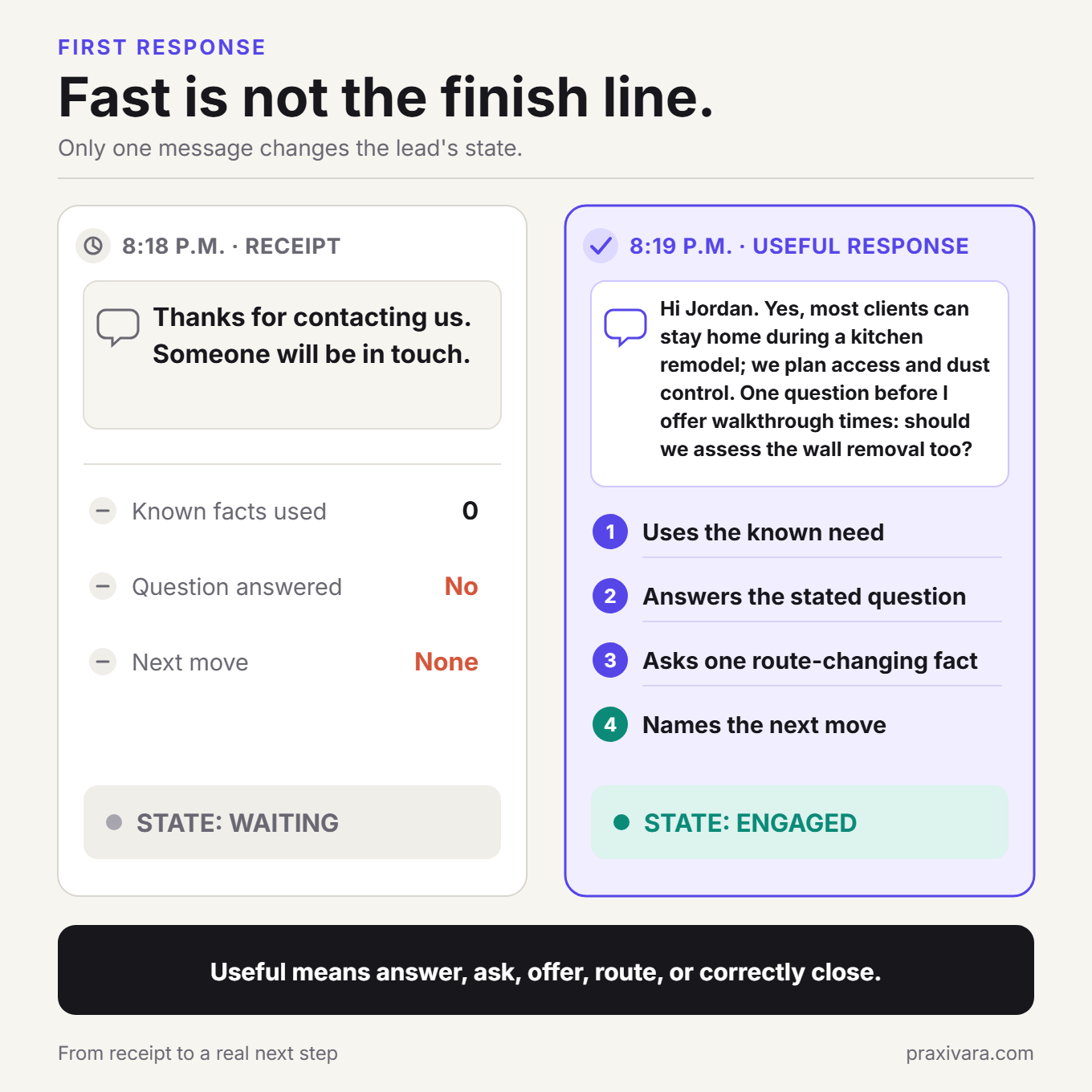
At 8:18 p.m., a homeowner submits a detailed kitchen-remodel inquiry. The form includes the ZIP code, property type, expected project range, preferred start window, and one practical question about living in the home during construction.
An automated email arrives seconds later: Thanks for contacting us. Someone will be in touch.
The business responded quickly. It did not move the inquiry forward. The system ignored facts the prospect had already supplied, did not answer the question, did not identify the one missing qualification detail, and did not create a path to a real consultation.
That gap is the difference between an autoresponder and a complete AI lead-follow-up system.
The direct answer: To automate lead follow-up with AI, store each inquiry in one trustworthy record, use current facts to choose the next permitted action, ask only for information that changes the route, and recheck the live record before every delayed message. Treat the appointment as booked only after the authoritative calendar creates the event and returns an event ID. Treat the workflow as complete only after CRM writeback or a tracked recovery state, owner acceptance, the confirmation outcome, and cancellation of pre-booking work are recorded.
This guide covers inbound inquiries from people who contact your business. It is not a cold-outreach playbook. Email, SMS, live calls, and AI-generated voice calls have different consent and operating requirements. The legal notes below are practical design guardrails, not legal advice for a particular business or jurisdiction.
In this guide
What AI lead follow-up automation actually is
AI lead-follow-up automation is a stateful workflow that takes an eligible inbound inquiry from capture to a verified next outcome. It can interpret the request, use approved business information, ask for missing facts, handle ordinary replies, offer valid appointment options, update connected systems, and route uncertainty to a person.
It is not simply an AI-written email. It is not a booking link sent to everyone. It is not a fixed series of messages that keeps running because a timer expired. Those tools can be useful, but they do not carry the whole job.
Current search advice often starts with the old idea that every lead must receive the same immediate sequence. The strongest evidence is more modest. A 2011 observational study of about 1.25 million inbound leads found a strong association between faster contact attempts and qualification, but it did not prove a universal five-minute rule, did not measure booked appointments or revenue, and used data that are now old. Praxivara's automation research report explains why the popular five-minute multiplier and unsupported first-responder folklore should not be repeated as current universal facts.
Speed still matters. A serious system should measure median and 90th-percentile time to the first useful response. But a fast wrong-channel message, a duplicate text, or a stale follow-up after the prospect already booked is not operational excellence. It is faster leakage.
Autoresponder, sequence, CRM workflow, or stateful AI?
Use the least complex system that can complete the job. If every branch is known and stable, a deterministic CRM workflow may be enough. AI earns its place when the system must interpret varied requests, recover facts from natural language, choose among approved response objectives, or handle ordinary conversation without losing operational control.
| Capability | Autoresponder | Fixed sequence | CRM workflow | Stateful AI follow-up |
|---|---|---|---|---|
| Uses the actual inquiry | Usually no | Basic tokens | Known fields | Extracts relevant facts and supporting language |
| Changes after a reply | No | May pause | Branches on configured events | Re-evaluates current state before acting |
| Asks for missing information | No | Same question for everyone | Predefined branches | Can ask one decision-changing question |
| Books against live availability | Rarely | Usually sends a link | Possible | Can offer, create, and verify valid slots |
| Updates authoritative records | No | Sometimes | Yes | Yes, with outcome and exception evidence |
| Handles uncertainty | No | Usually exits | Routes known branches | Can summarize and hand off within written limits |
The most reliable design is usually hybrid. Deterministic code owns permissions, timers, deduplication, stop conditions, and state changes. AI interprets language and chooses from allowed response objectives. People take anything outside the written operating boundary.
Define the finish line before writing a message
Teams often start by drafting the first email. Start instead by defining the events the system is allowed to claim. If the denominator and finish line are vague, every later metric will be vague too.
| Term | Operational definition | What does not count |
|---|---|---|
| New inquiry | A source event that may represent a new person, a duplicate, an existing customer, or a new opportunity. | Automatically treating every form event as a new lead. |
| Eligible inquiry | An inquiry that belongs in the active path under your source, channel, service, time, and suppression rules. | A record that merely contains an email address or phone number. |
| First useful response | A response that recognizes the actual request and supplies one valid next action. | A generic receipt saying someone will be in touch. |
| Assessable lead | A lead with enough reliable information to decide fit or the next route. | A precise AI score built from missing or inferred facts. |
| Qualified lead | A lead that meets written business criteria using known evidence. | Someone who opened a message or used enthusiastic language. |
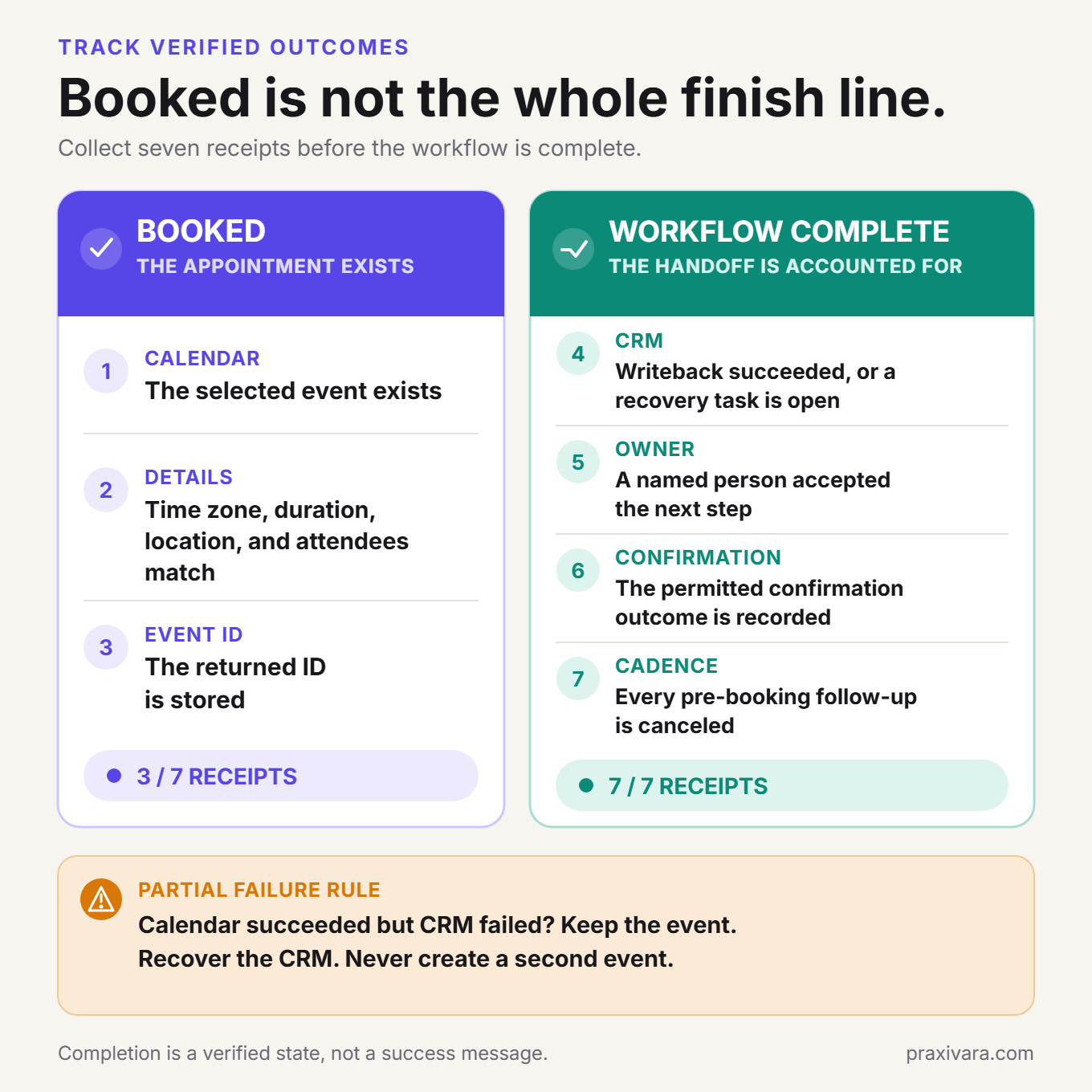
| Booked appointment | A specific time chosen by the prospect exists in the authoritative calendar, and the returned event ID is stored. | A booking link sent, a free slot found, or a create request with no verified result. |
| Completed booking workflow | The CRM is updated or in an explicit recovery state, an owner has accepted responsibility, the confirmation outcome is recorded, and pre-booking work is canceled. | A valid calendar event whose downstream operational work is still untracked. |
| Human takeover | A named person has accepted responsibility and incompatible automation has stopped. | A notification sent to a team inbox with no acknowledgment. |
| Correct stop | The workflow is booked, closed, suppressed, expired, or deliberately held with no conflicting action pending. | A timer still waiting to send after the state changed. |
This vocabulary prevents a common reporting mistake: treating provider acceptance, delivery, reply, qualification, appointment creation, attendance, sale, and revenue as one funnel event. They are different observations and should stay different.
The SLOT Loop: a better model for AI lead follow-up
The SLOT Loop is a practical four-stage framework for designing the workflow. It is not a scientifically validated scoring system. Its job is to keep the automation tied to current evidence and a verifiable result.
S: Save trustworthy state
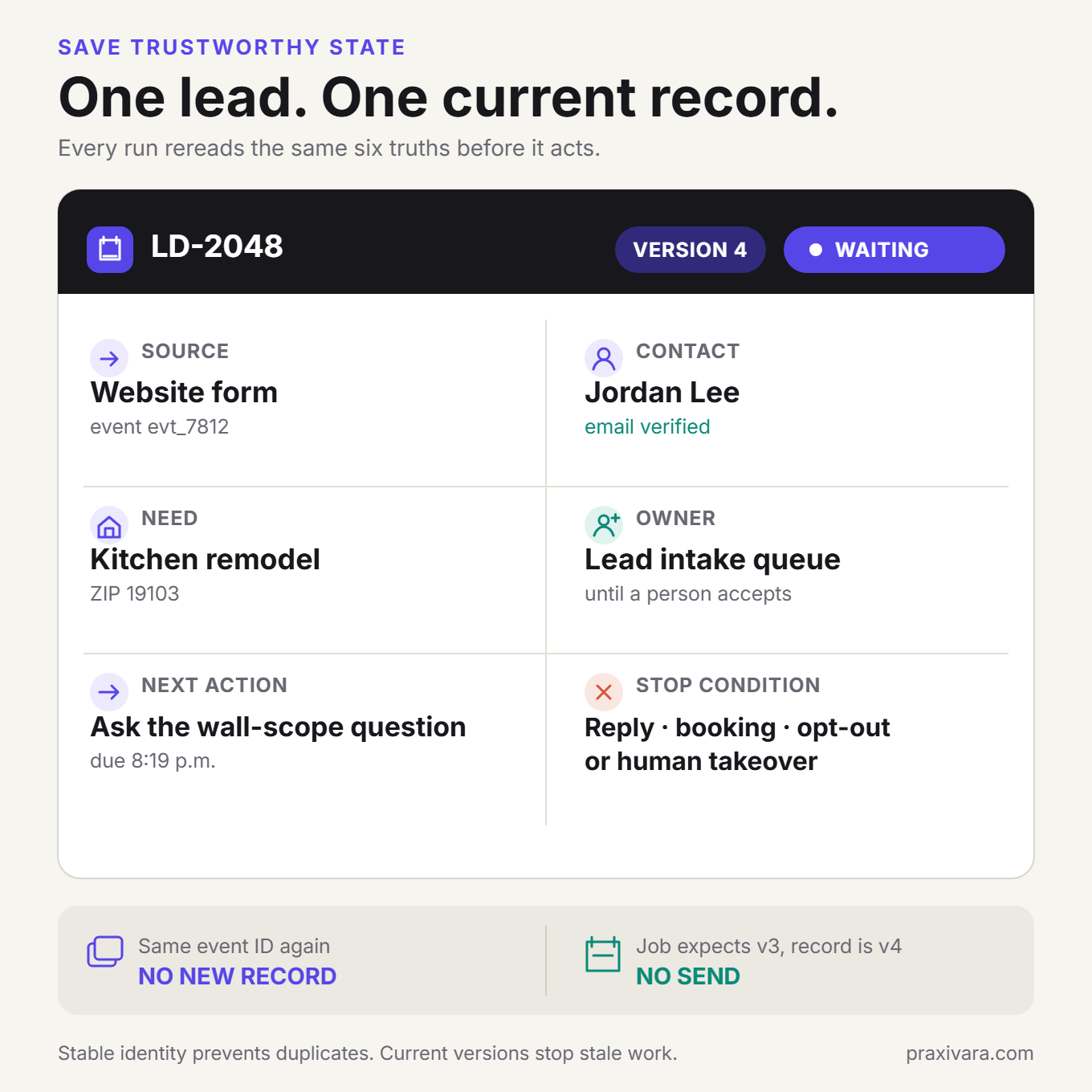
Before sending anything, create or update one durable lead record. Store the raw source event, received time, original inquiry, identity keys, seller and purpose, preferred channel, retained permission evidence, current owner, current stage, any existing appointment, and any suppression or open customer case.
Conversation memory is not this record. Memory can help an AI continue a discussion, but the CRM or another authoritative datastore should decide whether the person already exists, whether a booking is present, whether contact is permitted, and which action is due.
Webhooks and workflow steps can be retried or delivered more than once. An idempotency key is a stable identifier that lets the system recognize one intended operation when it is attempted again. Use the source event ID and an operation-specific key to prevent a second delivery from creating a second contact, deal, message, or appointment. Those external changes are side effects. AWS's current agent reliability guidance recommends deterministic idempotency keys and checking for a prior successful result before repeating side-effecting work. AWS Agentic AI Lens
Give the record a version number or token that changes whenever authoritative state changes. A delayed job may proceed only if its expected record version still matches. This turns old work into a safe no-op, meaning it records that no action was needed, instead of sending from stale information.
Save-stage build output:
- One written trigger, inclusion rule, exclusion rule, normal next outcome, and completion definition.
- An inventory of every form, mailbox, chat, call, CRM, referral, and advertising source in scope.
- Stable identity and deduplication rules, with ambiguous matches held for review.
- Retained seller, purpose, channel, disclosure, suppression, time, service-area, and ownership evidence.
- An explicit intake owner, queue, or agent until a person accepts responsibility.
L: Learn the one missing fact
Extract what the prospect already told you before asking another question. Preserve the exact supporting phrase alongside the structured field. If a form says, "We own the home and may remove the wall between the kitchen and dining room," the system can store ownership as known and structural scope as requiring review. It should not ask whether the prospect owns the home again.
The best next question is not the question with the highest sales value in the abstract. It is the smallest unanswered fact that changes the next route. That might be service ZIP, property ownership, project category, meeting purpose, number of locations, or whether an existing customer needs support instead of sales.
Keep unknowns explicit. Do not let the model turn likely facts into confirmed facts. A lead score may help order a queue, but it should not establish permission, budget, authority, eligibility, or intent.
Write three possible route outputs: ready for the normal next step, needs one answer, or needs a person. Require the workflow to retain the fact and supporting phrase that produced the route.
O: Offer the next valid move
The next move should advance the job. It may answer an approved question, ask one decisive question, offer two live appointment options, route an exception, or close politely. Sometimes the correct move is to wait because the current channel, time, or state is not eligible.
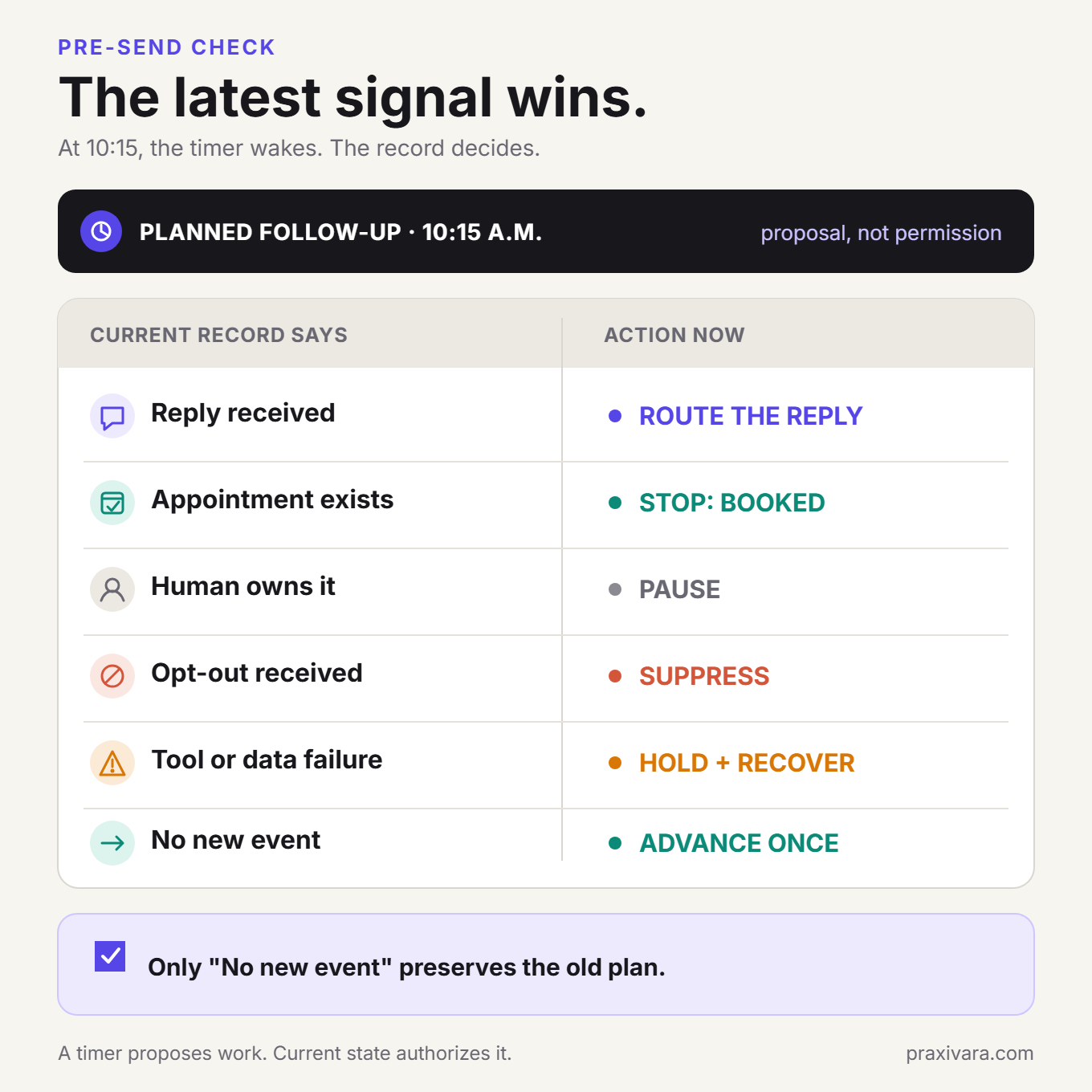
Every delayed action must reread the current record immediately before execution. A timer knows that time passed. It does not know that the prospect replied, booked through another route, asked to stop, reached a person, or changed the request unless the workflow checks.
This matters even when the messaging provider supports scheduling. Twilio's own guidance notes that an opt-out after a message is scheduled does not necessarily cancel that already scheduled message automatically. The safest pattern is to keep follow-up in a cancellable workflow, or explicitly cancel pending provider messages whenever a reply, booking, suppression, consent change, or human takeover arrives. Twilio scheduled-message guidance
Define the appointment contract before offering a time: appointment type, duration, buffers, time zone, notice, location, capacity, eligible owner, and any travel or preparation constraints. Offer a small number of live choices. When the prospect selects one, reload the lead, recheck the slot, create the event safely, store the returned event ID, and read back the details that will drive the confirmation.
T: Track the verified outcome
Tracking is where an AI demo becomes business operations. A free-busy result is not a reservation. Google Calendar, for example, exposes availability lookup and event creation as separate operations. Recheck availability immediately before creation, store the returned event ID, and read back the details you rely on. Google Calendar FreeBusy and Events.insert
Keep two states separate. The appointment is booked when the prospect-selected event exists in the authoritative calendar and its event ID is stored. The booking workflow is complete when the downstream operating work is also accounted for:
- The prospect chose a specific time and the authoritative calendar contains the event.
- The time zone, duration, location, and attendees are correct.
- The returned event ID is stored in the lead record.
- The CRM contains the event, source, relevant facts, and next stage, or a visible recovery task records the failed writeback.
- A named person has accepted what happens next.
- The permitted confirmation outcome was recorded from authoritative event details.
- Pre-booking follow-ups were canceled.
If the calendar succeeds and the CRM update fails, do not create another event. Preserve the event ID, retry the CRM write safely, and route the inconsistency for recovery. If the calendar call times out and the result is uncertain, search by the stable booking key before attempting another create.
Give rules, AI, and people different jobs
A prompt should not be your permission system. The model can interpret language and recommend a response objective, but deterministic gates should decide whether a specific action is allowed now.
| Rules and code should own | AI should own | People should own |
|---|---|---|
| Identity, deduplication, record versions, and state transitions | Extracting facts and supporting language from the inquiry | Unusual commitments and relationship-sensitive judgment |
| Channel eligibility, suppression, local send windows, and attempt limits | Interpreting ordinary replies and selecting an approved objective | Ambiguous consent, policy, or authority questions |
| Stable keys, retries, stale-job checks, and stop behavior | Drafting language from current facts and approved knowledge | Price commitments, exceptions, complaints, and sensitive cases |
| Calendar and CRM success evidence | Summarizing the full context for a handoff | Final decisions outside written limits and accepting ownership |
Risk-tiered review is more useful than requiring approval for every trivial step. AWS's current guidance recommends review for high-risk operations with enough context, a named reviewer, a timeout, an escalation path, and an audit record. Sending every action to a person creates rubber-stamping; sending none creates uncontrolled agency. AWS human-in-the-loop guidance
Download: Use The Lead-to-Appointment Launch Blueprint to inventory sources, define the SLOT Loop, write send gates and stop conditions, run twelve launch tests, and set your 30-day scorecard. It is a fillable local PDF and requires no account.
Worked example: From a kitchen-remodel inquiry to a design consultation
The following example is fictional. The business, person, messages, times, and results are illustrative implementation details, not measured performance claims.
Alder & Beam Design-Build handles residential kitchen and main-floor remodeling in a defined service area. A 30-minute design consultation is the normal first appointment. Emergency repairs, projects outside the service area, binding-price requests before assessment, and uncertain property authority require a different route.
1. The inquiry arrives with useful context
At 8:18 p.m., Jordan Lee submits this website request:
We own a 1960s two-story home in 19103 and want to remodel the kitchen this fall. We are considering opening the wall to the dining room. Our working range is $90,000 to $130,000. Can families usually stay in the house during work like this? Email is best.
The source event also contains the form ID, page URL, timestamp, disclosure version, email address, and property address. The system retains the original text and extracts the known facts. It does not replace the original with a summary.
2. Save: one record is created, not three
The source event ID has not been processed before. The email and property address match an existing newsletter contact but no open remodeling opportunity. The workflow updates that contact and creates one opportunity linked to the inquiry. It does not create a duplicate person merely because the event is new.
The record now contains:
- Source: kitchen-remodel website form
- Received: 8:18 p.m. in the business's local time
- Preferred response: email
- Service ZIP: 19103, inside the written territory
- Property: owner-occupied, two-story home
- Scope: kitchen remodel with a possible wall change
- Timing: fall
- Working range: $90,000 to $130,000, recorded as prospect-supplied
- Question: whether the family may remain in the home during construction
- Current owner: Lead Intake queue until a person accepts responsibility
3. Learn: answer what is known and isolate one route question
Alder & Beam has approved guidance explaining that occupancy depends on utilities, dust containment, access, and structural scope. The system may summarize that guidance, but it may not promise that the family can remain or quote a project price.
The one route question is whether the wall change is a firm requirement or an option to discuss. Ownership is already explicit in the inquiry, so the workflow does not ask for it again.
Before sending, the workflow records that email is Jordan's requested response channel, the address is valid and unsuppressed, the retained form context supports this inquiry response, the Lead Intake queue still owns the record, and Alder & Beam's internal timing rule permits the message. All configured send gates pass.
At 8:19 p.m., the fictional first response is:
Hi Jordan, thank you for the detailed note. Many families can remain at home during parts of a kitchen project, but the answer depends on utilities, containment, and whether structural work is involved. You mentioned opening the dining-room wall. Is that a required part of the project or an option you would like the designer to evaluate? Once I know that, I can offer the right consultation times.
This is the body of the fictional response. The sending layer adds the required sender identity, postal address, unsubscribe method, and any other channel controls. The body uses the inquiry, answers within an approved boundary, and asks one question that changes appointment preparation. It does not send a generic calendar link or ask Jordan to re-enter six known facts.
4. A reply changes the state before the next timer
At 8:27 p.m., Jordan replies that the wall change is an option and that the first goal is to understand feasibility and sequencing.
The inbound event updates the record version and cancels the pending no-response check. If that old timer wakes later, its expected record version no longer matches. It becomes a no-op, meaning the run records that no external action was needed, rather than sending an obsolete message.
The lead now meets Alder & Beam's written criteria for a design consultation. The system records the supporting sentence from Jordan's reply and moves to appointment selection.
5. Offer: two live consultation options
The workflow checks the current calendars of designers who handle this territory and appointment type. It applies the 30-minute duration, notice rule, and working hours, then offers two current options in Jordan's time zone:
Thanks, that helps. I can offer a 30-minute design consultation with Maya on Wednesday, October 14, 2026 at 4:00 p.m. or Thursday, October 15, 2026 at 10:30 a.m. Eastern. Which works better?
Jordan chooses Thursday, October 15 at 10:30 a.m. Before creating anything, the workflow reloads the lead, confirms there is still no appointment or human takeover, and rechecks that specific slot.
6. Track: the appointment is created and proved
The event is created with a stable booking key. The workflow stores the calendar event ID and reads back Thursday, October 15, 2026 at 10:30 a.m. Eastern, 30 minutes, video meeting, Jordan and Maya as attendees. At that point, the appointment is booked.
It then updates the CRM with the event ID, source, appointment type, known project facts, and Jordan's occupancy question. Maya explicitly accepts ownership; the acceptance event is stored, and she receives a preparation task. The confirmation is sent using the details read from the calendar, and every pending pre-booking action is canceled.
The complete workflow result is not "AI says booked." It is a booked calendar event plus a matching CRM record, an accepted owner, a confirmation outcome, and no stale follow-up left behind.
7. Recover correctly when the calendar result is uncertain
Now change one fact: the calendar create request times out after submission. The workflow does not know whether the provider created the event.
The unsafe response is to retry immediately. The safe response is to search using a client-generated stable booking key or a provider-supported custom ID. If the event exists, store its returned event ID and continue. If the provider proves it does not exist, retry with the same stable key. If the result remains ambiguous, hold the booking claim and route the case to a person. Jordan should never receive two appointments because a timeout was mistaken for a failure.
8. Correct non-booking outcomes are part of success
The same workflow should end differently when the facts differ:
- Outside service area: close with the written service-area response and record the reason.
- Emergency repair: route to the urgent-service path instead of the remodel calendar.
- Tenant without owner involvement: ask for the owner or route for review under business policy.
- Binding quote requested before assessment: explain the process and hand off if the prospect needs an exception.
- Duplicate submission: attach the event to the existing record and avoid a second conversation.
- Human designer takes over: require acceptance, stop the automated conversation, and preserve the handoff packet.
- Stop request: suppress incompatible follow-up immediately and retain the event.
A workflow that correctly closes an ineligible inquiry is working. Forcing every lead toward a calendar is not conversion optimization. It is bad state management.
Message-body patterns for AI lead follow-up
Good follow-up copy begins with an objective, required inputs, a send gate, and stop conditions. The words come last. Replace every bracketed field with current, verified information.
Before sending: These are message-body patterns, not complete send-ready messages. Add any required sender identification, postal address, commercial-message disclosure, consent language, unsubscribe or opt-out mechanism, and provider-required elements applicable to the selected channel, message purpose, and jurisdiction.
First useful response
Objective: Recognize the request, answer one approved question, and establish the next step.
Send only if: identity, channel, purpose, time, suppression, and ownership gates pass.
Hi [first name], thanks for the details about [specific request]. [One approved answer or expectation.] To make sure we route this correctly, [one decision-changing question]?
Stop if: the inquiry is a duplicate already being handled, an existing-customer case, outside scope, suppressed, or missing a permitted response channel.
One missing qualification fact
Objective: Collect the smallest fact that changes fit, ownership, or the appointment type.
You already shared [facts acknowledged]. One detail will determine the right next step: [single question]?
Do not ask a full qualification checklist when one answer can settle the route. If the lead cannot answer, send the case to the written uncertainty path.
Two real appointment options
Objective: Convert a qualified lead into a specific selection.
Required inputs: current owner eligibility, appointment type, duration, time zone, location, and live availability.
The next step is a [duration] [appointment type] with [owner or team]. I can offer [option one with time zone] or [option two with time zone]. Which works better?
Stop if: a booking already exists, the owner changes, the lead asks for different times, or either slot becomes stale.
No-reply follow-up that adds value
Objective: Make the unanswered decision easier, not repeat "just checking in."
Hi [first name], one detail may help you decide: [short approved fact, preparation note, or process explanation]. If [next step] still makes sense, I can [specific action]. If not, no problem.
Choose the timing from source intent, business hours, capacity, channel policy, and observed results. There is no universal proof that every business needs the same number of touches on the same days.
Human handoff
Objective: Set a truthful expectation and transfer a complete packet.
Thanks, [first name]. This needs [person or role] because [brief reason within policy]. I have passed along your request, the details you shared, and the current next step. [Owner] will contact you by [truthful time or channel expectation].
The internal packet should include the source, original inquiry, extracted facts, missing or conflicting detail, full conversation, attempted actions, current state, and the decision needed. The handoff completes only when the owner accepts it.
Outside-scope close
Objective: End clearly and respectfully without leaving another action pending.
Thanks for considering [business]. We do not currently handle [specific request or area], so I do not want to hold up your search. I have closed this inquiry and you will not receive additional follow-up about it.
Confirmed appointment
Objective: Confirm from the authoritative event and explain preparation or changes.
You are booked for [appointment type] with [owner] on [full date] at [time and time zone], [location or meeting method]. [One preparation instruction.] To change the appointment, [approved reschedule or contact path].
Generate this message from the event that was actually created, not from the earlier offered options.
Twelve failure cases to test before launch
A successful demo proves only that one happy path worked once. A production workflow must behave correctly when events repeat, arrive late, conflict, or fail halfway through.
| Test | Expected behavior | Evidence to inspect | Unacceptable failure |
|---|---|---|---|
| 1. Duplicate form | Attach or ignore the duplicate under written identity rules. | One contact, one opportunity, one outbound action. | Two records or two first messages. |
| 2. Reply during a delay | Cancel the old action and route the reply from current state. | New record version and stale timer recorded as a no-op. | A scheduled message sends after the reply. |
| 3. Booking elsewhere | Detect the event, record it, and stop pre-booking follow-up. | Provider event ID linked to the lead. | Another invitation or duplicate event. |
| 4. Plain-language stop | Suppress incompatible follow-up and send only any permitted confirmation. | Suppression event, canceled work, no later sends. | Matching only the exact word STOP while ignoring clear intent. |
| 5. Wrong person or invalid address | Stop the destination and review identity. | Permanent failure or wrong-person event. | Retrying or switching channels without a valid basis. |
| 6. Existing customer issue | Route to service or support with the full context. | Existing relationship and accepted owner. | Starting a new sales cadence. |
| 7. Outside service area | Close or route under written territory rules. | Reason code and no appointment offer. | Inventing an exception or offering an invalid slot. |
| 8. Unsupported request | Explain the boundary or hand off. | Request category, policy, and final route. | AI improvises a service or commitment. |
| 9. Slot disappears | Recheck, apologize briefly, and offer current alternatives. | Failed recheck and new availability query. | Claiming a booking that was never created. |
| 10. Ambiguous calendar timeout | Search by stable key before retrying. | One event or a held case with uncertainty recorded. | Duplicate calendar events. |
| 11. CRM fails after calendar succeeds | Preserve the event, retry writeback safely, and reconcile. | Event ID, pending CRM task, no second event. | Deleting or recreating a valid booking. |
| 12. Owner never accepts | Escalate or return to a safe queue before the deadline. | Acceptance timer and named escalation owner. | Calling a notification a completed handoff. |
Run each test more than once, including concurrent and out-of-order events. Inspect the final calendar, CRM, pending-action queue, provider status, and owner state. A fluent final message can hide a broken environment.
The 30-day lead-follow-up measurement plan
Choose a baseline period with comparable sources, appointment types, hours, staffing, and capacity. Then measure the pilot using the same definitions. A simple before-and-after comparison may show operational change, but it does not prove that AI caused revenue growth when campaigns, capacity, seasonality, or offer quality also changed.
| Metric | Definition | Why it matters |
|---|---|---|
| First useful response, median and P90 | Time from eligible inquiry receipt to the first response that supplies a valid next action. | Shows typical speed and the slow tail without rewarding generic receipts. |
| Eligibility rate | Eligible inquiries divided by all captured inquiry events. | Separates demand quality and routing rules from follow-up execution. |
| Prospect-reply rate | Eligible inquiries with a meaningful inbound reply divided by eligible inquiries contacted. | Shows whether the response opened a conversation. |
| Qualification rate | Leads meeting written criteria divided by assessable leads. | Prevents missing-data cases from being silently labeled unqualified. |
| Booked appointments per eligible inquiry | Appointments with an authoritative calendar event and stored event ID divided by eligible inquiries. | Primary appointment-creation result. |
| Booked appointments per qualified lead | Booked appointments divided by qualified leads. | Separates qualification quality from booking execution. |
| Booking-workflow completion rate | Booked appointments with CRM completion or tracked recovery, accepted ownership, recorded confirmation outcome, and canceled pre-booking work divided by booked appointments. | Exposes operational gaps that calendar volume alone hides. |
| Show rate | Appointments attended divided by appointments scheduled to occur in the period. | Keeps booking volume separate from appointment quality. |
| Unplanned human intervention rate | Eligible inquiries requiring rescue outside the written handoff design divided by eligible inquiries. | Shows where rules, knowledge, integrations, or exception design need work without penalizing correct planned handoffs. |
| Handoff acceptance time | Time from escalation creation to named-owner acceptance. | Measures whether handoffs actually transfer responsibility. |
| Duplicate prevention, count and rate | Repeated events safely absorbed, plus repeated events safely absorbed divided by all detected repeated events. | Reveals reliability work that conversion metrics miss. |
| Technical recovery rate | Recoverable failures resolved correctly divided by recoverable failures. | Shows whether retries and reconciliation work. |
| Stop and opt-out signal | Raw stops or opt-outs and the rate per unique recipient contacted on that channel, segmented by source, objective, and attempt number. | Detects over-contact and poor channel fit. |
| Cost per booked appointment | Total model, tool, messaging, runtime, review, and rework cost divided by booked appointments. | Measures the cost of a real outcome, not the cost of one prompt. |
Segment results by source, appointment type, operating hours, and major route. A blended booking rate can hide that one source improved while another generated more duplicates or stops.
Use traces for one lead's full path, metrics for aggregate behavior, and structured logs for discrete events. Do not put raw emails, phone numbers, or message bodies in metric labels. OpenTelemetry's current guidance treats traces, metrics, and logs as separate but correlated signals. OpenTelemetry signals
The minimum system stack
You do not need the longest software list. You need six functions with clear evidence that each one worked.
| Function | What it must do | Proof |
|---|---|---|
| Inquiry source | Emit the original event, stable ID, time, fields, and retained disclosure context. | Authenticated, deduplicated raw event. |
| System of record | Hold identity, current state, permission evidence, owner, appointment, and stop status. | One current record with version history. |
| Trigger and orchestration | Run gates, persist state, wait durably, cancel stale work, retry safely, and escalate. | Reviewable run and pending-action state. |
| Communication channel | Send only when eligible and report provider status separately from business outcome. | Provider ID, acceptance, delivery callback, reply, or failure. |
| Live calendar | Return availability, create the correct event, support safe retry, and expose updates. | Authoritative event ID and readback. |
| Logging and measurement | Correlate source, decisions, tools, errors, approvals, cost, and final state. | Trace, metrics, logs, and exception queue. |
Connect only what the job needs. A lead-follow-up system with every available application but no authoritative record, stop rule, or booking proof is a larger failure surface, not a more capable workflow.
Channel rules the workflow must respect
Store permission and suppression by seller, purpose, channel, source, disclosure, and time. Do not compress the whole subject into a timeless yes-or-no field.
| Channel | Current operating baseline | Workflow control |
|---|---|---|
| Commercial email in the United States | CAN-SPAM requires accurate sender and subject information, clear identification of a commercial message as an advertisement, a valid postal address, a clear opt-out, and honoring opt-outs within 10 business days. It applies to B2B commercial email too. | Supply the required footer and suppress immediately. Do not use the legal maximum as the service target. |
| SMS and robotexts in the United States | Consent depends on the technology, purpose, destination, and applicable exemption. Under 47 CFR 64.1200, reasonable opt-out language can extend beyond one exact keyword and must be honored as soon as practicable, no later than 10 business days. | Retain the applicable basis, understand plain-language revocation, and cancel incompatible pending messages. |
| AI-generated voice in the United States | The FCC treats an AI-generated human voice as artificial or prerecorded under the TCPA. Applicable outbound advertising or telemarketing calls generally require prior express written consent, identification, and opt-out behavior. FCC Declaratory Ruling 24-17 | Do not treat an inbound AI receptionist and an unsolicited outbound AI telemarketing call as the same fact pattern. |
| International inquiries | There is no safe global consent formula. The United Kingdom's PECR guidance and Canada's CASL guidance differ from the U.S. baseline. | Use jurisdiction-specific rules reviewed by qualified counsel, with a conservative manual route for uncertainty. |
Two time-sensitive U.S. details: The FCC extended through January 31, 2027 a waiver concerning whether a revocation for one informational topic must automatically cover unrelated robocalls or robotexts from the same caller. The waiver does not erase other revocation duties. Separately, the Eleventh Circuit vacated the FCC's former one-to-one seller-consent rule in January 2025. Neither change is a free pass for unclear consent or unwanted messages. FCC Order DA 26-12 and Insurance Marketing Coalition v. FCC
Regulatory information checked August 16, 2026. Rules, waivers, provider policies, and business facts can change. Verify the current requirements for your use case before launch.
Operational rule: When permission, identity, purpose, destination, or jurisdiction is unclear, do not ask the model to improvise legality. Hold the action, preserve the evidence, and route the decision.
How Praxivara runs the inquiry-to-appointment job
You do not need to manually build every API, timer, state check, and workflow described in this guide. Praxivara lets you describe the job in plain language, connect the supported systems, review the agent Blueprint and approval rules, and coordinate the work from one operating layer.
Praxivara is most valuable when lead follow-up is not one email campaign but one cross-tool job. A supported lead, form, CRM, or email event can wake a named agent. That agent can work with connected records and approved business context, coordinate permitted communication and calendar actions, update the systems that hold the result, and leave a reviewable run.
The AI Agents builder starts with the job in plain language, identifies tools, instructions, a schedule or supported trigger, and shows a Blueprint for review. Agents can run from supported events, on a schedule, or on demand. Run logs show each execution step and what is waiting on you; Deliveries collect outputs; versions support rolling back an agent configuration; and an agent can be paused or stopped.
With the relevant applications connected and permissioned, Praxivara's 200+ integrations cover CRM, email, calendars, forms, communication, and other business categories. The exact path depends on the triggers and actions each application exposes. No platform can make an ineligible channel eligible or declare an appointment booked when the calendar write failed.
| SLOT stage | How Praxivara can support it |
|---|---|
| Save | A supported trigger can start a run, while connected CRM, form, and mailbox tools provide the permitted working record. |
| Learn | The agent can use the inquiry, connected context, and approved workspace knowledge to extract facts and identify the next missing detail. |
| Offer | Connected communication and calendar tools can support the next permitted response, scheduling action, or human route. |
| Track | The agent can update connected systems and leave a run record showing actions, outputs, errors, and remaining work. |
Implementation note: A supported trigger can start a run automatically. You choose whether the agent checks with you before customer-facing sends and other sensitive external actions, or runs on its own. Praxivara Phone supports live calls; customer messaging requires an eligible connected messaging integration or channel.
Current public plans list integrations and permission settings across the plan range, subject to plan entitlements and usage allowances. The better buying question is not which plan sends the cheapest message. It is which setup can carry the complete job with the required sources, records, calendar, channels, controls, volume, and human review.
Frequently asked questions
Can AI follow up with inbound leads automatically?
Yes, when the workflow has an eligible trigger, a trustworthy lead record, channel-specific permission rules, approved knowledge, connected communication and scheduling tools, explicit stop conditions, and a human exception path. The safe level of autonomy depends on the action and the business. Drafting a response is lower risk than placing an AI-generated telemarketing call or making a binding commercial promise.
What is the best way to automate lead follow-up?
Build from the outcome backward. Define the eligible inquiry, booked appointment, and completed booking workflow; normalize every source into one record; encode contact and stop gates; write the first useful response; ask only for route-changing facts; create appointments from live availability; and recheck current state before every delayed action. Measure verified outcomes and failures, not message volume alone.
How quickly should a business respond to a new inquiry?
Promptly enough to meet the prospect's context and your operating promise, but there is no current universal five-minute law for every industry and channel. Set an internal target by source, intent, business hours, risk, and capacity. Measure both median and 90th-percentile time to the first useful response. Do not improve the metric by sending a generic receipt that makes no progress.
Can AI qualify leads and book appointments?
AI can extract known facts, ask for missing information, apply written criteria, and work with a connected calendar. Deterministic rules should enforce eligibility and permissions. A lead should be called qualified only when known evidence meets written criteria. The appointment is booked when the selected event exists in the authoritative calendar and its event ID is stored; the workflow is complete only when downstream records, ownership, confirmation, and pending actions are accounted for.
What should stop an automated follow-up sequence?
At minimum: a relevant reply, a booking, an opt-out or stop request, human takeover, wrong-person report, permanent delivery failure, an existing-customer or closed state, maximum attempts, expiry, or a tool and data failure that makes the next action unsafe. Check these conditions again immediately before every delayed send.
Should AI follow up by email, text, or phone?
Use only a channel supported by the retained permission evidence, message purpose, recipient, jurisdiction, provider rules, and business policy. Email, SMS, live-agent calls, and AI-generated voice calls do not share one legal standard. The prospect's expressed preference matters, but it does not replace required consent or suppression checks.
What tools are required?
You need six functions: an inquiry source, a durable CRM or other system of record, a trigger and orchestration layer, an approved communication channel, a live calendar, and logs and metrics. One platform may provide several functions. What matters is that each action leaves authoritative evidence and that stale or failed work can be canceled or recovered.
How many times should AI follow up with a lead?
There is no defensible universal number. Set a bounded policy by source, intent, channel, sales cycle, business hours, and observed stop or reply behavior. Every touch should have a distinct objective or add useful information. Stop when the state changes, the attempt or time limit is reached, or continuing would no longer be eligible or helpful.
How should lead-to-appointment performance be measured?
Track first useful response time, eligibility, replies, qualification, booked appointments per eligible inquiry and per qualified lead, booking-workflow completion, show rate, unplanned human intervention, handoff acceptance, duplicate prevention, technical recovery, stop signals, and cost per booked appointment. Segment by source and appointment type. Keep workflow completion, attendance, sale, and revenue as separate stages.
Stop automating reminders. Start operating the next outcome.
The old approach to lead follow-up was built around a clock: send a message, wait, send another, and hope the prospect reaches the calendar before the sequence becomes annoying or obsolete.
A better system is built around truth. It knows which inquiry arrived, which facts are verified, which channel is currently permitted, which question can advance the route, which event changed the state, which person owns the exception, and which evidence proves the appointment exists.
That is why the SLOT Loop begins with state and ends with proof. Saving, learning, offering, and tracking turn follow-up from a series of messages into one accountable business job.
The goal is not to send follow-ups faster. It is to build a business that can carry a genuine inquiry all the way to a real appointment without making the owner serve as the glue between the inbox, CRM, calendar, and sales team.
Praxivara is built to coordinate that cross-tool job through supported triggers, integrations, records, and permission settings, so the owner does not remain the workflow.
Build your lead follow-up agent
Describe the job in plain language, connect the systems that hold the truth, review the Blueprint, and launch with the controls your workflow needs.