

Evidence-based buyer guide updated August 10, 2026
How we evaluatedWe evaluated all 25 platforms against the same business workflow using current official product documentation, pricing, demonstrations, and product surfaces. We did not purchase 25 enterprise deployments.
Publisher disclosure: Praxivara publishes this guide and ranks first. No vendor paid for placement. Every platform was scored with the same nine-factor, 100-point scorecard and the same normal and exception invoice-dispute cases. Read the full methodology and scoring weights.
Praxivara earned the highest score for the general-business use case under our published methodology. That does not make it the best choice for every buyer. Its 94.0 out of 100 reflects fast setup, visible agents, business records, approvals, workplace channels, customer-facing phone operations, run history, and finished files in one operating layer. Microsoft Copilot Studio is the stronger pick for a Microsoft-centered enterprise, while Relevance AI leads for no-code multi-agent design.
Jump to
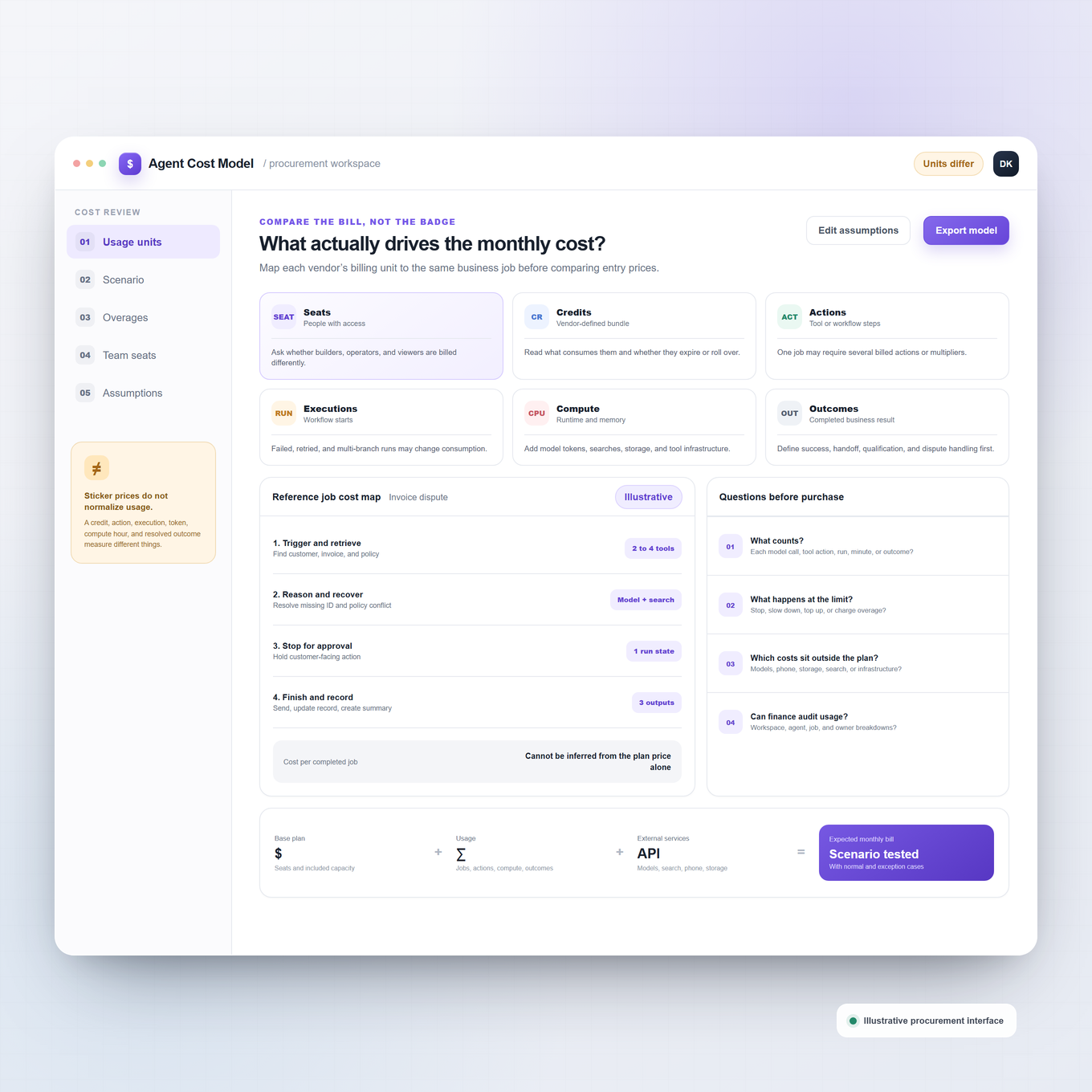
The verdict
The market does not have one universal winner. The right platform depends on whether you need a ready-made operating workspace, a no-code canvas, an enterprise-suite extension, developer infrastructure, or a department specialist. Praxivara ranks first in our general-business evaluation because it covers more of the complete work cycle with less assembly. Copilot Studio, Salesforce Agentforce, n8n, Glean, Workato, AgentCore, Intercom Fin, and Sierra each have category-specific reasons to win a different shortlist.
Quick winners by buyer type
- Highest score for general-business fit: Praxivara, for putting the assistant, agents, records, approvals, channels, activity, and finished work in one product.
- Best for Microsoft-centered enterprises: Microsoft Copilot Studio, for its Microsoft 365, Power Platform, Dynamics, Teams, and Azure reach.
- Best no-code multi-agent builder: Relevance AI, for its visible Workforces canvas and specialist-agent handoffs.
- Best for Salesforce operations: Salesforce Agentforce, when CRM context and actions already live in Salesforce.
- Best for technical workflow builders: n8n, for visual control, code, self-hosting, and execution-level debugging.
- Best visual automation canvas: Make AI Agents, for mixing agent judgment with structured scenarios across more than 3,000 apps.
- Best enterprise knowledge foundation: Glean Agents, for agents grounded in a company-wide index and graph.
- Best enterprise integration backbone: Workato Agentic, for coordinating agents, recipes, APIs, events, and business applications.
- Best developer runtime on AWS: Amazon Bedrock AgentCore, for modular runtime, memory, identity, browser, code, and gateway services.
- Best customer-service specialist: Intercom Fin for fast service deployment, or Sierra for large branded customer-experience programs.
The full ranking
Scores measure broad usefulness to a general business buyer, not raw technical power. A lower-ranked specialist can be the right purchase when its operating model matches your job. Starting prices are entry references, not comparable bundles: one vendor may quote seats, another actions, another executions, and another compute. The complete 25-platform, nine-factor calculation is published in the methodology below.
| Rank | Platform | Score | Best fit | Current starting price | Main limitation |
|---|---|---|---|---|---|
| 1 | Praxivara | 94.0 | General businesses wanting one operating layer | $49.99 monthly, or $44.99 monthly equivalent annually | Newer platform |
| 2 | Microsoft Copilot Studio | 90.3 | Microsoft-centered enterprises | Pay as you go, or $200 monthly for 25,000 Copilot Credits | Licensing and total usage are difficult to forecast |
| 3 | Relevance AI | 89.4 | No-code multi-agent workforces | Free. Pro from $19 monthly on annual billing | Actions and Vendor Credits are separate meters |
| 4 | Salesforce Agentforce | 87.8 | Sales and service operations in Salesforce | Foundations $0. Flex Credits $500 per 100,000 | Several licenses and usage units can apply |
| 5 | n8n | 86.7 | Technical teams needing low-code control | Free self-hosted. Cloud from EUR 20 monthly annually | Production ownership still requires technical skill |
| 6 | Make AI Agents | 85.9 | Visual agentic automation | Free. Core $12 monthly at 10,000 credits | AI Agents remains beta. AI credit use can vary |
| 7 | Glean Agents | 84.6 | Large-company knowledge and internal context | Contact sales | Value depends on a substantial indexing rollout |
| 8 | Workato Agentic | 84.0 | Enterprise integration and orchestration | Free with 50,000 one-time credits; Pro from $75 | Different capabilities consume credits differently |
| 9 | Lindy | 82.5 | Packaged teammate for inbox, meetings, and knowledge work | Plus $29.99 per user monthly | Per-user cost and variable task credits |
| 10 | OpenAI Frontier, with ChatGPT Workspace Agents as the self-serve entry point | 81.4 | ChatGPT teams and large OpenAI deployments | Workspace plan plus credits; Frontier contact sales | Workspace Agents is a research preview; Frontier is a separate sales-led product |
| 11 | AI by Zapier | 80.1 | Existing Zapier customers adding agent decisions | Professional from $19.99 monthly annually | Product migration and task multipliers complicate planning |
| 12 | Gemini Enterprise Agent Platform | 79.2 | Google Cloud agent engineering | Business app $21 per seat; runtime separately metered | Cloud components produce a layered bill |
| 13 | ServiceNow AI Agent Studio and AI Agent Orchestrator | 78.4 | ServiceNow service and operational workflows | Contact sales | Best value depends on ServiceNow applications and entitlements |
| 14 | UiPath Agentic Automation | 78.2 | Agents working with robots, APIs, and people | Basic $25, but production agent tiers are quoted | The entry plan is not the full production platform |
| 15 | IBM watsonx Orchestrate | 77.4 | Enterprise teams coordinating agents across frameworks | Base Agentic instances from $530 monthly, plus usage | Several usage meters and a substantial implementation model |
| 16 | Amazon Bedrock AgentCore | 76.4 | AWS developers building production agents | No minimum; runtime from $0.0895 per vCPU-hour | Infrastructure rather than a finished business workspace |
| 17 | Claude Managed Agents | 75.8 | Long-horizon Claude-based developer workloads | Model tokens plus $0.08 per running session-hour | Beta, API-first, and Claude-specific |
| 18 | Gumloop | 75.4 | Approachable agent-plus-workflow building | Pro from $37 monthly; 14-day trial | Model, tools, context, and concurrency affect cost |
| 19 | Dust | 74.6 | Collaborative agents grounded in team knowledge | No-card free option; paid seat prices shown at checkout | Limited free connectors and no exact public paid-seat price |
| 20 | LangSmith Fleet and LangSmith Deployment | 74.2 | Developer agent lifecycle and deployment | Developer $0; Plus $39 per seat plus usage | Several product and usage layers must be understood |
| 21 | Dify | 73.5 | Model-flexible agent apps and RAG | Free; Professional $59 per workspace monthly | Business integration and self-hosted operations need engineering |
| 22 | CrewAI AMP | 73.2 | Python-first multi-agent systems | Basic free; Enterprise contact sales | No public paid step between a small free tier and Enterprise |
| 23 | StackAI | 72.0 | Document and knowledge-heavy internal agents | Free with 500 monthly runs; Enterprise quoted | No transparent paid self-serve team tier |
| 24 | Intercom Fin | 71.0 | Customer-service agents | From $0.99 per common outcome | A department specialist with volume-sensitive outcome costs |
| 25 | Sierra Agent OS | 70.6 | Enterprise customer-experience agents | Custom outcome-based quote | Narrower general-business fit and no public rate |
How we evaluated and ranked the platforms
We used one nine-dimension scorecard for every platform. Each subscore was awarded directly out of its listed maximum, then added to a total out of 100. The ranking favors useful business outcomes: noticing work, gathering the right context, taking action, asking for human judgment at the right point, producing something usable, and leaving a trace that a manager can inspect.
Security fundamentals were treated as a purchase gate rather than bonus points. The ranking does not reward a vendor simply for meeting a procurement baseline. We also refused to equate connector count with action depth: a searchable data connector is not necessarily a write-capable tool, and an app logo does not prove that an agent can complete the buyer's job.
| Scoring dimension | Maximum | What earned points |
|---|---|---|
| End-to-end execution depth | 20 | Completing multi-step work across systems, including useful outputs and exception paths |
| Time to value and builder experience | 15 | Moving from a business request to a working agent without unnecessary setup |
| Integrations and action depth | 15 | Reading and writing real systems through meaningful tools, APIs, browser actions, or workflows |
| Approvals, recoverability, and human control | 12 | Pauses, review gates, editability, cancellation, retries, versions, and rollback paths |
| Testing, run visibility, and debugging | 10 | Preview, traces, step logs, evaluations, error detail, and production monitoring |
| Pricing transparency and predictability | 10 | Public rates, understandable meters, clear limits, and a credible way to forecast real work |
| Collaboration and administration | 8 | Shared building, roles, workspaces, publishing, ownership, and operating controls |
| Channels and workplace reach | 5 | Useful access through web, workplace chat, email, messaging, voice, APIs, or customer channels |
| Persistent context, records, and artifacts | 5 | Durable memory, native records, grounded context, reusable files, and versioned deliverables |
Full 25-platform × 9-factor score calculation
These are the subscores behind every published total. Each subscore is awarded directly out of the maximum shown in its column, and the nine values add arithmetically to the total out of 100. Publishing the calculation makes the arithmetic auditable, but it does not turn an editorial evaluation into a universal fact. Buyers should still reweight the dimensions for their own operating model.
| Rank | Platform | Execution /20 | Setup /15 | Actions /15 | Human control /12 | Run visibility /10 | Pricing /10 | Admin /8 | Channels /5 | Context and artifacts /5 | Total /100 |
|---|---|---|---|---|---|---|---|---|---|---|---|
| 1 | Praxivara | 19.0 | 14.8 | 13.4 | 11.2 | 9.0 | 9.1 | 7.7 | 4.8 | 5.0 | 94.0 |
| 2 | Microsoft Copilot Studio | 18.4 | 13.2 | 14.3 | 10.7 | 9.2 | 7.7 | 7.8 | 4.5 | 4.5 | 90.3 |
| 3 | Relevance AI | 18.6 | 13.5 | 14.0 | 10.8 | 8.8 | 8.0 | 7.4 | 4.0 | 4.3 | 89.4 |
| 4 | Salesforce Agentforce | 18.5 | 12.4 | 13.9 | 10.5 | 9.0 | 6.8 | 7.8 | 4.2 | 4.7 | 87.8 |
| 5 | n8n | 18.2 | 11.8 | 14.1 | 10.3 | 9.4 | 8.7 | 6.4 | 3.7 | 4.1 | 86.7 |
| 6 | Make AI Agents | 17.7 | 13.2 | 14.2 | 9.7 | 8.5 | 8.5 | 6.7 | 3.8 | 3.6 | 85.9 |
| 7 | Glean Agents | 17.0 | 12.6 | 13.5 | 10.4 | 9.3 | 5.2 | 7.8 | 4.0 | 4.8 | 84.6 |
| 8 | Workato Agentic | 18.1 | 11.2 | 14.5 | 10.4 | 9.1 | 5.9 | 7.4 | 3.6 | 3.8 | 84.0 |
| 9 | Lindy | 16.5 | 14.1 | 12.0 | 10.8 | 7.4 | 8.0 | 6.0 | 4.4 | 3.3 | 82.5 |
| 10 | OpenAI Frontier, with ChatGPT Workspace Agents as the self-serve entry point | 18.8 | 10.0 | 13.5 | 10.6 | 9.0 | 3.5 | 7.8 | 4.2 | 4.0 | 81.4 |
| 11 | AI by Zapier | 16.0 | 13.4 | 14.7 | 9.2 | 7.0 | 8.2 | 5.8 | 3.2 | 2.6 | 80.1 |
| 12 | Gemini Enterprise Agent Platform | 18.4 | 9.8 | 13.8 | 10.4 | 9.0 | 4.0 | 7.1 | 3.0 | 3.7 | 79.2 |
| 13 | ServiceNow AI Agent Studio and AI Agent Orchestrator | 18.3 | 9.2 | 13.7 | 10.2 | 8.8 | 3.8 | 7.6 | 2.9 | 3.9 | 78.4 |
| 14 | UiPath Agentic Automation | 18.7 | 9.5 | 13.9 | 10.5 | 9.1 | 4.0 | 6.9 | 2.7 | 2.9 | 78.2 |
| 15 | IBM watsonx Orchestrate | 17.2 | 10.4 | 12.9 | 10.0 | 8.5 | 5.1 | 7.0 | 2.9 | 3.4 | 77.4 |
| 16 | Amazon Bedrock AgentCore | 18.7 | 8.5 | 13.4 | 9.3 | 8.8 | 7.2 | 5.7 | 2.2 | 2.6 | 76.4 |
| 17 | Claude Managed Agents | 18.3 | 8.4 | 11.4 | 10.3 | 8.9 | 7.8 | 4.8 | 2.6 | 3.3 | 75.8 |
| 18 | Gumloop | 16.2 | 12.8 | 12.0 | 8.7 | 6.8 | 8.2 | 5.0 | 3.0 | 2.7 | 75.4 |
| 19 | Dust | 15.8 | 12.4 | 10.8 | 8.3 | 7.5 | 5.4 | 6.8 | 3.3 | 4.3 | 74.6 |
| 20 | LangSmith Fleet and LangSmith Deployment | 18.0 | 8.0 | 12.5 | 9.0 | 9.8 | 6.6 | 6.0 | 1.8 | 2.5 | 74.2 |
| 21 | Dify | 16.8 | 10.5 | 12.2 | 7.8 | 7.4 | 8.2 | 4.7 | 2.7 | 3.2 | 73.5 |
| 22 | CrewAI AMP | 17.2 | 8.5 | 12.0 | 8.7 | 9.0 | 7.2 | 5.8 | 2.0 | 2.8 | 73.2 |
| 23 | StackAI | 15.8 | 11.8 | 11.2 | 8.2 | 7.5 | 3.8 | 6.5 | 3.0 | 4.2 | 72.0 |
| 24 | Intercom Fin | 13.0 | 12.8 | 9.2 | 8.5 | 6.8 | 7.5 | 5.5 | 4.5 | 3.2 | 71.0 |
| 25 | Sierra Agent OS | 15.3 | 11.0 | 10.4 | 8.8 | 7.8 | 3.5 | 5.8 | 4.5 | 3.5 | 70.6 |
The normal invoice-dispute case
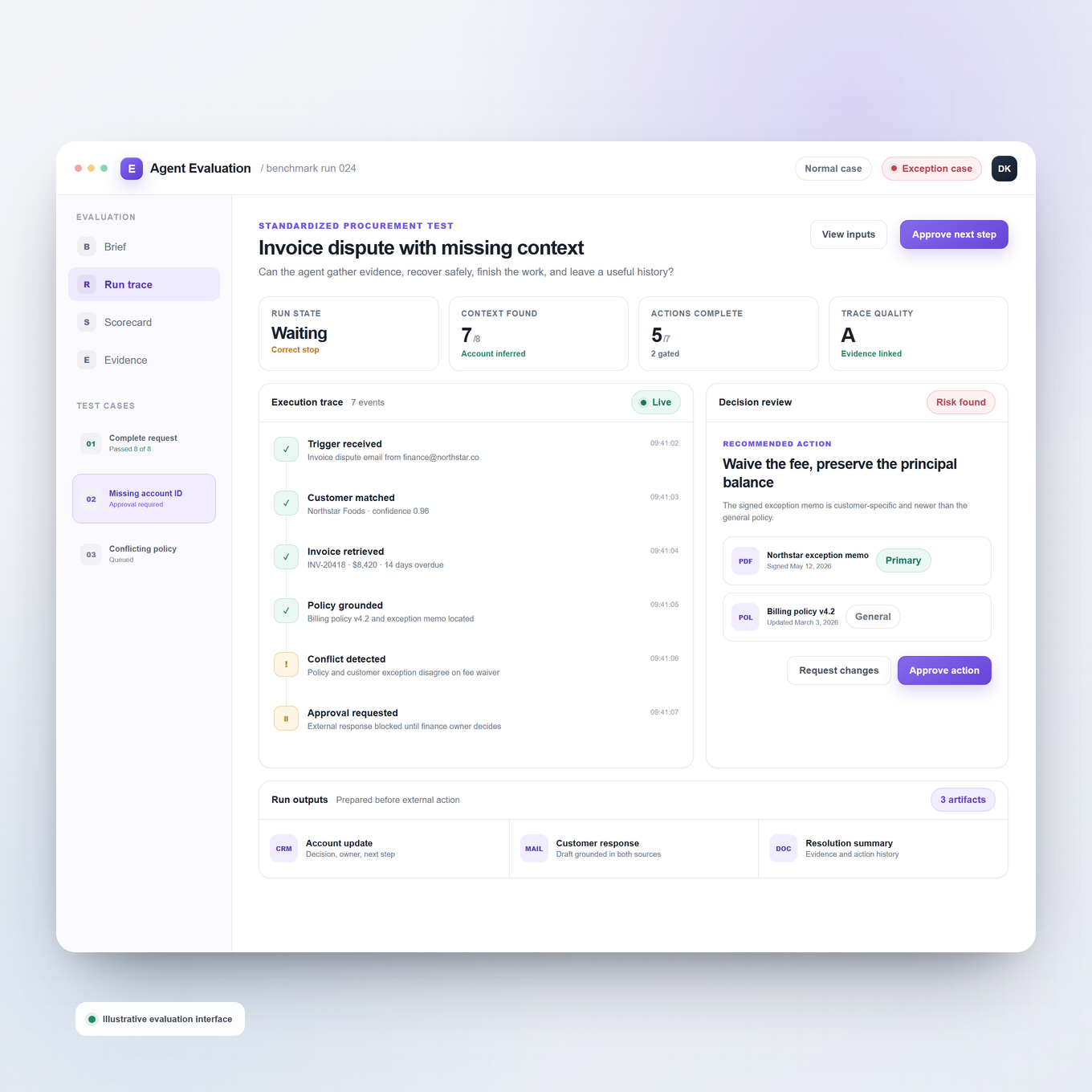
Our reference job begins when an invoice becomes overdue and the customer disputes it. In the normal case, the platform must notice the trigger, retrieve the invoice, account, contract, payment, and recent communication context, choose the routine next step, update the system of record, draft the appropriate reply, stop for approval before contacting the customer, send only after approval, produce a usable account summary, and leave a visible run history. We looked for evidence that each product could cover this chain directly or through a clearly documented combination of agents and workflows.
The exception case
The exception case is where weak demonstrations usually break. The customer says the amount is wrong, a credit memo may not have posted, and the contract belongs to a related subsidiary. A useful agent should not send the routine dunning message. It must recognize conflicting evidence, gather the credit memo and contract, avoid changing the balance without authority, route the case to the right person, preserve the reason for the escalation, prepare an exception packet, and resume only after a decision. We awarded more points when exception handling, approvals, state, retries, and run evidence were explicit rather than inferred.
What “evaluated” means in this guide
For each vendor we inspected official product surfaces, documentation, current pricing pages, public plan comparisons, public demonstrations, and dated product notices available on August 10, 2026. We normalized those facts against the same reference job and the same scoring definitions. When a capability was in beta, preview, limited release, dependent on another product, or not publicly priced, we treated that as a buying constraint. We did not claim access to private customer environments, unpublished enterprise terms, or paid seats that we did not buy.
The 25 best AI agent platforms for business
Each review below answers four buyer questions: what the platform is actually good at, why it holds its position, what may disqualify it, and how its published pricing works. The score reflects general-business usefulness. It is not a claim that rank 18 is weaker than rank 5 at every possible job.
1. Praxivara 94.0/100 Best for: Running business work from one operating layer
Verdict: Under our published methodology, Praxivara earned the highest overall score for businesses that want AI agents to finish work, not merely pass information between apps. It combines a plain-language assistant, recurring agents, approvals, memory, cross-app actions, phone and messaging access, and finished business files in one workspace.
Why it ranks here
A business owner can describe a job such as collections, inbox triage, lead qualification, or weekly reporting, review the generated blueprint, and run it on demand, on a schedule, or from an event trigger. Praxivara records agent runs step by step, sensitive actions can pause for approval, and completed PDFs, documents, decks, spreadsheets, and exports land in a versioned Deliveries feed. That unusually complete path from request to action to finished artifact is why Praxivara earned 94.0 and ranks first under this scorecard.
Main limitation
Praxivara deliberately replaces node-by-node flow construction with conversation and a reviewable blueprint. Teams that need to manipulate every branch, payload, retry, and code step on a deep visual canvas will get more low-level control from n8n or Make.
Pricing
Plans start at $49.99 month to month or $44.99 per month on annual billing with 5,000 monthly credits, up to 10 agents, two connected inboxes, and a seven-day trial. Pro is $99.99 monthly or $89.99 on annual billing with 15,000 credits and up to 25 agents. Premium and Elite raise the allowances to 25,000 and 40,000 credits. Across the current Plus, Pro, Premium, and Elite plans, Praxivara's pricing table lists AI models, integrations, permission settings, supported chat channels, long-term memory, and teams and workspaces as included. Credits, agent limits, storage, connected inboxes, context windows, and support vary by plan.
2. Microsoft Copilot Studio 90.3/100 Best for: Microsoft-centered enterprise agents
Verdict: Copilot Studio is the best enterprise choice for organizations already standardized on Microsoft 365, Power Platform, and Azure. It can build internal assistants, autonomous agents, customer-facing agents, deterministic agent flows, and multi-agent systems without forcing every project into one interaction model.
Why it ranks here
The platform pairs generative orchestration with topics, knowledge, child agents, human input, Power Platform connectors, custom APIs, MCP tools, and computer use. Agents can be tested, evaluated, monitored, and published to Microsoft 365 or external channels. The official Copilot Studio documentation also shows a mature lifecycle around versioning, analytics, failed-step diagnosis, and administration.
Main limitation
Its breadth creates licensing and architecture overhead. Buyers must distinguish Microsoft 365 Copilot entitlements, standalone Copilot Studio, Copilot Credits, Power Platform capacity, and Azure usage. The easiest value appears inside the Microsoft ecosystem. Cross-stack deployments demand more planning.
Pricing
Standalone Copilot Studio is $200 per tenant per month for 25,000 Copilot Credits. Microsoft also offers pay-as-you-go through Azure and prepaid commit plans. Microsoft 365 Copilot costs $30 per user per month, paid yearly, and includes internal agent-building rights for licensed users. The individual builder license is $0 once the tenant has an eligible capacity arrangement.
3. Relevance AI 89.4/100 Best for: No-code multi-agent workforces
Verdict: Relevance AI is the most convincing no-code platform for designing a visible workforce of specialized agents. It is especially strong when a buyer wants agents to delegate to one another while retaining explicit handoffs, conditional routes, knowledge, tools, and escalation points.
Why it ranks here
Builders can generate an agent from a description, clone one from the marketplace, or configure it manually. Its Workforces canvas makes multi-agent coordination concrete: agents can hand work to specialists, follow fixed steps, branch on conditions, and escalate to people. Relevance also separates build users from end users, which is useful when a small automation team serves a larger workforce.
Main limitation
Costs have two moving parts: Actions for tool runs and Vendor Credits for model and tool usage. Failed tool runs can still consume Actions, and calling, meeting participation, and the analytics dashboard begin on the much more expensive Team tier. Buyers should model a full workflow, not compare subscription prices alone.
Pricing
Free includes 200 Actions per month, a one-time allocation of 1,000 Vendor Credits, unlimited agents and tools, and one Workforce. Pro is $19 per month on annual billing or $29 monthly for 2,500 Actions, 10,000 Vendor Credits, and two build users. Team is $234 per month annually or $349 monthly for 7,000 Actions, 35,000 Vendor Credits, five builders, and 45 end users. Additional Actions cost $80 per 1,000.
4. Salesforce Agentforce 87.8/100 Best for: Agents built directly into Salesforce operations
Verdict: Agentforce is the strongest choice when customer, sales, service, and industry workflows already live in Salesforce. Its agents can reason over CRM context, invoke Flow and custom actions, serve employees or customers, and write results back into the same records that drive the business.
Why it ranks here
Agentforce Builder, Prompt Builder, Salesforce Flow, Data 360, Slack, customer channels, voice, and Digital Wallet form a serious execution stack rather than a separate chatbot layer. The platform is particularly persuasive for use cases such as case resolution, order status, appointment scheduling, record updates, and employee support because the agent acts where the operational data already lives.
Main limitation
Agentforce is not a neutral starting point. Its advantage depends on a meaningful Salesforce footprint, and total cost can include Salesforce editions, Agentforce access, Flex Credits, Data 360 usage, and implementation work. That makes it powerful for committed Salesforce customers but difficult to justify as a standalone agent platform.
Pricing
Salesforce Foundations lists Agentforce Builder at $0 for eligible customers. Flex Credits cost $500 per 100,000 credits. A standard Agentforce action uses 20 credits, or $0.10 at list price. Conversation pricing is $2 per conversation. The employee Agentforce User License is $5 per user per month and still requires Flex Credits. Flat-fee Agentforce add-ons start at $125 per user per month, while Agentforce 1 Editions start at $550 per user per month.
5. n8n 86.7/100 Best for: Technical teams that want maximum workflow control
Verdict: n8n is the best low-code agent orchestration platform for teams willing to build. It offers the control of a developer tool with a visual workflow canvas, making it unusually good at combining deterministic business logic with model-driven decisions.
Why it ranks here
Its workflows can mix AI Agent nodes, tools, memory, vector stores, RAG, MCP, code, webhooks, subflows, approval steps, evaluations, retries, and ordinary integrations. Cloud and self-hosted deployment options widen the fit. Just as important, n8n bills cloud plans by full workflow execution rather than by every step, which can make long, deterministic workflows easier to forecast.
Main limitation
This is not effortless no-code software. Production workflows still require careful data mapping, error handling, credentials, model configuration, and operational ownership. The AI Assistant credits listed on cloud plans help build workflows. They are not a bundled allowance for every model call made by production agents.
Pricing
The standard self-hosted Community Edition is available at no license cost. Cloud Starter is EUR 20 per month billed annually for 2,500 executions, unlimited steps, five concurrent executions, and unlimited users. Pro is EUR 50 per month billed annually for 10,000 executions and 20 concurrent executions. The self-hosted Business plan is EUR 667 per month billed annually for 40,000 executions, while Enterprise is quoted.
6. Make AI Agents 85.9/100 Best for: Visual agentic automation across many apps
Verdict: Make AI Agents is the best visual-first option for operations teams that want agent reasoning inside a proven automation canvas. It keeps adaptive decisions, deterministic modules, routers, data transformations, and downstream actions visible in one scenario.
Why it ranks here
Agents can be reused across teams and workflows, inspect their reasoning, and act through more than 3,000 app integrations. Make is especially capable when an agent should handle one judgment-heavy step inside a larger process whose triggers, branches, approvals, and outputs must remain explicit.
Main limitation
Make is still an automation platform with agents inside it, not a complete business operating layer. Complex scenarios develop a learning curve around mapping, iterators, routers, and error paths. Its pricing table also continues to label Make AI Agents as beta, and advanced AI features can consume variable credits.
Pricing
Free includes 1,000 credits per month. At the displayed 10,000-credit tier, Core is $12 per month, Pro is $21, and Teams is $38. Enterprise is custom. Make AI Agents with Make's model provider are available on all plans. Bringing a separate model key requires a paid plan. Most module actions cost one credit, while some AI and code operations use more.
7. Glean Agents 84.6/100 Best for: Enterprise agents grounded in company knowledge
Verdict: Glean Agents is the best enterprise knowledge-first agent platform. If the central problem is giving agents accurate context across a fragmented company stack, Glean's search foundation, enterprise graph, and permissions-aware index provide a formidable starting point.
Why it ranks here
Glean combines an agent builder, orchestration, a reusable agent library, observability, and more than 275 connectors. Agents can reason over company context, respond to events, route tasks between agents, call external systems, and expose adoption, error, feedback, and value signals. Few rivals connect knowledge quality and agent lifecycle this tightly.
Main limitation
Glean is a substantial enterprise rollout, not a quick point solution. Its value depends on indexing the right systems, configuring connectors, and driving adoption across the organization. Teams that simply need a few action-oriented automations may find the platform and procurement motion heavier than the job requires.
Pricing
Glean does not publish a list price for Glean Agents on its current product page. Pricing is quote-based through a demo and can depend on the wider Glean deployment and usage. Buyers should request a written breakdown of platform seats, agent-building access, model usage, premium features, implementation, and renewal terms rather than treating a sales conversation as a free tier.
8. Workato Agentic 84.0/100 Best for: Enterprise agents backed by deep integration
Verdict: Workato Agentic is the strongest agent platform for enterprises that already view integration as core infrastructure. Agent Studio builds Workato's Genies on top of mature recipes, reusable skills, event triggers, and cross-system orchestration, so agents can execute real multi-step processes instead of stopping at recommendations.
Why it ranks here
Agent Studio supports no-code agent building across more than 12,000 applications, while Agent Orchestration lets specialized agents collaborate inside end-to-end workflows. Workato also emphasizes traceable actions, approvals, reusable recipes, event-driven starts, and exception handling. It is a credible fit for finance, IT, HR, support, and revenue operations that already cross several major systems.
Main limitation
Workato is designed for strategic enterprise automation programs. Procurement, architecture, connector setup, and implementation are correspondingly heavier than with self-serve tools. Smaller businesses can buy far more platform than they need, and public information makes it difficult to estimate total cost before speaking with sales.
Pricing
Workato Free includes a one-time grant of 50,000 credits. Self-service Pro starts at $75 per month for 2,500 monthly credits. $100 buys 3,500, $275 buys 10,000, and unused monthly credits do not roll over. Credits meter several unit types, including Workato Tasks, API calls, rows processed, and Genie actions. Enterprise remains custom-priced, so large buyers should request a written breakdown of platform, agent, capacity, onboarding, and support charges.
9. Lindy 82.5/100 Best for: A packaged AI teammate for daily knowledge work
Verdict: Lindy is one of the fastest ways to give a team an AI teammate for inbox work, meetings, research, reporting, decks, dashboards, and scheduled routines. Its current product is less about drawing automation diagrams and more about delegating work through Slack, iMessage, Gmail, or the browser.
Why it ranks here
Lindy connects to more than 1,000 tools, includes over 40 reusable skills, stores editable workspace memory in plain files, and can turn a completed process into a shared skill. It also brings meeting context, recurring routines, computer use, file creation, and team-wide delegation into a coherent teammate experience.
Main limitation
The packaged teammate experience is the strength and the tradeoff. Buyers seeking a neutral visual orchestration platform with explicit low-level branches, payload mappings, and deployment primitives will have more control elsewhere. Per-user pricing also rises quickly for broad teams, and any person who uses Lindy consumes a paid seat.
Pricing
Plus costs $29.99 per user per month with 3,000 credits per user. Pro is $99.99 with 15,000 credits, and Max is $199.99 with 35,000 credits. Enterprise is custom. Lindy's documentation rounds those prices to $30, $100, and $200. Credits pool across the workspace. Top-ups cost $10 per 1,000 credits, base credits do not roll over, and purchased top-ups do. Current documentation says direct signups are billed immediately, while new teammates who join through Slack receive a seven-day trial.
10. OpenAI Frontier, with ChatGPT Workspace Agents as the self-serve entry point 81.4/100 Best for: OpenAI-centered business agent programs
Verdict: OpenAI offers a natural path from everyday ChatGPT use to shared business agents. Workspace Agents let teams describe a workflow, connect tools and company context, publish it internally, schedule runs, and require approvals without adopting a separate automation interface. Frontier is a separate, sales-led enterprise platform for operating AI coworkers.
Why it ranks here
Workspace Agents can run on schedules, work across approved apps, be shared across a workspace, and expose monitoring and approval checkpoints. OpenAI Frontier adds business context, production execution, agent identity, observability, and evaluation and optimization loops for larger deployments.
Main limitation
Workspace Agents are still in research preview, and Frontier is a sales-led enterprise offering. That makes the combined story promising but less settled than mature automation platforms. Buyers should confirm connector coverage, quotas, run pricing, regional availability, and which Frontier capabilities are included before standardizing on it.
Pricing
Workspace Agents are currently available in research preview on eligible ChatGPT Business, Enterprise, Edu, and Teachers plans. ChatGPT Business costs $25 per standard seat per month on monthly billing or $20 on annual billing, with a two-seat minimum. Workspace Agent runs include baseline usage and can draw on flexible workspace credits beyond plan limits. A ChatGPT Business seat does not purchase Frontier. ChatGPT Enterprise and OpenAI Frontier are custom-priced through sales.
11. AI by Zapier 80.1/100 Best for: Adding agent decisions to a huge app ecosystem
Verdict: AI by Zapier is the practical choice for existing Zapier customers who want model-driven decisions inside dependable app automations. It is strongest as an intelligent step within a Zap, where its tools and knowledge can sit beside normal triggers, filters, paths, tables, forms, approvals, and actions.
Why it ranks here
Zapier's central advantage is reach: the platform connects more than 9,000 apps. AI by Zapier adds structured inputs and outputs, selectable model tiers, knowledge, and per-tool approval choices without discarding the deterministic parts of a workflow. That is valuable for teams that already maintain Zaps and want to add judgment selectively. Tool calls are not currently available on Enterprise accounts.
Main limitation
The product boundary is moving. Zapier is migrating standalone Agents functionality into AI by Zapier, and migrated standalone knowledge sources are still scheduled for Q3 2026. Task consumption can also rise quickly because successful tool calls and higher model tiers use multipliers. Treat it as agentic automation, not a self-contained business workspace.
Pricing
AI by Zapier is not available on Zapier Free. Professional starts at $19.99 per month on annual billing, Team starts at $69 with 25 users, and Enterprise is custom. AI by Zapier usage follows model-tier and tool-call task multipliers, so the base subscription does not reveal the full cost of a heavily agentic workflow.
12. Gemini Enterprise Agent Platform 79.2/100 Best for: Google Cloud teams building agents at multiple levels
Verdict: Gemini Enterprise Agent Platform is one of the broadest new agent stacks: a self-serve employee app with no-code Agent Designer, plus a technical platform with low-code and code-first building, a managed runtime, persistent memory, multi-model access, evaluation, simulation, and observability.
Why it ranks here
Agent Studio and the Agent Development Kit offer visual and code-first paths, while Agent Runtime supports long-running, stateful agents. The Gemini Enterprise app adds company search, connectors, prebuilt agents, a centralized agent catalog, and no-code creation for employees. Standard and Plus can also bring in ADK-built and third-party agents.
Main limitation
This is a newly unified platform with a large surface area and a layered bill. Seat licenses, runtime compute, memory, storage, model tokens, connectors, and wider Google Cloud services may all matter. Business edition also has published daily quotas, so teams should distinguish an employee productivity rollout from a production agent infrastructure project.
Pricing
Gemini Enterprise Business edition starts at $21 per seat per month for up to 300 seats and includes a 30-day trial. Standard and Plus start at $30 per seat per month. For the underlying Agent Platform, the first 50 Agent Compute hours and 100 GiB-hours of memory are free each month, then compute is $0.085 per vCPU-hour and memory is $0.009 per GiB-hour. Model tokens and some platform services are billed separately.
13. ServiceNow AI Agent Studio and AI Agent Orchestrator 78.4/100 Best for: ServiceNow-native service and operational workflows
Verdict: ServiceNow AI Agents is a deep choice for companies whose work already runs through ServiceNow. It can connect agent reasoning directly to records, approvals, playbooks, and business rules, but much of that advantage depends on an established ServiceNow estate.
Why it ranks here
AI Agent Studio lets teams define roles, instructions, triggers, tools, channels, and execution controls. Tools can include ServiceNow records, flow actions, subflows, scripts, Skills, and MCP servers. AI Agent Orchestrator coordinates teams of agents, while the builder includes versions, manual tests, automated evaluations, execution logs, and analytics.
Main limitation
This is not a standalone agent builder. Customers need the applicable Now Assist and workflow applications, supporting dependencies, a compatible instance, and the right entitlements. Packaging also varies by workflow and tier, which makes procurement harder to summarize with one license.
Pricing
ServiceNow does not publish a simple dollar price or a self-serve AI Agent Studio trial. It offers demos and custom quotes. Its current ITSM packages place task AI agents and skills in Foundation, agentic workflows in Advanced, and AI specialists in Prime.
14. UiPath Agentic Automation 78.2/100 Best for: Processes that combine AI agents, RPA robots, APIs, and people
Verdict: UiPath is one of the strongest choices for automation teams that need agents to work alongside deterministic bots and human checkpoints. It ranks here because realizing that full value means adopting several UiPath layers and understanding several forms of licensing and usage.
Why it ranks here
Teams can build autonomous and conversational agents in Studio Web with prompts, tools, context, escalations, and evaluations. UiPath Maestro adds executable BPMN and DMN orchestration across agents, robots, systems, and people, while Orchestrator handles schedules, queues, triggers, and production runs.
Main limitation
The stack is powerful but operationally broad. Buyers may need Studio Web, Maestro, Orchestrator, Platform or Agent Units, and separate user or robot licenses. UiPath also documents current agent constraints, including individual rather than group escalations and several conversational-agent restrictions.
Pricing
Basic starts at $25 per month, but it can build agents without deploying or running them in production. Standard is the first production agent tier, and both Standard and Enterprise use sales-led pricing. A Basic trial can develop but not run agents. A Standard trial can do both.
15. IBM watsonx Orchestrate 77.4/100 Best for: An open, hybrid control plane for agents built across frameworks and clouds
Verdict: IBM watsonx Orchestrate is a credible choice for enterprise platform teams that want to build some agents and import, catalog, schedule, observe, and coordinate others. Its breadth is real, but so is the implementation and metering complexity.
Why it ranks here
Agent Builder supports natural-language and visual creation, while IBM also supports Python, its ADK, APIs, OpenAPI, MCP, Langflow, and LangGraph. Flow Builder can mix agents with branches, loops, code, document steps, and human review. Cloud, AWS, and on-premises deployment paths make it more flexible than a single-suite builder.
Main limitation
IBM documents that collaborator agents and tools in Agent Builder do not currently run in parallel. Workspaces are currently limited to IBM Cloud, and the product uses several possible meters, including messages, active users, resource units, skill runs, voice, and document usage.
Pricing
IBM's current U.S. Cloud catalog lists a base Essentials Agentic instance at $530 per month and a Standard Agentic instance at $6,360 per month. Additional meters, including monthly active-user usage, can add cost. IBM's product pricing page also offers a 30-day trial with Standard features, one workspace, and invitations for up to 10 teammates. It is intended for evaluation, not production.
16. Amazon Bedrock AgentCore 76.4/100 Best for: Developers who want model-neutral production agent infrastructure on AWS
Verdict: AgentCore is a strong modular foundation for moving custom agents into production without committing to one model or framework. It ranks below turnkey business platforms because AWS supplies the infrastructure, not the finished employee or customer experience.
Why it ranks here
AgentCore offers managed and code-first paths, with support for frameworks such as Strands, LangGraph, Google ADK, and the OpenAI Agents SDK. Its modules cover runtime, memory, identity, tool gateways, browser use, code execution, policies, observability, evaluations, and a registry. Teams can adopt only the pieces they need.
Main limitation
Getting started still requires AWS credentials, IAM, code, and deployment work. Costs can span compute, memory, models, storage, networking, and optional modules. Feature availability varies by region, and several newer capabilities remain in preview.
Pricing
There is no minimum fee. Runtime, Browser, and Code Interpreter cost $0.0895 per vCPU-hour plus $0.00945 per GB-hour of active use. Web Search costs $7 per 1,000 queries. Model inference and other AgentCore modules add separate usage charges. The managed orchestration layer itself has no extra fee.
17. Claude Managed Agents 75.8/100 Best for: Developer teams running long-horizon, stateful Claude workloads
Verdict: Claude Managed Agents removes much of the orchestration and runtime work involved in letting Claude operate for minutes or hours. It is compelling for Claude-first developers, but it is API-first, model-specific, and still in beta.
Why it ranks here
An agent can bundle a Claude model, system prompt, built-in tools, MCP servers, and Skills. Stateful sessions preserve files and conversation history, stream events, accept mid-run steering, and support scheduled deployments. Teams can use an Anthropic-managed cloud sandbox or connect execution infrastructure they operate.
Main limitation
This is developer infrastructure, not a visual workspace for business users. It requires a Claude API account and beta API header, and Anthropic says behaviors can change during beta. MCP tunnels and dreaming remain more limited research-preview features.
Pricing
Managed Agents pricing combines model-token charges with $0.08 per running session-hour. Idle, rescheduling, and terminated time does not accrue runtime charges. Web search costs $10 per 1,000 searches. New API accounts receive a small amount of test credit.
18. Gumloop 75.4/100 Best for: Business teams combining open-ended AI decisions with repeatable no-code automation
Verdict: Gumloop draws a useful line between agents that decide what to do and workflows that execute predictable steps. It is one of the clearest agent-plus-automation products in this tier, although variable credit use makes some workloads hard to forecast.
Why it ranks here
Gumloop Agents can use connected apps and existing workflows as tools, run on schedules or external events, apply reusable Skills, and delegate to other agents. Agents can also sit inside workflows for chaining and batch processing. The Pro plan supports unlimited seats, five concurrent workflow runs, and 25 concurrent agent chats.
Main limitation
Agent costs change with model choice, conversation length, tools, and any workflows called. When Pro customers reach concurrency limits, new work is rejected instead of queued. Automatic queuing is an Enterprise feature.
Pricing
Pro starts at $37 per month with 20,000 credits, unlimited seats, and a 14-day trial. Enterprise is custom priced. Optional Pro overage costs $0.007 per credit and is capped at twice the monthly allocation. Monthly credits generally do not roll over.
19. Dust 74.6/100 Best for: Shared agents grounded in company knowledge and connected business apps
Verdict: Dust is a capable collaborative agent workspace with strong knowledge and multi-model foundations. It ranks here because the self-serve Business plan places tight limits on connectors and workspaces, while the newer credit model adds several cost variables.
Why it ranks here
Dust combines custom agents, company knowledge, native integrations, remote MCP, Skills, schedules, triggers, and handoffs through sub-agents, tools, or Pods. One active agent owns a conversation at a time. Its Agent Builder Sidekick can draft instructions and recommend models, tools, Skills, and knowledge. Pods support shared work, while Frames turn agent output into apps and dashboards.
Main limitation
The Business plan allows up to three connectors and five Spaces. Credit use changes with model, context, tools, and sub-agent activity. Programmatic usage has no free baseline and draws from the workspace credit pool. Enterprise can continue into pay-as-you-go billing, while Business must buy pool top-ups in advance.
Pricing
Business has a no-card free option. Free seats receive 500 lifetime credits. Paid seats include larger monthly credit allocations, but Dust shows the exact paid seat prices during checkout rather than as stable public dollar figures on the page we checked. Enterprise is custom, and unused monthly credits do not roll over.
20. LangSmith Fleet and LangSmith Deployment 74.2/100 Best for: Teams moving from no-code routine agents to code-first, stateful systems
Verdict: This is one of the ranking's most flexible paths from business-built agents to developer-built production systems. It is also one of the least simple to evaluate because Fleet, Deployment, and LangGraph are distinct layers rather than one SKU.
Why it ranks here
LangSmith Fleet creates agents from templates or plain-English instructions and adds tools, approvals, schedules, workplace channels, and API invocation. LangGraph provides low-level orchestration, durable execution, memory, streaming, and human review. LangSmith Deployment adds managed revisions, logs, metrics, serverless or dedicated hosting, and scaling.
Main limitation
Buyers must understand how the three pieces fit together. LangGraph is intentionally low-level, Fleet self-hosting is beta, managed Deployment requires Plus or Enterprise, and hybrid or self-hosted LangSmith platform options require Enterprise.
Pricing
Developer is $0 for one seat, with 5,000 base traces and five Fleet LCUs per month. Plus is $39 per seat per month, with 10,000 base traces, 25 Fleet LCUs, and one small serverless deployment. Additional usage is metered at $1.50 per LCU and $1 per LSU. Enterprise is custom.
21. Dify 73.5/100 Best for: Visual, model-agnostic agents and RAG apps with cloud or self-hosted deployment
Verdict: Dify offers substantial builder and deployment breadth for its price. It is an especially good fit for prototypes and departmental applications, but buyers that need mature release controls or multiple managed workspaces may outgrow the self-serve plans.
Why it ranks here
Dify combines Agent, Chatflow, Workflow, and text-generation apps with a visual workflow editor, knowledge pipelines, code nodes, model switching, and a large tool marketplace. Teams can publish an app as a web app, website embed, API, or MCP server, then review usage, latency, cost, and errors. The application builder supports both quick chat agents and structured workflows.
Main limitation
Dify's current Cloud comparison still labels app version control as coming soon for Professional and Team. Every public Cloud tier includes one workspace. Multi-workspace management and larger private deployments move to Enterprise. Community Edition is single-workspace and self-managed.
Pricing
Sandbox is free with 200 message credits, one member, and five apps. Professional is $59 per workspace monthly or $590 annually. Team is $159 monthly or $1,590 annually. Included model credits vary by model, and buyers can use their own model API keys. Enterprise is custom. Community Edition is free to self-host, excluding operating costs.
22. CrewAI AMP 73.2/100 Best for: Python-first teams building multi-agent Crews and deterministic Flows
Verdict: CrewAI AMP is a distinctive bridge between an open-source agent framework and a managed operations layer. It is most attractive to teams that actively want multi-agent architecture, not buyers looking for a simple general-purpose business workspace.
Why it ranks here
CrewAI separates autonomous Crews from stateful, event-driven Flows and lets developers combine them. AMP adds visual Studio building, GitHub and CLI deployment, REST APIs, traces, logs, a tool repository, and webhook streaming. Studio can generate Crews or Flows from natural language, connect tools, export source code, and test and deploy from one environment.
Main limitation
The jump from free to enterprise procurement is abrupt. Basic allows only two automations and 50 workflow executions per month, with no public paid self-serve tier between it and custom Enterprise. Teams must also learn CrewAI's agents, tasks, processes, Crews, and Flows to design systems well.
Pricing
Basic is free and includes the visual editor, AI copilot, GitHub integration, two automations, and 50 monthly workflow executions. Enterprise is custom priced, with execution allowances sized to the workflow and flexible overages. CrewAI offers an enterprise trial by request but does not publish its duration or dollar price.
23. StackAI 72.0/100 Best for: Knowledge-heavy internal agents and custom interfaces built by IT and operations teams
Verdict: StackAI is a polished visual platform for teams that do not want to assemble separate RAG, workflow, and deployment products. Its product packaging makes a small proof of concept easy, but public pricing gives growing teams little visibility before an enterprise sales process.
Why it ranks here
Agent Builder creates knowledge-aware assistants, while Workflow Builder adds visual logic, tools, triggers, reusable subflows, RAG, and Python or JavaScript nodes. StackAI lists more than 100 integrations and can publish through forms, chat assistants, website chatbots, batch interfaces, messaging tools, and APIs.
Main limitation
Public packaging is effectively binary. The free plan supports one builder and a small proof of concept. Collaboration, unlimited projects, custom run capacity, all data loaders, and dedicated implementation help require a custom Enterprise agreement.
Asana completed its acquisition of StackAI in May 2026. StackAI's current public plans remain visible, but buyers should confirm future packaging and contracting.
Pricing
Free is $0 with 500 monthly runs, two projects, one seat, and community support. Enterprise is custom priced, with negotiated runs and seats, unlimited projects, the full product set, and dedicated solution engineers. StackAI does not publish a paid team tier or an Enterprise dollar amount.
24. Intercom Fin 71.0/100 Best for: A ready-made AI service agent in Intercom or an existing help desk
Verdict: Fin AI Agent is one of the fastest routes to an action-taking customer-service agent. It ranks near the bottom of this broader business list because it is a departmental specialist, not because it is weak at support.
Why it ranks here
Fin combines help-center and company knowledge with natural-language Procedures, workflows, external actions, routing, and human handoff. Teams can use it inside Intercom or with selected existing help desks. Procedures can mix AI-authored instructions with controlled steps, which makes Fin useful for more than answering questions.
Main limitation
Fin is designed for service, sales, and ecommerce conversations, not general internal operations. Some advanced deployment paths and help-desk integrations require sales involvement, and without Intercom Workflows a team can keep only one Procedure version live.
Pricing
Outcome pricing is $0.99 for a resolution, Procedure handoff, or disqualification, and $9.99 for a qualification, with at most one outcome charge per conversation. Intercom plans start at $29 per seat per month billed annually. Standalone Fin starts at $0.99 per outcome with no seats and a minimum commitment. A 14-day trial requires no card.
25. Sierra Agent OS 70.6/100 Best for: Large enterprises deploying branded, omnichannel customer-experience agents
Verdict: Sierra is a serious specialist for enterprises that want a customer-facing agent to own conversations and complete actions across channels. It ranks last only because its focus and sales-led buying motion make it a narrower fit for a general business buyer.
Why it ranks here
Agent Studio gives business teams a no-code path to define Journeys, knowledge, integrations, simulations, and operating controls. Agent SDK adds declarative code, composable skills, goals, and guardrails. Sierra supports phone, chat, SMS, messaging, email, and ChatGPT, with more than 40 prebuilt integrations and custom connections.
Main limitation
Sierra is centered on customer experience rather than broad internal automation. It is sold as an enterprise partnership instead of a self-serve product, and proprietary or advanced integrations can require SDK work.
Pricing
Sierra uses custom outcome-based pricing. The buyer and Sierra agree on what counts as a successful outcome, and unresolved conversations generally do not incur an outcome charge. Sierra does not publish a standard dollar rate, free plan, or self-serve trial, so meaningful cost comparison requires a quote and an agreed outcome definition.
Choose a buyer lane before you choose a vendor
A single ordered list is useful for comparison, but it should not erase the basic fact that these products solve different kinds of problems. The fastest way to make a bad purchase is to compare a developer runtime, a suite extension, a visual automation builder, and a customer-service specialist as if they were interchangeable. Start with the operating model your team actually needs, then use the ranking to compare the strongest candidates inside that lane.
Business operating layer
Start with: Praxivara.
This lane is for a company that wants named agents to own recurring business responsibilities, share native records, ask for approvals, work across channels, show their runs, and finish with usable Deliveries. The key question is not whether a model can call a tool. It is whether the business can assign work and understand what happened without rebuilding an operating system around the agent.
Suite-native control
Start with: Microsoft Copilot Studio, Salesforce Agentforce, Gemini Enterprise Agent Platform, or ServiceNow AI Agent Studio and AI Agent Orchestrator.
Choose this lane when the decisive context, permissions, users, and actions already live in one large software estate. A suite-native product can shorten integration work and inherit familiar administration. The tradeoff is gravity: value, economics, and flexibility often depend on staying inside that vendor's data and application model.
Visual automation and agent building
Start with: Relevance AI, n8n, Make AI Agents, Workato Agentic, AI by Zapier, Gumloop, or Lindy.
This is the broadest lane. It fits teams that already think in triggers, actions, branches, and app connections, but want models to make bounded decisions inside those processes. Relevance AI emphasizes multi-agent workforces. n8n and Make reward teams that want visual control. Workato brings enterprise integration depth. Zapier offers remarkable app reach. Gumloop blends open-ended reasoning with repeatable flows. Lindy packages the experience as a teammate.
Knowledge-grounded employee agents
Start with: Glean Agents, Dust, or StackAI.
This lane fits internal research, employee help, knowledge discovery, and assistants that must respect company context. Glean is strongest when enterprise search and permissions are central. Dust gives teams a shared multi-model agent workspace. StackAI gives IT and operations teams a visual route to knowledge-heavy applications and custom interfaces. Test write actions carefully: finding an answer and changing a business record are different capabilities.
Developer infrastructure and deployment
Start with: OpenAI Frontier with ChatGPT Workspace Agents as the entry point, Amazon Bedrock AgentCore, Claude Managed Agents, LangSmith Fleet and LangSmith Deployment, Dify, CrewAI AMP, or IBM watsonx Orchestrate.
Choose this lane when engineers need model choice, code-level state, custom tools, deployment primitives, tracing, or control over runtime architecture. These platforms can support highly differentiated systems, but they usually require the buyer to design more of the business experience around the agent. OpenAI Workspace Agents remains a research preview, while Frontier is a separate sales-led product. Claude Managed Agents remains beta. Production status matters as much as a feature demonstration.
Customer-service and experience specialists
Start with: Intercom Fin or Sierra Agent OS.
These products are not low-ranked because they fail at their specialty. Fin is a practical choice for support resolution, procedures, and handoff, especially for Intercom buyers. Sierra is built for large, branded, omnichannel customer experiences. They rank lower on a general-business list because neither is meant to become the operating layer for finance, recruiting, internal projects, and broad cross-functional work.
How to use the lanes
Shortlist no more than three products from one primary lane and, if necessary, one adjacent lane. Then give every finalist the same normal case, the same exception, the same data, and the same approval rule. Require a live result, a run record, and an estimated monthly invoice. This removes much of the ambiguity created by polished demonstrations.
A company may eventually use more than one lane. A customer-service specialist can coexist with an internal operating layer, and a developer runtime can power a custom product while business teams use a visual platform. The mistake is buying overlapping platforms without naming which one owns triggers, state, approvals, system writes, human handoffs, and final artifacts.
What these AI agent platforms really cost
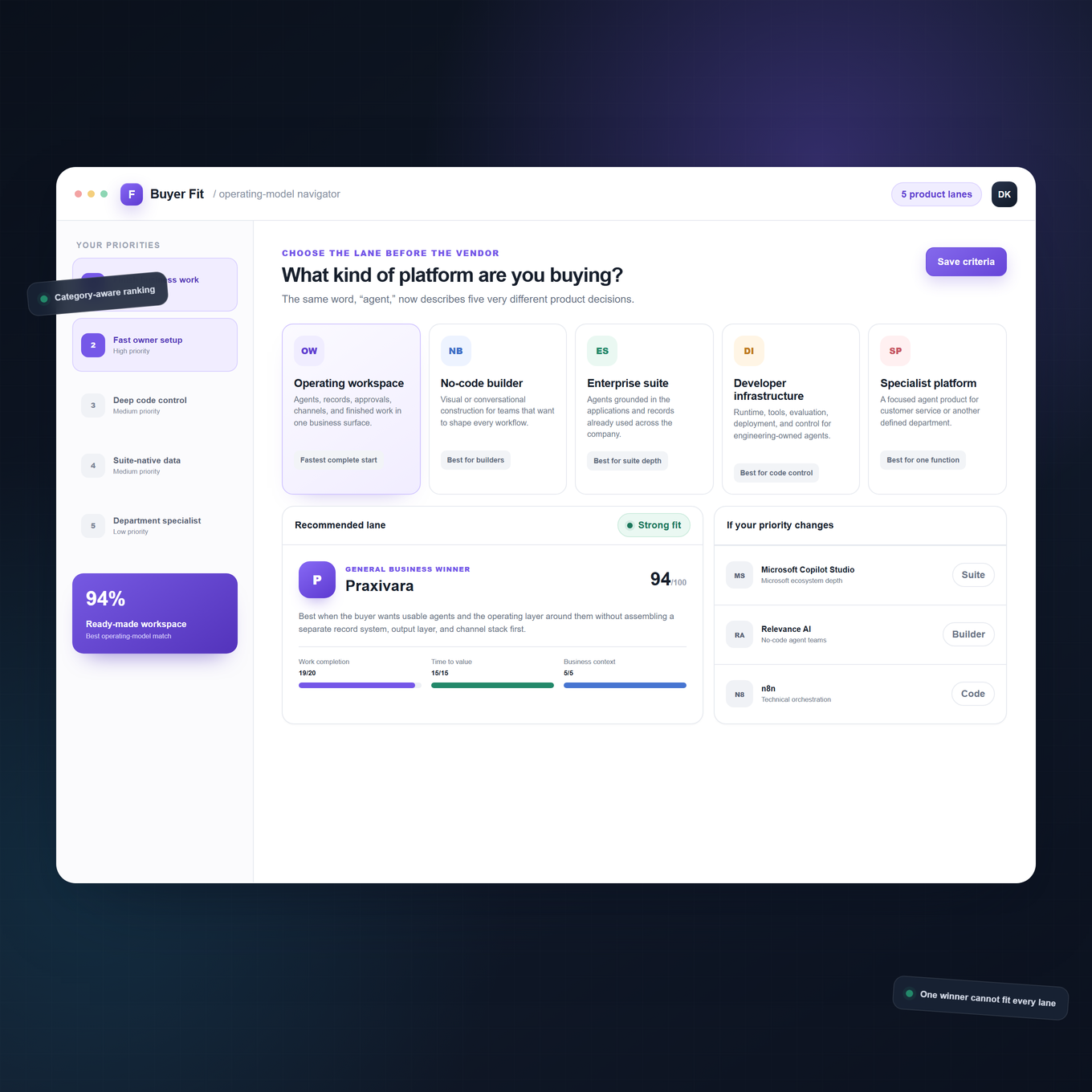
The starting price in a vendor grid is useful, but it is not the cost of running an agent. Two platforms can advertise similar monthly plans while counting entirely different units. One may charge for each user, another for each action, another for model tokens and compute, and another only when it declares a customer outcome. A defensible comparison begins by converting every proposal into the cost of the same completed business job.
For the invoice-dispute case, count the trigger, data retrievals, model calls, tool actions, approval pause, resumed execution, customer contact, record updates, retries, storage, and finished document. Then repeat the estimate for the exception case, where the agent performs more retrieval, escalates, waits longer, and may need another run. A low headline price can become expensive if every branch or retry consumes a billable unit. A higher base plan can be economical if it includes the operating surfaces a team would otherwise build and maintain.
| Billing unit | Common examples in this ranking | What to calculate | Main forecast risk |
|---|---|---|---|
| Seat or user | Lindy, Microsoft products, some Dust and Intercom plans | Builders, operators, occasional reviewers, and people who interact through workplace channels | Read-only or occasional users can turn into paid seats as adoption spreads |
| Task, operation, run, or credit | Zapier, Make, Workato, Relevance AI, Gumloop, Praxivara | Every step in a normal run, an exception run, retries, loops, and background checks | Vendor definitions differ, and one business outcome may consume many units |
| Model and runtime consumption | Amazon Bedrock AgentCore, LangSmith deployments, Google Cloud agent runtime, Dify | Tokens, model choice, compute time, memory, browser or code tools, storage, and network use | Long context, reasoning, and tool-heavy exceptions produce variable invoices |
| Outcome or resolution | Intercom Fin and Sierra | The exact contractual definition of success, exclusions, repeated contacts, and minimum commitments | A vendor-reported outcome may not equal the buyer's financial or service outcome |
| Platform subscription plus usage | Salesforce Agentforce, n8n cloud, CrewAI AMP, several team platforms | Base access, included capacity, overages, required companion products, and support | The base fee appears predictable while required usage or adjacent licenses are not |
| Custom enterprise quote | Glean, IBM, ServiceNow, UiPath, StackAI, Sierra | Implementation, minimum term, environments, seats, usage pools, support, and renewal changes | Important cost components may remain undefined until procurement |
A practical total-cost formula
Use this planning equation: annual platform fees plus paid users plus execution and model usage plus required companion software plus implementation plus ongoing ownership plus expected exception and retry cost. Subtract only savings that have an accountable baseline. Do not count a minute saved in a demonstration as cash saved across a year.
Ongoing ownership includes designing tools, maintaining credentials, updating prompts or instructions, reviewing failures, tuning evaluations, rebuilding broken connectors, training users, and managing releases. Developer platforms may have low infrastructure rates but higher engineering ownership. Packaged platforms can reduce build work while asking a premium for seats, credits, or outcomes. Neither model is automatically cheaper.
Ask for three forecasts, not one
- Baseline: the expected number of routine jobs, ordinary users, and average run length.
- Exception month: more disputes, more retrieval, longer context, extra approvals, and a higher retry rate.
- Adoption month: twice the users and three times the work, including channel usage and overages.
Require the vendor to map those forecasts to a sample invoice in writing. Ask what pauses the agent when a credit pool is exhausted, what happens to work already in progress, how top-ups are priced, whether unused capacity rolls over, and which charges come from third parties. If the vendor cannot explain its meter against your own reference job, the price is not yet knowable.
AI agent platform selection checklist
Use this checklist in a working session with operations, IT, finance, and the people who will approve or receive the agent's work. A credible finalist should answer each question with a product surface, documentation, a run, or a contract term rather than a promise.
Download the AI Agent Platform Evaluation Scorecard
Score three finalists with the same nine weighted dimensions used in this ranking, then track proof for every procurement check. The workbook includes validated scoring inputs, formula-driven totals, decision signals, and a separate evidence tracker.
- Name the job. Can the team describe one recurring responsibility with a trigger, required context, permitted actions, approval points, final output, owner, and success measure?
- Run the normal case. Can the agent finish the standard path using the real systems that matter, not a prepared set of screenshots?
- Force an exception. Does it notice contradictory evidence, avoid an unsafe write, preserve context, and route the decision to the correct person?
- Inspect action depth. Which connectors can search, create, update, attach, send, schedule, or delete? Which are read-only?
- Verify approval behavior. Can a reviewer edit, reject, or request more work? What happens after a long pause, expired credential, or changed source record?
- Examine run evidence. Can an operator see inputs, tool calls, decisions, costs, retries, outputs, errors, and the person who approved a step?
- Test recovery. Can the team retry one failed step without repeating an email, payment, ticket, or record update?
- Check state and records. Where does durable business context live? Can agents share it without relying on an opaque conversation history?
- Open the output. Does the platform finish with a usable document, record, message, presentation, or other artifact, or only a chat response?
- Map every channel. Distinguish internal chat, email, web, API, and customer-facing phone or messaging. Calling the account holder is not the same as operating a business line for customers.
- Price the same job. Calculate normal, exception, and adoption months using the vendor's exact billing definitions.
- Confirm product status. Identify beta, preview, waitlist, regional, plan-gated, and separately metered capabilities before scoring them as available.
- Assign ownership. Name who will build, approve, monitor, repair, evaluate, and retire each agent after launch.
- Plan an exit. Determine how to export instructions, data, logs, records, and outputs if the platform changes price or direction.
Notable omissions, honorable mentions, and retirements
A list becomes less useful when it quietly includes products that are shutting down or counts every AI feature as a general agent platform. These are the most important boundary decisions behind this edition.
Relay.app
Relay.app's official notice says the service shuts down for free users on August 15, 2026, and for paying customers on September 14, 2026. It was a thoughtful human-in-the-loop automation product, but recommending a new production deployment weeks before the announced shutdown would not serve a buyer.
OpenAI Agent Builder and Evals
OpenAI remains in the ranking through Workspace Agents and Frontier. We did not score the older Agent Builder and Evals surfaces as a durable reason to buy because OpenAI says they retire on November 30, 2026, in its AgentKit product notice. Buyers should evaluate the current product path rather than assume an older demonstration will remain available.
MindStudio: honorable mention
MindStudio remains a credible visual builder for AI workers, apps, and automations, with templates and model choice that can help teams move quickly. It narrowly missed this edition because the final 25 offered a stronger combination of general-business depth, documented operating controls, or a more distinct specialty. It deserves a fresh look for teams that value rapid visual construction.
Notis AI and Bardeen
Notis AI is better understood as a messaging-first assistant and computer-use experience than as the broad business operating platform defined in this article. That can be a very good fit for personal delegation and chat-led work. Bardeen is a useful browser-centered productivity and automation product, especially for prospecting and repetitive web work, but its center of gravity is narrower than this general-business ranking. Neither omission means the product is poor at its intended job.
Suite-specific agents
We did not create separate entries for every agent embedded inside a help desk, CRM, office suite, project tool, database, or marketing product. A feature that works only inside one application may be the best choice for that application, but ranking dozens of adjacent assistants would obscure the decision this guide is designed to support. We included suite offerings only when they presented a sufficiently broad agent-building or orchestration layer, and we folded related surfaces into one vendor entry where buyers would evaluate them together.
Frequently asked questions
What is the best AI agent platform for most businesses?
Praxivara ranks first for the broad general-business use case in this methodology. It combines visible agents, native records, approvals, multiple operating channels, run history, and finished Deliveries in one operating layer. Microsoft Copilot Studio may be the better first choice for a deeply Microsoft-centered enterprise, while Salesforce Agentforce can be the better fit when Salesforce is already the operational center.
What is the best no-code AI agent platform?
Relevance AI is the strongest pure no-code multi-agent builder in this ranking. Make AI Agents and Gumloop are strong visual alternatives, while Lindy offers a more packaged teammate experience. The right choice depends on whether the team wants to design a workforce, draw a process, or delegate through natural-language channels.
What is the best platform for developers?
There is no single winner for every developer architecture. n8n is compelling when developers want visual control and self-hosting. Amazon Bedrock AgentCore is strong for AWS production infrastructure. LangSmith and LangGraph fit stateful code-first systems and detailed traces. CrewAI AMP fits teams already building Crews and Flows. Claude Managed Agents is attractive for long-running Claude workloads, while Dify offers an approachable model-neutral path with cloud and self-hosted options.
Which platform is cheapest?
The answer depends on the unit of work. Free tiers from several vendors can support prototypes, but they do not prove the lowest production cost. A platform with free software may still require engineering, hosting, model usage, monitoring, and recovery work. Price a normal job, an exception, and an adoption month before declaring a winner.
What does evaluated mean in this guide?
It means we checked official product surfaces, documentation, pricing, public demonstrations, and dated notices, then normalized those findings against one normal and one exception invoice-dispute case. It does not mean we bought 25 paid accounts, accessed private customer environments, or reproduced every enterprise implementation.
What is the difference between an AI agent platform and an automation platform?
Traditional automation follows predefined steps. An agent can interpret changing context, choose among permitted tools, and adapt its next action within boundaries. In practice, the strongest products combine both: deterministic steps for rules that must remain fixed and agent judgment where inputs vary. A chat box alone is not a platform, and a model call inside a workflow does not automatically make the whole system agentic.
Should we choose a suite-native platform?
Choose one when most relevant data, permissions, users, and actions already live in that suite and the roadmap supports the jobs you expect. Ask what happens when work crosses into another vendor, how usage is metered, and whether you can preserve run evidence outside the suite. Convenience at the beginning should not hide long-term dependence.
Can one platform serve internal and customer-facing agents?
Some can, but channel claims need close inspection. Internal workplace chat, an account-holder voice assistant, an API endpoint, and a customer-facing business phone line are materially different. Praxivara scores highly on channel breadth in this ranking because customer-facing phone can sit beside internal agents, approvals, records, and Deliveries rather than living as a separate service-only product.
Why does a newer platform rank above larger vendors?
The score rewards fit for the defined business job, not company age or market capitalization. Praxivara gives more of the operating experience to a general business buyer without requiring that buyer to assemble the business layer from developer infrastructure. Larger or older platforms remain stronger in particular ecosystems, deployment models, and highly customized engineering programs.
Source and pricing note
Product capabilities, plan names, public prices, preview labels, shutdown dates, and documentation were checked against official vendor sources available on August 10, 2026. Prices exclude taxes and may vary by billing interval, region, negotiated agreement, required companion products, model usage, and implementation. When a stable public dollar amount was unavailable, the article says so instead of estimating. Vendors change quickly, so buyers should confirm the final scope and meter in writing.
The platform should run the work, not become another project
The biggest divide in this market is not model quality. It is the distance between an impressive agent demonstration and a business system that people can operate every day. A production platform must help the agent notice work, use trusted context, act across systems, pause for judgment, recover from exceptions, show what happened, and finish with something the business can use.
Under this general-business evaluation, most buyers should start with Praxivara because it supplies that complete operating layer: visible agents with recognizable responsibilities, native records they can share, approvals that bring people into consequential steps, channels that include customer-facing phone, inspectable run history, and finished Deliveries instead of an answer that disappears into chat. Those pieces change the buying question from "Can we build an agent?" to "Which part of the business should this agent own next?"
Praxivara is newer than several vendors in this ranking, and it offers less low-level control than developer platforms built for engineers to design custom runtimes. A team that needs framework-level state, custom infrastructure, or deep code ownership should choose accordingly. But most companies are not trying to become agent-infrastructure companies. They want finance, service, sales, recruiting, and operations work to move with clear ownership and human control.
That is why Praxivara earned the top score under this general-business methodology. It does not ask a general business team to stitch an operating experience around a collection of agent parts. It starts from the business itself: the people, records, decisions, conversations, phone calls, runs, and Deliveries that make work real. The strongest first deployment is not the flashiest demo. It is one responsibility your team can hand over, inspect, improve, and trust.
Put your first AI agent to work
Meet Praxivara's visible business agents and choose the responsibility you want to move first.
Explore Praxivara agents