

The short version
Notis wins at the door on price, and on running work from your own Mac. Praxivara wins on running a business. It ships an agent team, a business phone line that answers customers, one shared workspace, and your choice of when it checks with you before anything leaves your account. Notis says plainly what it is: an "AI intern" and "AI Personal Assistant" that "lives in your WhatsApp", built for founders. Praxivara is built for the company that founder runs. So the Praxivara vs Notis question is not which product is better made. It is how much of your operation you want it to hold.
Fair warning: this is our site, so read it that way. Every Notis fact below was read from their own published pages on 9 September 2026, and each one is linked where it is used.
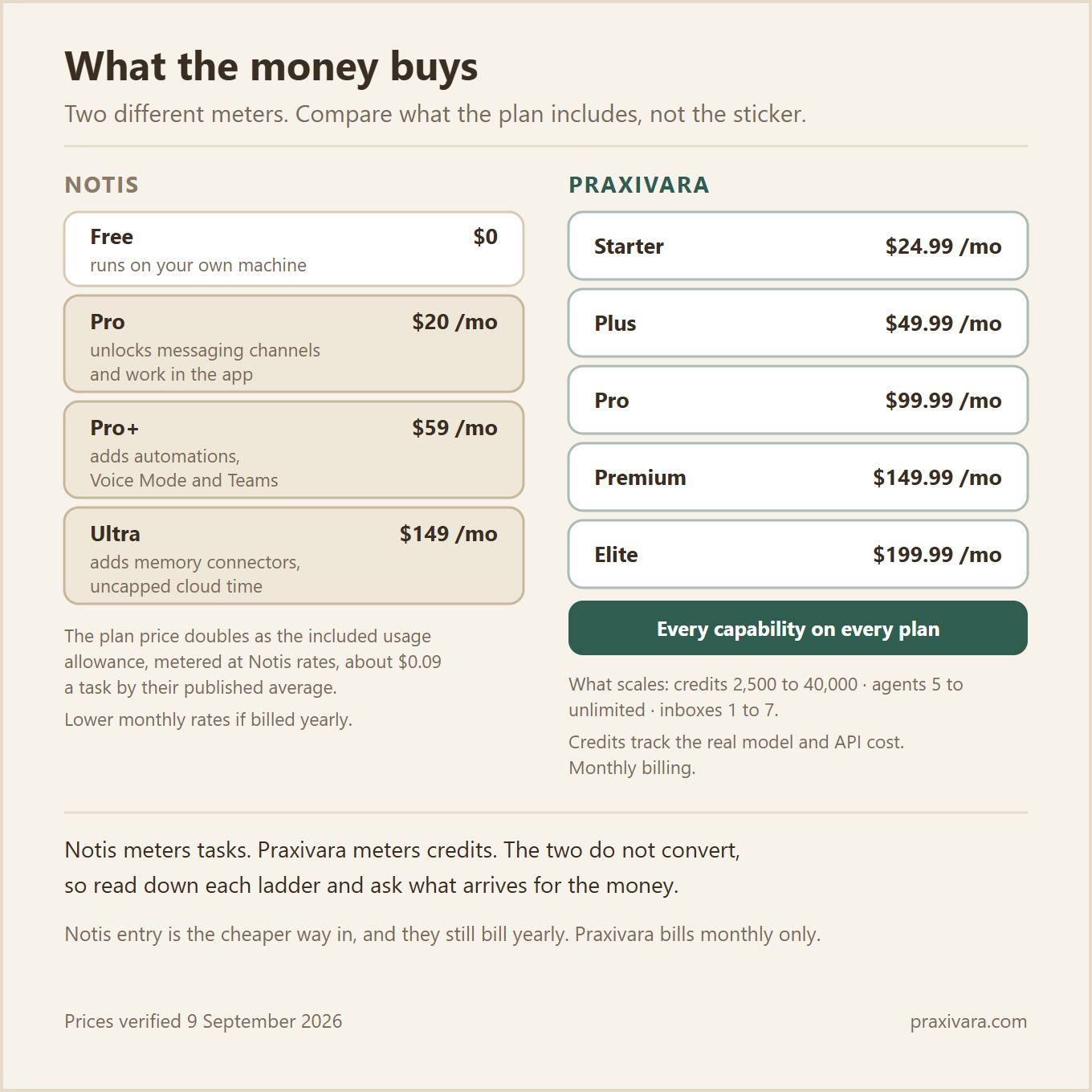
Notis pricing as of September 2026: a Free tier at $0 forever, then Pro $20, Pro+ $59 and Ultra $149 a month, or less if you pay for a year up front. Praxivara is monthly only: five plans from $24.99 to $199.99, each with a 7-day free trial.
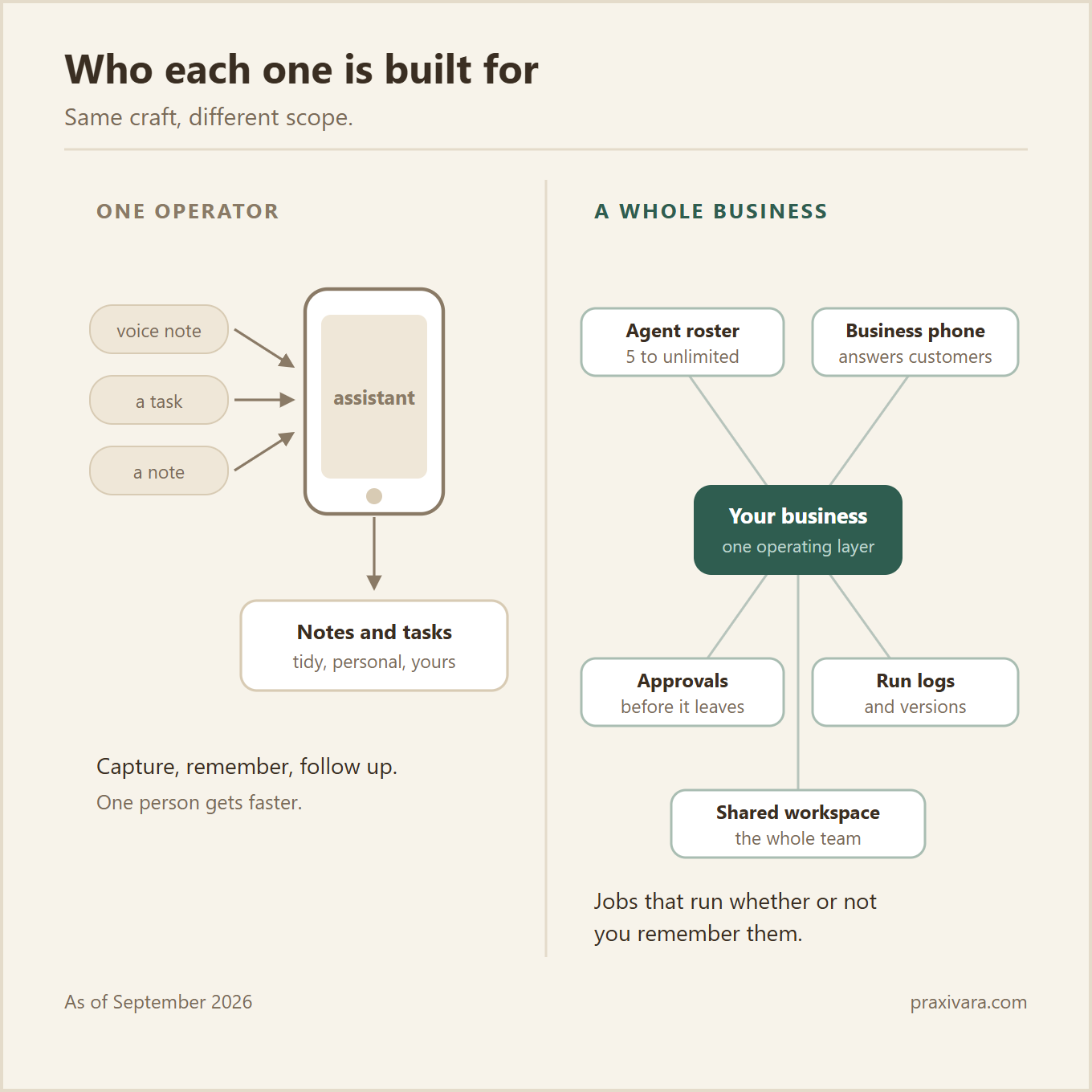
Built for one person, or built for a business
Notis is clear about who it serves, and that clarity is a strength, not a gap. As of September 2026, their pages describe an "AI intern, one message away", an "AI Personal Assistant That Works Across Your Apps", and an "on-the-go productivity assistant" that "lives in your WhatsApp". Their homepage says "Trusted by 17,000+ founders". Even the top of the ladder keeps that frame: Ultra is described as being "for operators running a swarm of agents".
Read those lines together and you get a precise picture. One person captures things on the move. One person's notes, tasks and follow ups get organised. One person messages the assistant, and the assistant messages back. That product is well made, and it is aimed exactly where they say it is aimed.
A business is a different shape. The phone rings, and someone has to answer it on the business number, not on the founder's personal handset. Recurring jobs have to run whether or not anyone remembers them. Staff need the same information in the same place. And someone will eventually ask what happened, then want to undo part of it.
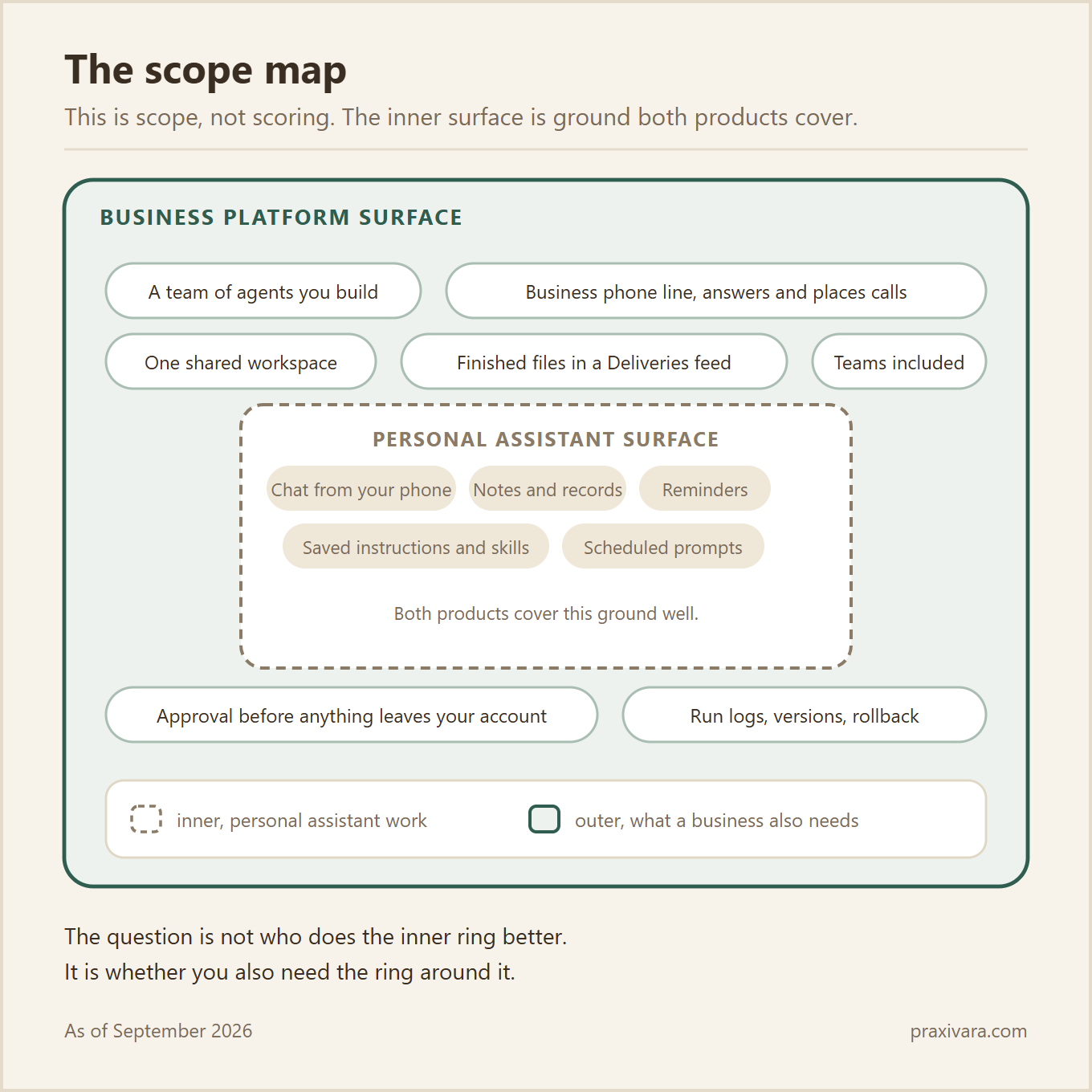
So this is a scope argument, not a quality argument. Three product surfaces carry the difference, and the rest of this page takes them one at a time.
- A team of agents you build. You describe the job in a sentence, then approve a blueprint before anything runs.
- A business phone line that gets answered. Your agents and your assistant place and answer live calls on a number you rent.
- One workspace with sign off and a record. Work lands as finished files, you choose when it stops for your OK, and every run is logged.
None of this makes the personal surface small. Praxivara's assistant covers that ground too, and Notis covers it well. The question is what sits around it. The two price ladders also use different meters, which is worth real care, so it gets its own section further down.
A team of agents, not a list of automations
On Praxivara you build an agent by describing the job in one sentence. The builder picks the tools, writes the instructions, and sets the schedule and the triggers. Then it shows you a visual blueprint before anything runs. You read it, change what you want, and approve it. No code, no flowcharts.
Each agent is a named hire that owns one recurring job. It carries its own skills, memory, tools, deliverables and run logs. Agents run on demand, on a schedule, or on an event like a new email, a new lead or a payment. When several of them need to hand work to each other, that is how agent teams coordinate.
The proof that this is a real product surface sits on the price list. Every Praxivara plan publishes an agent count: 5 on Starter at $24.99 a month, 10 on Plus, 25 on Pro, 50 on Premium, and unlimited on Elite at $199.99. For which jobs are worth handing over first, we wrote a separate piece on agents for small businesses.
How Notis handles the same ground
Notis has Automations, and they are well documented. As of September 2026, an automation is a trigger plus a prompt plus a channel. The trigger types are a schedule, a one-time run, a webhook, an integration event, or a change to a row in a Notis database. Automations are gated to Pro+ at $59 a month and above, along with Teams and Voice Mode.
Two details matter if you plan to lean on them. Automations always run at Economy (Flex) priority, which Notis describes as about half the base price at a lower and slower priority. The event triggers also carry daily ceilings: webhooks are capped at 50 requests a day each, and integration triggers at 50 events a day each.
The difference in one line. An automation is a saved instruction that fires. An agent is a named hire with a blueprint you approve, tools of its own, logs you can read, and a pause button you can hit.
Your business line, answered
Praxivara rents you a real phone number. Your assistant and your agents place and answer live calls on it, inbound and outbound, straight from your chat. That is customer-facing reach. The person on the other end is your customer, calling your business, and someone picks up. That matters more than it sounds once you price what an unanswered call costs. The same applies to email, where you get a real inbox on praxivaramail.com plus your connected Gmail or Outlook. Both sit in our published catalogue of 200+ integrations.
Be careful with the rest of the channel list, because we are careful with it too. Web chat, SMS, WhatsApp, iMessage, Telegram and live voice are how you and your staff reach your own assistant. Phone and email are the two that face your customers. We could pad the list and call all six customer reach. We do not, because it would not be true.
Notis has a phone number as well, and it is worth being exact about what it does. As of September 2026, Voice Mode includes a dial-in number, +1 828 809 0858. Their Voice Mode instructions tell you to dial it from the phone number connected to your Notis account, useful when you have no data or you are on a landline. That is the owner reaching their own assistant, which is a different job, and a good feature for the job it does.
The cleanest evidence for where the line sits is Notis's own. In their comparison against a receptionist product, they place inbound and outbound customer phone calls on the other product's side: "Beside is built around your inbound and outbound conversations, especially phone calls." No answering of a customer's call on your own business number is described on the Notis pages we reviewed as of September 2026.
One workspace, one record of what happened
Work should not live in a chat thread. On Praxivara, the chat, your agent roster, the deliveries feed, your inbox and your connections sit in one place. When a job finishes, it lands as a real file. PDFs, Word documents, PowerPoint decks, Excel workbooks, CSV exports and images all arrive versioned in the Deliveries feed, ready to download, send or sign. You are not copying text out of a message window and rebuilding it somewhere else.
You choose when it checks with you first. When it asks, it shows what is about to happen, and you allow it or deny it. Your assistant asks right in the chat, and your agents ask you by message. It is not a paid upgrade either. Our pricing page states that every plan includes permission settings and security controls, right down to Starter. For the longer treatment of where to put that line, read our agent security report.
Then there is the record. Every run keeps timestamped logs of each step, so you can read what an agent did and why. A full activity trail covers the account. Any agent can be paused or stopped in one click, and versions roll back like a document. People ask about that part only after something goes wrong, which is the wrong time to find out you do not have it.
Notis is genuinely good here for one person. As documented on their help pages in September 2026, they ship approve and edit buttons directly in chat, framed as human in the loop, plus an Inbox for reviewing drafts. They also keep agent traces and filterable automation logs that show the trigger, the source and the channel a run used.
One difference matters once a second person is involved. On a Notis team, usage views show costs, timestamps, channels and statuses, never message content. Their docs state that you cannot read a teammate's conversations from the Usage page, the Team page, or the API, per their Teams documentation as of September 2026. Notis presents that as a privacy guarantee, and it is one. It also means an owner cannot review a teammate's work. On Praxivara, the shared record is the point, because it is meant to be read.
Notis pricing vs Praxivara pricing, and what the money actually buys
Here is the honest comparison, with both ladders and both billing options side by side.
Notis figures read from their own published pages as of September 2026. Praxivara figures are our live pricing on the same date.
| Plan level | Notis | Praxivara | Advantage |
|---|---|---|---|
| Entry | Free, called Notis CLI, $0 forever, runs in your terminal or coding agent | 7-day free trial on any plan, no card needed to start | Notis |
| First paid tier | Pro, $20 a month | Starter, $24.99 a month | Notis |
| Notis mid tier / Praxivara mid tier, different contents | Pro+, $59 a month | Plus, $49.99 a month | Different meters |
| Notis top tier / Praxivara middle of the ladder | Ultra, $149 a month | Pro, $99.99 a month | Different meters |
| Higher tiers | Three paid tiers published | Premium $149.99, Elite $199.99 | Praxivara |
| Monthly billing | Yes, $20, $59, $149 | Yes, $24.99 to $199.99 | Tie |
| Annual billing | Yes. Annual gets you 4 months free, about $13, $39 and $99 a month | Not offered. Monthly only | Notis |
| What scales with price | Capability. Automations, Voice Mode and Teams start at Pro+. Memory connectors and uncapped cloud computer time are Ultra only | Volume only. Credits 2,500 to 40,000, agents 5 to unlimited, inboxes 1 to 7, storage 25 GB to 200 GB | Praxivara |
Rows line up by position on each ladder, not by what the plans include. The meters are different.
Two things on that table deserve to be said out loud. Their entry price is lower than ours, clearly so. And they still sell annual billing while we do not, which widens the gap again if you pay for a year up front. We withdrew annual plans, so there is no yearly Praxivara rate to quote. We are not going to pretend either fact away.
The meters are different, so do not read the two ladders as the same unit. On Notis the dollar figure is both the price and the included monthly usage allowance. Every message draws down that budget at Notis model rates, which their billing docs say include a 20% service markup over the provider's published API price for OpenAI models, as of September 2026. They publish an average of about $0.09 a task, and convert that to roughly 230 tasks on Pro, 680 on Pro+ and 1,700 on Ultra. Past the allowance, On-Demand usage is opt-in and off by default, billed in arrears. With it off, paid work pauses until the cycle resets. On Praxivara you spend credits, which track the real model and API cost of the work, with an auto-router picking the model per task. Their tasks and our credits are not the same unit, so do not divide one by the other. Compare what the money buys.
So compare the entry plans on contents, not on sticker. Notis Pro at $20 a month is a well-built personal assistant with about $20 of usage behind it. Praxivara Starter at $24.99 a month is 2,500 credits, five named AI agents, a connected inbox and 25 GB of storage, plus every capability we ship.
That last part is the whole argument. Our pricing page states that every plan includes all AI models with auto-routing, all integrations, file generation, every chat channel, permission settings and security controls. There is no tier where permission settings turn on, no tier where agents unlock, and no tier where a channel appears. Every plan also carries a 7-day free trial, and we publish 200+ integrations.
Notis works the other way, by their own published plan pages as of September 2026. Skills, Your Computer and building apps are on every plan including Free, which is a good design. But Teams, Automations and Voice Mode are gated to Pro+ at $59 a month, and memory connectors plus uncapped cloud computer time are Ultra only at $149. The free tier is the Notis CLI, which runs in your terminal or coding agent rather than as a hosted assistant.
So the question is not which number is smaller. It is what arrives for the money at the tier you would actually buy. To run payback on your own numbers rather than ours, use our separate cost and payback report.
What Notis does genuinely well
Some of what Notis ships is better than good, and one part of it is new. Everything here comes from their own published pages, as of September 2026.
Start with bring your own subscription. On any paid plan you connect the ChatGPT or Claude subscription you already pay for, and Notis says work routed there "does not draw from this budget". They also state they never ask for an API key. That is a real answer to a real complaint about paying for the same model twice, and Notis says no other AI assistant offers it.
The entry point is low, and we are not going to pretend otherwise. There is a free forever tier, "Notis CLI", at $0. Paid plans start at $20 a month, then $59 and $149. They also bill monthly or annually, and annual gets you four months free, so about $13, $39 and $99 a month. Praxivara is monthly only, so we have no annual rate to set beside that. We do not compete on the cheapest first month.
Notis also runs on your own machine. Their desktop app adds local MCP and a local shell behind per-command approvals. On a Mac it can drive apps that have no API at all, with cloud computer time as the fallback when the Mac is asleep. That fallback runs 1 hour a month on Pro, 3 hours on Pro+, and uncapped on Ultra. For a technical operator that is capability, not a checkbox.
Skills, reusable folders of instructions and scripts, are on every plan including Free, alongside Your Computer and building apps. Their catalogue of connectors is broad as well, and it is a genuine strength. The traction is real too, with 17,000+ founders claimed on their homepage.
None of that is a weakness dressed up as praise. It is a well-made assistant for one operator. The difference is scope, not quality.
The scorecard
Twelve rows, side by side, with the advantage marked. Three go to Notis outright, and two are honest ties.
| Capability | Praxivara | Notis | Advantage |
|---|---|---|---|
| Free plan and entry price | 7-day free trial on any plan, no card needed to start; plans from $24.99/mo | Free forever tier, the Notis CLI; paid plans from $20/mo, less on annual | Notis |
| Use an AI subscription you already pay for | Not offered; every model is included in the plan and auto-routed per task | Connect your ChatGPT or Claude subscription on any paid plan, and that work does not draw from the budget | Notis |
| Runs on your own computer | Cloud platform; the work runs on our infrastructure | Desktop app with a local shell behind per-command approvals, app control on macOS, and cloud computer hours as fallback | Notis |
| Ways you and your team reach your assistant | Web workspace, SMS, WhatsApp, iMessage, Telegram, plus a live voice call | Six channels, desktop and web, Telegram, iMessage, WhatsApp, Slack and email, plus Voice Mode; documented as not at parity | Tie |
| How the monthly price is metered | Credits tracking the real model and API cost, with an auto-router and optional top-ups | A dollar allowance equal to the plan price, metered at Notis rates including a published 20% markup | Tie |
| Capabilities included on the entry plan | Everything: all models, all integrations, every channel, permission settings and security controls | Skills, Your Computer and building apps from Free; Automations, Voice Mode and Teams start at $59/mo, memory connectors at $149/mo | Praxivara |
| A team of named agents you build | Describe the job, approve a blueprint; 5 to unlimited agents by plan, each with its own tools, memory and logs | Automations, a trigger plus a prompt plus a channel, from $59/mo, always run at Economy priority | Praxivara |
| Answering and placing calls on a business number | Rent a real number; the assistant and agents place and answer live calls, inbound and outbound | A dial-in number, +1 828 809 0858, for reaching your own assistant, dialed from the phone number connected to your Notis account | Praxivara |
| Work delivered as finished files | PDFs, Word, PowerPoint, Excel, CSV and images, versioned in a Deliveries feed | Document creation and editing on paid plans; pay-per-use tools draw from the monthly allowance. No versioned deliveries feed is described on the Notis pages we reviewed as of September 2026 | Praxivara |
| Sign-off before something leaves your account | You choose when it checks with you first, on the assistant and on agents | Approve and edit buttons in chat, plus an Inbox for reviewing drafts | Praxivara |
| Record of what was done, and undo | Timestamped run logs, a full activity trail, one-click pause or stop, and versions you can roll back | Agent traces and filterable automation logs showing trigger, source and channel | Praxivara |
| Working as a team on one account | One shared workspace on every plan, priced by plan rather than by seat | Teams start at Pro+, $59/mo, with usage shared across the cycle and billing managed by the team owner | Praxivara |
Verified September 2026. The Notis column is taken from their own published pricing page and help centre on that date, and any of it can change after we checked.
Questions people ask before switching
Is Praxivara a Notis alternative?
Yes, if what you need is a business platform rather than a personal assistant. Praxivara gives you a team of named agents that own recurring jobs, a real business phone number that answers and places calls, and one workspace where work lands as finished files with sign off on your terms. Notis, in its own words as of September 2026, is an AI intern that lives in your WhatsApp, built for founders. Same category, different scope.
Can Notis answer my business phone?
Notis Voice Mode includes a dial-in number, +1 828 809 0858, documented as of September 2026. Their instructions tell you to dial it from the phone number connected to your Notis account, which helps when you have no data or you are on a landline. That is you reaching your own assistant. In their own comparison with a receptionist product, inbound and outbound customer calls sit on the other product's side of the line. No answering of a customer's call on your own business number is described on the Notis pages we reviewed as of September 2026. On Praxivara you rent a real number, and your assistant and your agents take and place live calls on it.
Can I keep using WhatsApp?
Yes. WhatsApp is one of the chat channels included on every Praxivara plan, alongside SMS, iMessage, Telegram, the web workspace and a live voice call. Nothing there is reserved for a higher tier. As covered above, those apps are how you and your team reach your assistant, while your customers reach your business by phone and email.
What about my Notion?
Notis is built around Notion, and it is good at that job. Praxivara is not a Notion front end, so do not expect a like for like swap of that workflow. Every Praxivara plan includes all 200 plus integrations, so check the connector list rather than a plan comparison. Work in Praxivara also lands as finished files in your workspace, versioned and ready to download, send or sign, instead of only as pages inside another tool.
Is Praxivara more expensive?
Their entry price is lower, and we are not going to pretend otherwise. Notis has a Free tier, the Notis CLI at $0 forever, then Pro at $20 a month, Pro+ at $59 and Ultra at $149. Their plans page states that paid plans bill monthly or annually, and that annual gets you four months free, which works out near $13, $39 and $99 a month. Praxivara starts at $24.99 a month and is monthly only.
The two meters do not line up, as set out in the pricing section above, so do not convert one into the other. Compare what each plan includes, then run your own numbers with the cost and payback report and our published plan pricing.
Does Praxivara have a free plan?
No. There is a 7-day free trial on any plan, with no card needed to start; add a card to keep going after it. Notis does have a free forever tier, the Notis CLI, which runs in your terminal or coding agent as of September 2026.
Can I bring my own ChatGPT or Claude subscription to Praxivara?
No. Every Praxivara plan includes all AI models, with an auto-router that picks one per task, and credits track the real cost of the work. Notis does offer this on paid plans as of September 2026, and it is a genuine advantage if you already pay for one of those subscriptions.
Do I need to rebuild my automations?
Yes. There is no import path between the two products, and we would rather say that up front. The rebuild is usually short. A Notis automation is a trigger, a prompt and a channel, gated to Pro+ and above as of September 2026, and it always runs at Economy priority, described in their automations reference as about half the base price at a lower and slower priority. Webhook and integration triggers are capped at 50 a day each. In Praxivara you describe the job in a sentence, approve the blueprint, and the agent owns it from there.
How we checked this
Every Notis fact on this page was read from their own public pages on 9 September 2026. That means their marketing pricing page, their in-app pricing grid, and the help centre articles on plans and trial, usage and rates, on-demand usage, automations, Voice Mode, channels compared, teams and skills, plus their own published comparison post. Each fact is linked where it is used, so you can check it yourself.
We checked our own pricing page the same day, and the Praxivara figures here are what it showed on 9 September 2026. Notis ships quickly. They cut the price of their Medium intelligence level by 80% in August 2026, so any Notis price comparison written before then is already out of date. Anything on either side can move after our date stamp.
Notis is a trademark of its owner and is named here for comparison only. If something on either side has changed since our date stamp, tell us and we will correct it.
The bottom line
Pick the tool that matches the size of the job. If the job is one person keeping their own notes, tasks and follow ups in order, a personal assistant is enough. If the job is a business, the work is bigger than one person's memory.
That is what Praxivara is built to hold. A team of agents that own the recurring work, a business line that gets answered, one workspace where work lands as finished files, your choice of when it checks with you before work leaves your account, and a record you can roll back. All of it is on every plan, starting at $24.99 a month.
See what your first agent would own, then start a 7-day free trial on any plan. Build your agent team.