

At 4:07 Friday afternoon, a vendor invoice lands in the office inbox. The amount looks right. The service address looks familiar. Someone forwards it to finance, someone else marks the job complete, and the weekly report quietly counts the cost before anyone confirms that the work happened or the bill reached the accounting system.
That is the back-office problem AI should solve: not faster typing, but one controlled path from messy input to verified business state.
The direct answer: to automate your back office with AI, choose one bounded recurring outcome, not an entire department. Map the authoritative records, use AI only for variable interpretation, keep calculations and policy checks deterministic, gate consequential actions, execute side effects once, and reconcile the real destination before calling the job complete.
- Choose one outcome: name a recurring job and the exact state that means it is finished.
- Measure the manual baseline: count completed jobs, exceptions, corrections, cycle time, and human touches.
- Name the sources of truth: decide which system is allowed to answer every required question.
- Split AI from rules: let AI interpret variable language; use deterministic logic for math, policy, limits, dates, and duplicate checks.
- Write the boundary: define routine actions, approval points, forbidden states, exception owners, and expiries.
- Connect narrowly: grant only the tools and permissions the job needs, with duplicate protection on every side effect.
- Test before autonomy: begin in shadow or draft mode and deliberately run the failure paths.
- Reconcile and learn: read the destination back, keep completion receipts, and review the first 30 real runs before expanding.
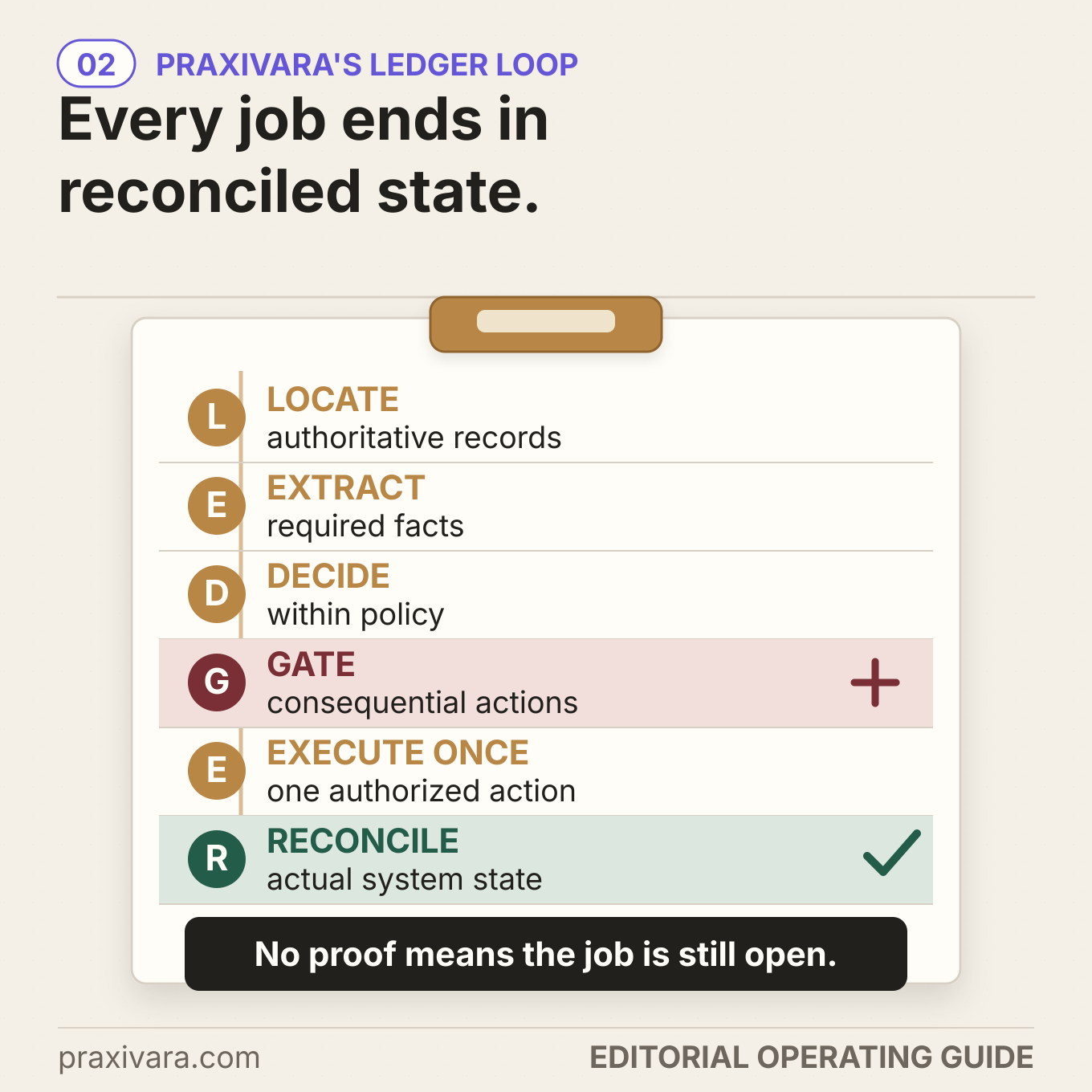
We call the operating model in this guide Praxivara's LEDGER Loop: Locate, Extract, Decide, Gate, Execute once, Reconcile. It is a practical framework, not a scientific, legal, accounting, audit, COSO, or NIST standard.
One disclosure before we start: Praxivara builds AI assistants and agents for business, so our product appears near the end. The implementation model stands on its own. Use it with any stack, and judge the product section against the current supported integrations and controls.
In this guide
Back-office automation is a chain of evidence, not a list of chores
Your back office is the internal work that keeps the business true and moving: finance, operations, administration, and reporting. It includes invoices, expenses, records, approvals, purchasing, document intake, project status, reconciliations, recurring reports, and the exception queues between them.
Traditional workflow automation is excellent when the input is structured and every branch is already known. AI becomes useful when the job begins with variable language or layout: a supplier changes an invoice format, an email describes a problem indirectly, a project note contains the evidence in prose, or a manager needs a readable explanation of a deterministic variance.
Those two systems should work together. Google's current architecture guidance says predictable, highly structured work may be more cost-effective without an agent, while agents fit open-ended, goal-focused, multi-step work. That distinction matters. A model should not recalculate tax, improvise an approval limit, or decide that two differently formatted totals are close enough. Code and the system of record can answer those questions more consistently.
COSO's 2026 guidance makes the same underlying risk visible from a control perspective. It describes generative AI across ingestion, transformation, transaction processing, orchestration, judgment, monitoring, retrieval, and human collaboration. It also warns that generative outputs are probabilistic and may be confidently wrong, so organizations should treat them as assertions requiring evidence rather than facts accepted by default. The full source is COSO's Achieving Effective Internal Control Over Generative AI.
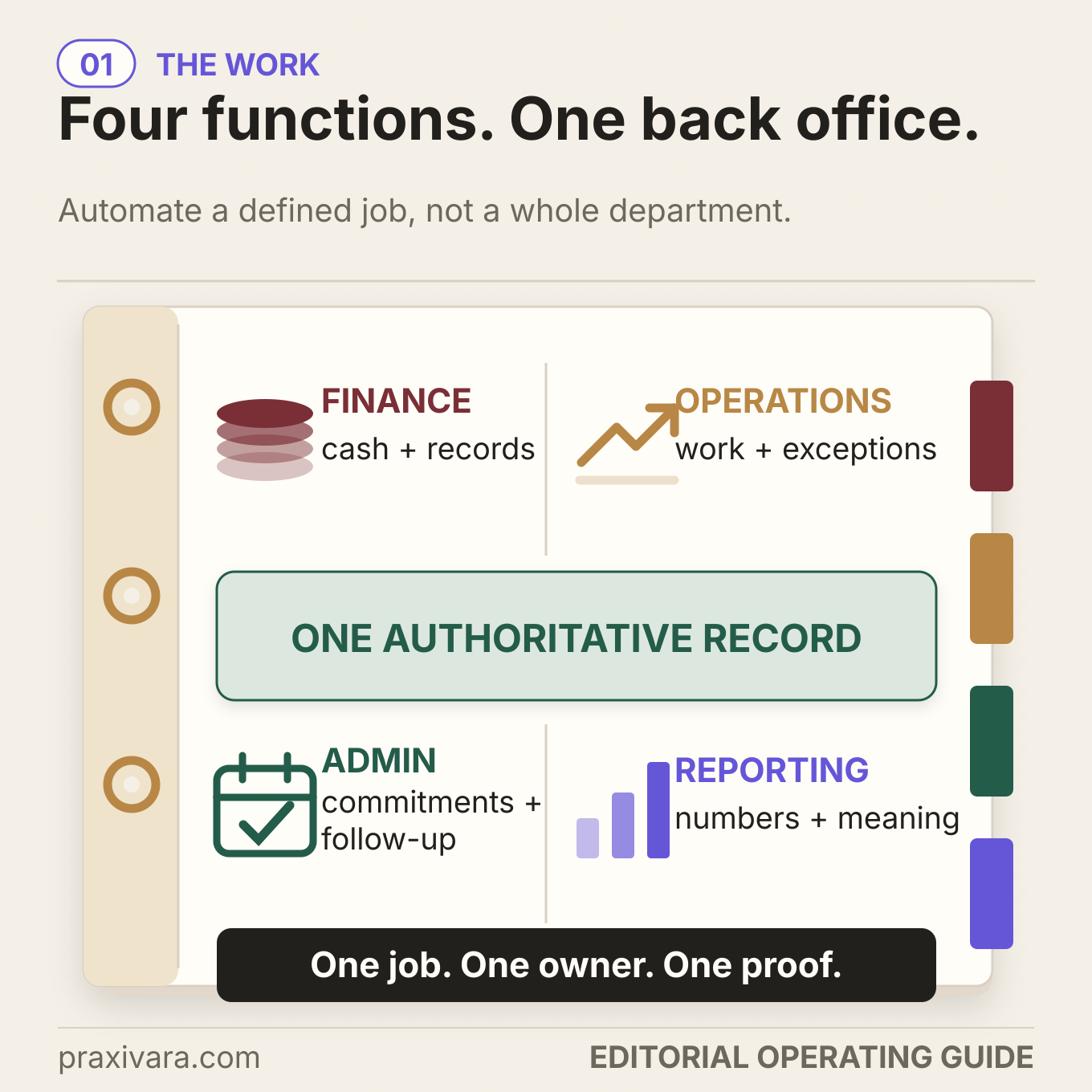
A useful automation therefore has five properties:
- A bounded outcome: `prepare and route every eligible vendor bill` is a job; `run finance` is not.
- An authoritative record: each fact has one place the workflow trusts over an email summary or model memory.
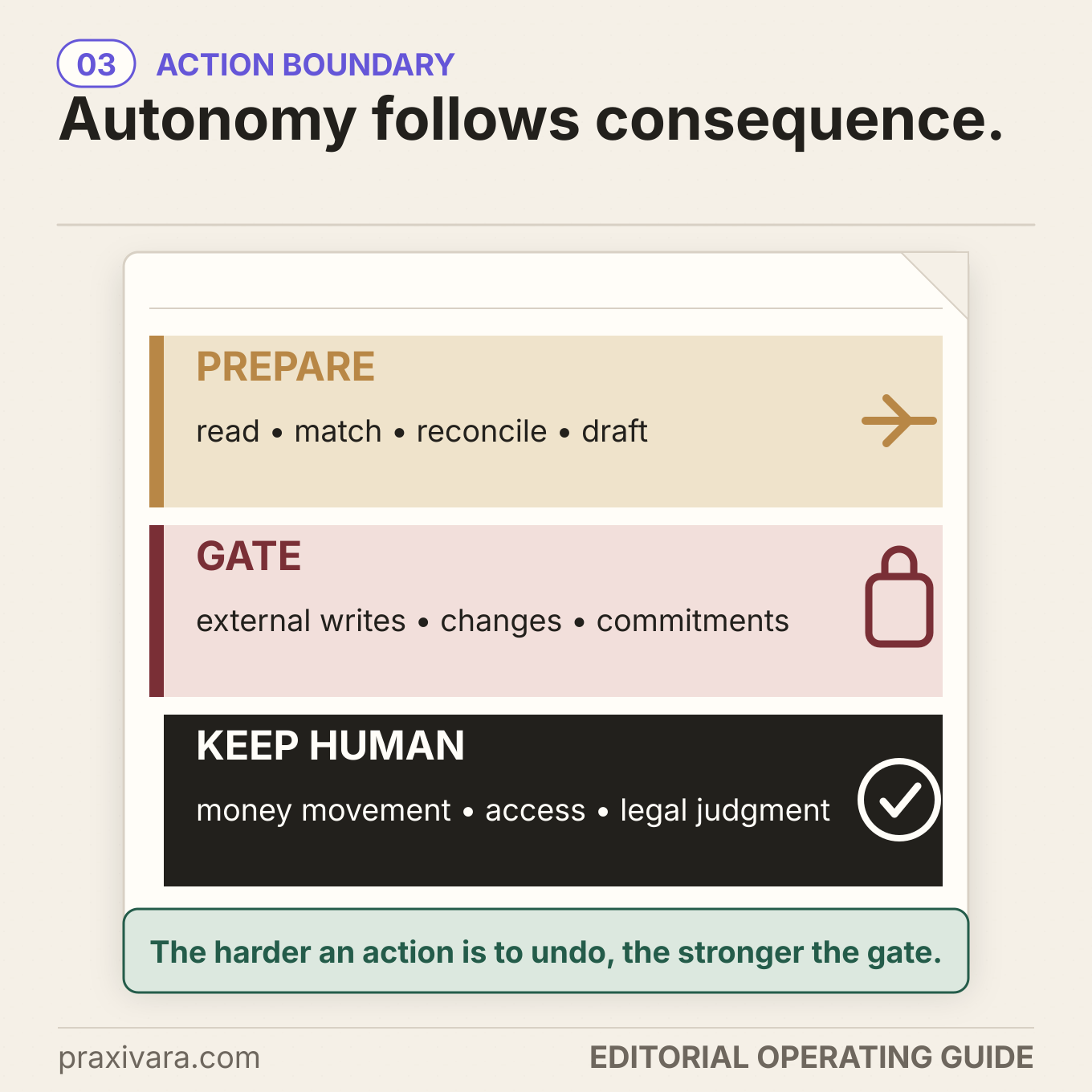
- A written authority boundary: routine preparation may run, while money, access, filings, and material exceptions stop.
- An owned exception: every hold has a named person, reason, and review time.
- Completion evidence: the destination state is read back instead of inferred from a successful tool call.
If you have not chosen the first job yet, use the separate guide to choose which small-business task to automate first. This article begins after the job has earned its place.
Use Praxivara's LEDGER Loop from first record to verified result
Most automation diagrams end at `update system`. That is one step too early. Writes can time out, duplicate events can create duplicate records, source data can change after a review, and one system can succeed while the next fails. The LEDGER Loop gives each of those states a place.
1. Locate the authoritative records
List every question the job must answer, then assign one source that is allowed to answer it. The invoice may provide the supplier's request. The approved vendor master establishes vendor status. A purchase order or work order establishes authorization. A service receipt or project record establishes that the work happened. The accounting system establishes whether the bill exists. The payment provider establishes whether money moved.
Do not make `search everything and decide` the policy. Approved sources should be narrow enough that the system can detect a conflict instead of averaging incompatible answers. Record freshness matters too. A price list, policy, or project status without a current version or `as of` time is not safe context.
2. Extract only the facts the job needs
AI is useful here because documents and messages vary. Ask it for a defined schema: vendor, invoice number, dates, currency, line items, subtotal, tax, total, purchase reference, service location, and stated payment details. Preserve the source identifier and extraction version with each field. If the number is unreadable or the purchase reference is absent, store `missing` or `uncertain`. Do not let the model complete a plausible value.
Data minimization is operationally useful, not only a privacy slogan. The FTC's Start with Security guidance advises businesses to collect what they need, keep it only as long as they have a legitimate need, restrict access, and oversee service providers. A bounded extraction schema reduces what reaches the model and makes testing far easier than an open-ended request to `understand this vendor`.
3. Decide within written policy
Turn the business's routine decisions into explicit logic. Normalize the vendor and invoice number before creating a duplicate key. Recompute line totals. Check currency and dates. Match the authorized order and evidence of delivery. Apply written tolerances. Require specific documents. Route each failed check to a named exception, rather than asking the model whether the invoice `looks okay`.
COSO's 2026 paper gives a useful reconciliation example: automatic posting occurs only when match confidence exceeds a validated threshold and no policy exception fires; every other item goes to a review queue with context. Changes to the posting threshold require approval, evidence, testing, and ongoing monitoring. The point is not that every small business should auto-post. The point is that a score never overrules an exception.
4. Gate consequential actions
A good gate names four things: the action waiting, the rule that stopped it, the evidence the reviewer needs, and the person who may decide. `Needs human review` is not enough. A changed bank account should say `Hold: independently verify vendor payment details through the known contact; owner: finance manager; expiry: before payment batch closes.`
The reviewer must be independent where policy requires separation. The person who changes controlled configuration or vendor master data should not be the only person who approves its use. The model also cannot approve its own uncertain extraction. For material forecasts and reports, use someone qualified to assess the assumptions and source coverage, not merely the next person online.
5. Execute once
Every side effect needs a stable business key. If the same invoice arrives through email, upload, and webhook, those events should resolve to one logical job. AWS's current agent reliability guidance explains why: retries without idempotency can produce duplicate side effects. It recommends deterministic keys, checking for an existing successful result before execution, and carrying the key through downstream steps. See AWS's idempotent task pattern.
A timeout is not proof of failure. If a bill-creation request times out after the destination accepted it, a blind retry can create a second bill. Search the destination for the stable key or provider identifier first. Retry only when absence is established or the provider's own idempotency mechanism makes the repeat safe.
6. Reconcile the real system state
Read the destination after the write. Confirm the expected record exists, the business key is unique, the amount and currency match, the status is correct, and the approval or hold is attached. If an accounting write succeeds but the task queue or management report fails, the job is not fully complete. It is in an explicit partial-completion state with a recovery owner.
This is where technical observability and business evidence part ways. OpenTelemetry describes traces, metrics, and logs as different signals about a running application. Those signals help explain what software did, but they do not by themselves prove that the accounting ledger, vendor record, or report reached the intended state. Keep both.
Keep Four Completion Receipts
| Receipt | What it records | Question it answers |
|---|---|---|
| Source | Record and document identifiers, freshness, version, and missing-data state | What evidence did the job use? |
| Authority | The written rule or named approver, decision, identity, and timestamp | Why was this action allowed? |
| Destination | The provider or system identifier returned for the side effect | Where did the action land? |
| Reconciliation | The read-after-write or cross-record check and final state | Does reality match the intended result? |
These are practical operational receipts, not a promise of legal or audit sufficiency. Keep the underlying invoices, receipts, approvals, system identifiers, and reconciliation evidence needed to support each recorded outcome; an activity log alone is not a substitute for source records or proof of the actual transaction. Your entity, jurisdiction, accountant, auditor, lender, insurer, or regulator may require different records, controls, and retention periods.
Build the first job before you connect the tools
Start with a one-page job contract. If the job cannot fit on one page, it is probably several jobs hiding under one name.
| Field | Question to answer | Example |
|---|---|---|
| Outcome | What recurring result does the business need? | Every eligible vendor invoice is prepared, approved or held, recorded once, and reflected in the Friday pack |
| Trigger | What starts one logical job? | A new invoice in the approved intake address or document folder |
| Eligibility | What must be true before processing begins? | Readable invoice, approved business entity, supported currency, and identifiable vendor |
| Sources | Which current records answer each question? | Invoice, vendor master, order/work record, service evidence, accounting system |
| Authority | What may run, what waits, and who may approve? | Routine preparation runs; changed payment details, exceptions, posting, and payment follow written gates |
| Terminal states | How can the job legitimately end? | Recorded; held for evidence; rejected; duplicate suppressed; not eligible; failed with owner |
| Receipts | What proves each terminal state? | Source IDs, authority event, destination ID, and reconciliation result |
Then draw the system map. Put the source of truth beside every field, the approved direction of every write, and the owner beside every exception. A spreadsheet is acceptable if it is the real authoritative record and ownership is clear. Replacing a working spreadsheet merely to look sophisticated creates migration risk without fixing the process.
Next, translate policy into executable tests. Write `invoice total must equal recomputed line total plus applicable tax` instead of `check the math`. Write `bank-detail change always holds for independent verification` instead of `be careful with fraud`. Write `no PO or service evidence routes to operations owner` instead of `use judgment`. Plain rules make disagreement visible.
Grant the smallest permissions the job needs. The intake phase may need read access to one inbox or folder and approved source records. Preparation may need the ability to create a reversible draft or internal task. Posting, external communication, money movement, access changes, and deletion should be separate capabilities, not one broad credential. OWASP's Excessive Agency guidance shows why: an incoming email can carry malicious instructions that induce an over-permissioned agent to expose information or perform an unintended action.
Build the approval request for speed, not ceremony. Show the source records, recomputed values, mismatches, requested action, policy reason, destination, and consequence. Let the authorized person approve, correct, reject, or request more evidence. An approval with no context invites rubber-stamping.
Design recovery before the first run. For each dependency, answer:
- What if the read fails?
- What if the source changes after the read?
- What if approval expires?
- What if the write succeeds but the response is lost?
- What if the first write succeeds and the second fails?
- How does a person pause the queue and resume from the last verified state?
Finally, launch in stages. In shadow mode, the system reads, extracts, and recommends while a person performs the action. Compare the recommendation with the real decision. In draft mode, the system prepares the destination action and the person reviews it. Only validated routine cases inside the written policy graduate to bounded automation. Exceptions do not graduate merely because the routine path improved.
If you need the broader build sequence, use the full guide to build and launch a business AI agent. If the automation still leaves you watching every trigger and handoff, test who still owns the workflow.
Download the working file: use the AI Back-Office Control Workbook to write the job contract, map sources, divide AI from rules, set the authority matrix, define the Four Completion Receipts, run all twelve tests, and score the first 30 runs. It is an ungated spreadsheet with a completed example and a blank working copy.
Prefer a printable review: use the fillable AI Back-Office Control Sheet to review the same boundary, evidence, and launch decisions with an owner, accountant, operations lead, or other responsible reviewer.
Worked example: one vendor invoice becomes a verified Friday close packet
Harborline Facility Services is fictional. This is a fictional example, not a Praxivara performance claim. It maintains commercial properties, uses a shared operations inbox, records approved work orders in a project system, and keeps its books in an accounting platform. On Friday afternoon, a subcontractor sends an invoice for a completed repair.
Locate. The invoice email and PDF are source evidence, not the complete truth. The approved vendor master establishes the supplier. The work order establishes authorization. The technician's signed completion record establishes that service occurred. The accounting platform establishes whether the bill already exists and its current status.
Extract. The AI returns the vendor name, invoice number, service date, property, work-order reference, line items, subtotal, tax, currency, total, and stated payment details. Each field keeps a link to its source. One line description is ambiguous, so the extraction records uncertainty instead of deciding what service was delivered.
Decide. Code normalizes the vendor and invoice number, creates the duplicate key, recomputes every total, checks the entity and currency, matches the work order, and looks for the signed service record. The amount is within the written work-order tolerance, but the invoice contains a different bank account from the approved vendor master.
Gate. The system does not update the vendor master or prepare payment. It creates a finance hold that says why the change matters, includes the known vendor contact from the approved record, and tells the finance manager to verify the request through that known channel. The invoice remains visible to operations, with no false `approved` state.
Execute once. After independent verification and the required approval, the accounting record is prepared under the stable invoice key. The first create request times out. Before retrying, the system searches the accounting destination. It finds the new bill and records the existing provider ID instead of creating a duplicate.
Reconcile. A fresh read confirms the bill amount, currency, vendor, work reference, status, and destination ID. The task queue marks the finance hold resolved, and the Friday close packet pulls the current bill and project states. Deterministic formulas calculate the weekly cost and outstanding exception count. AI writes a short explanation linked to the underlying records. The manager reviews one unresolved variance before the packet is released internally.
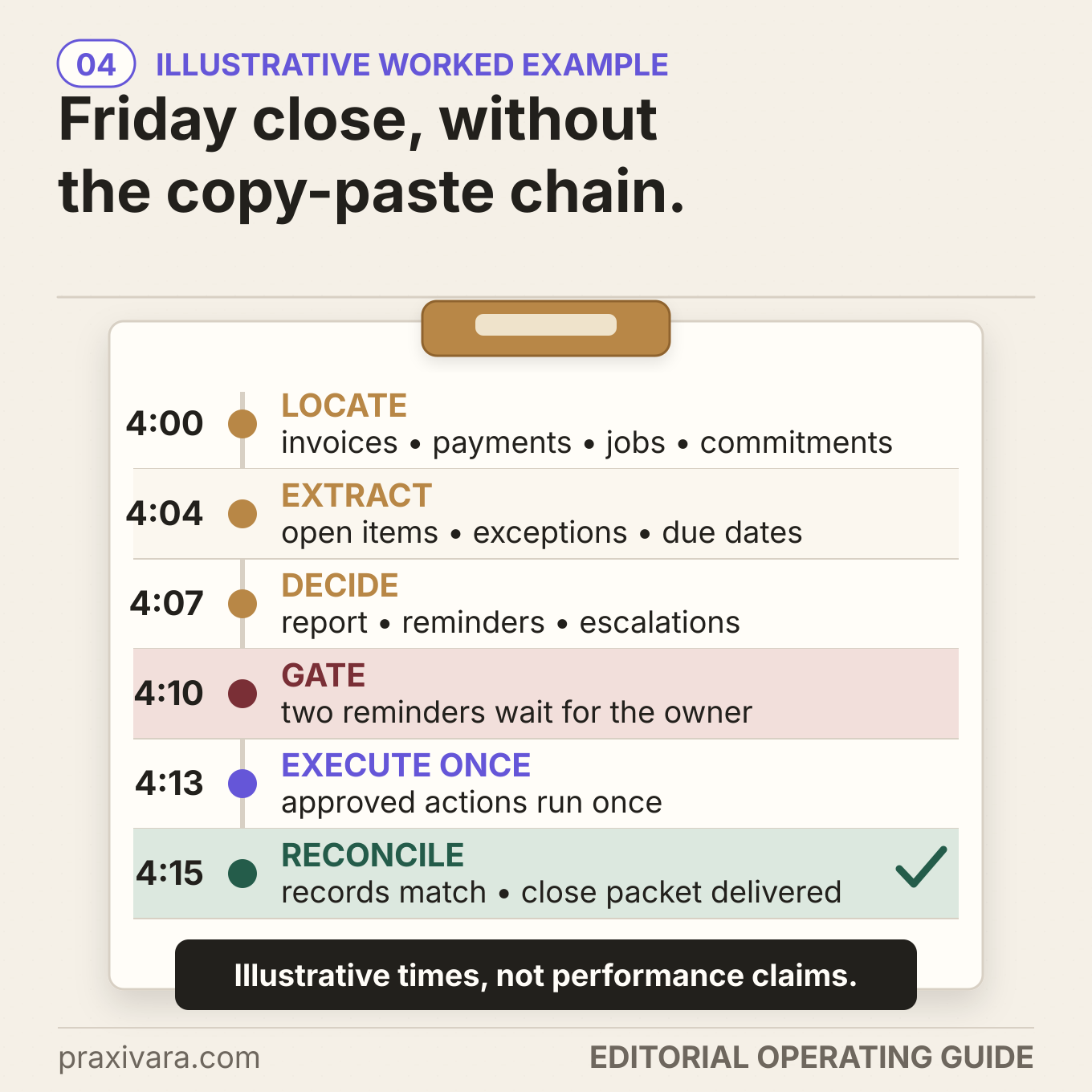
The outcome is not `AI processed an invoice`. The outcome is one eligible bill, one approved business key, one destination record, one reconciled state, and one visible exception trail from intake through the Friday packet.
The same design applies whether the accounting system is QuickBooks, Xero, Zoho Books, an ERP, or another platform. The exact connector, permitted action, duplicate behavior, and approval path still need verification. For a product-by-job comparison, compare AI options for QuickBooks jobs.
LEDGER across Finance, Operations, Admin & Reporting
The same controls can govern other back-office jobs without handing an entire function to one agent.
| Area | LEDGER in practice |
|---|---|
| Finance | For an incoming vendor invoice, locate the approved vendor, purchase evidence, service record, and accounting state; extract the fields; then use deterministic math, matching, and duplicate checks. Gate changed payment details or missing evidence, create one authorized bill record, and read it back before marking the job complete. |
| Operations | For a service request, locate the customer agreement, asset record, schedule, and work order; extract the issue, site, urgency, and requested date; then apply routing and capacity rules. Gate safety exceptions or material commitments, update one work order, and reconcile its assignee, status, and promised time. |
| Admin | For new-vendor paperwork, locate the approved onboarding checklist and vendor master, then extract submitted fields while preserving missing or conflicting values. Deterministic checks set the route; access, master-data, and payment-detail changes stay gated; the workflow creates one owned exception or approved record and confirms its final state. |
| Reporting | For a weekly KPI pack, locate current source records and period cutoffs, then build the numbers with deterministic formulas before AI drafts source-linked commentary. Gate unexplained variances or external release, publish one version, and reconcile the table, source links, as-of time, and approval state. |
Run these twelve failure tests before bounded automation
Do not test only whether the happy path works. A production test names the input, expected hold or action, evidence produced, recovery path, and owner. These twelve cases expose the quiet failures most likely to create duplicate costs, false reports, or invisible work.
- Duplicate event: the same invoice arrives through two webhooks or inbox events. Expected: one logical job and one destination side effect.
- Duplicate document: the same PDF is forwarded or uploaded under a different file name. Expected: content and business-key checks suppress a second record.
- Changed payment details: a familiar vendor emails a new bank account. Expected: no master-data update or payment; independent verification through a known channel.
- Missing business evidence: the invoice has no approved work order, PO, service receipt, or other required record. Expected: a named hold, not a guessed match.
- Math or currency mismatch: line items, tax, total, or currency disagree. Expected: deterministic recomputation and an exception showing the exact difference.
- Unknown vendor: the supplier is new, inactive, or absent from the approved master. Expected: vendor-review path; no silent creation.
- Prompt injection: an email or PDF tells the AI to ignore policy, reveal data, or use another tool. Expected: content is treated as untrusted input and cannot expand authority.
- Stale approval: a source record changes after extraction but before execution. Expected: current-state recheck invalidates or refreshes the approval.
- Invalid approver: the approver is unauthorized, expired, absent, or approving a restricted change they configured. Expected: stop and escalate through the written path.
- Ambiguous timeout: the destination times out after a write. Expected: search for the stable key or provider ID before any retry.
- Partial completion: the accounting update succeeds but the task or report update fails. Expected: explicit partial state, no repeated accounting write, and recovery from the last verified checkpoint.
- Report disagreement: a source is stale or the AI narrative contradicts the deterministic table. Expected: withhold the report, show the mismatch, and assign the correction.
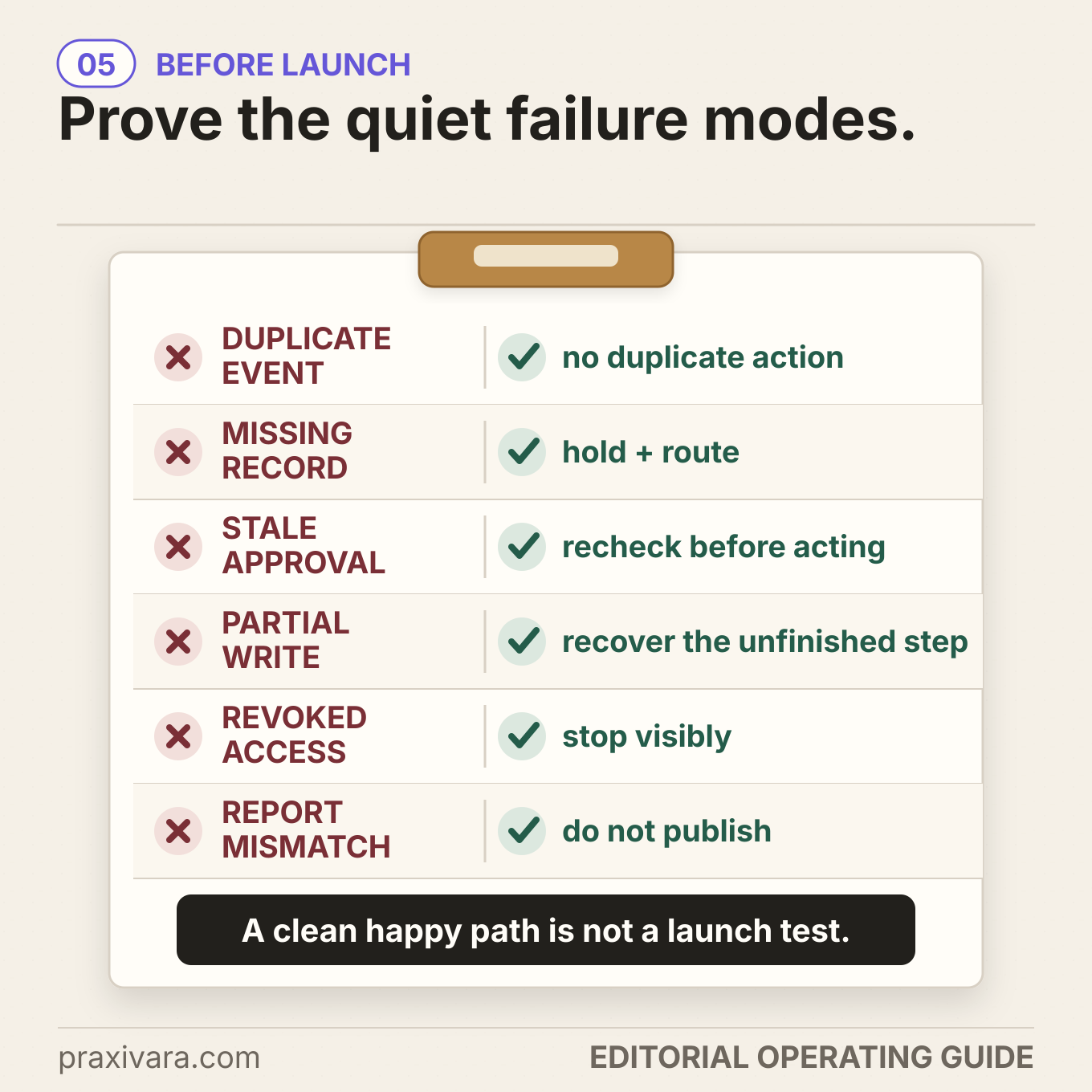
Exercise these tests again after changing the model, prompt, policy, source schema, integration, confidence threshold, approval logic, or destination behavior. COSO recommends continuous or increasingly continuous attention to change and monitoring because models, prompts, retrieval sources, and configuration can evolve. A workflow that passed in March is not automatically the same workflow in August.
Measure completed outcomes, not automation activity
For the first 30 real runs, review the evidence weekly. The first 30 runs are not a scientific threshold. Thirty is a practical operating sample for this guide, not statistical proof of safety. A high-volume, regulated, or high-impact process may need a larger test population, independent review, or formal assurance.
| Measure | Why it matters | Do not confuse it with |
|---|---|---|
| Eligible jobs completed and reconciled | Shows whether bounded outcomes reached a verified terminal state | Events received or tool calls made |
| Routine first-pass match rate | Shows how much work stayed inside validated policy | Model confidence by itself |
| Human touches and exception aging | Shows where queues still depend on manual coordination | A generic estimate of hours saved |
| Rework, reversals, and overrides | Shows the cost of bad routine decisions and weak gates | Raw completion speed |
| Duplicate side effects prevented | Proves idempotency and timeout recovery are doing useful work | Duplicate events merely detected |
| Unsupported completion claims | Finds runs where software said done without destination proof | A successful model response |
| Control bypass or unauthorized action | Tests the authority boundary directly; the target is zero | A low average error rate |
| Report correction rate | Shows whether sources, calculations, and narrative remain aligned | How polished the report looks |
Expand one boundary at a time. If routine matching earns trust, allow that path to advance while new vendors and bank-detail changes stay gated. If report commentary improves, keep material external reports under qualified review. The evidence should loosen a specific rule, not award autonomy to an entire department.
For a complete financial model, use the separate report to calculate the full cost and payback of an AI agent. Here, cost per completed and reconciled job is more useful than cost per prompt.
How Praxivara coordinates a controlled back-office job
You do not need to hand-build every connector, timer, approval checkpoint, file generator, and run ledger described in this guide. Praxivara gives you one operating layer for the job: describe the recurring back-office role in plain language, connect the supported systems, review the Agent Blueprint and tool permissions, choose whether the Agent checks with you before consequential actions or runs on its own, and receive the finished report or exception queue in Deliveries with the underlying run history available for review.
That is a natural fit for back-office work because the job rarely lives in one app. An invoice may arrive by email, depend on a document or project record, create work in an accounting system, wait for a sign-off, and return a management file. On Praxivara, an agent can run on a schedule, a supported trigger, or on demand; the Blueprint makes the job visible before launch; an Agent set to check with you holds the steps that need your OK; Deliveries return finished files or outputs; and the run history shows the steps and current state. Pause, stop, and version controls help the owner intervene and improve the job over time.
The exact integration and action still matter. Check the current Praxivara integrations catalog for the systems in your job, verify the available read/write path and account identity, and test the permission boundary with non-production records. A catalog listing does not mean every operation in this article is supported automatically.
Praxivara does not turn a model into your accountant, controller, auditor, lawyer, tax professional, or security team. It gives the business a place to describe the job, connect supported tools, configure approvals, inspect runs, and receive the output. Your written policy and authorized people still set the consequential boundary. Review Praxivara's security controls alongside your own data, retention, access, and vendor requirements.
A strong first Praxivara job: prepare a weekly operations and finance packet from approved sources, surface every mismatch, and stop before any unsupported write or money action. That proves the cross-system operating model without asking the first run to carry the highest consequence.
Frequently asked questions
What is AI back-office automation?
AI back-office automation uses AI plus ordinary software rules and integrations to perform bounded internal work across finance, operations, administration, and reporting. AI is most useful for interpreting variable documents and language. Deterministic logic should handle calculations, limits, required fields, duplicate checks, and explicit policy. The system of record remains authoritative, and a human remains responsible for consequential judgment.
What back-office task should a small business automate first?
Choose a recurring, measurable outcome with current data, written rules, a known exception owner, and a low-cost shadow mode. Do not choose by department or by whatever demo looks most impressive. If you need to rank candidates, use the full department-by-department automation playbook.
What is the difference between RPA, workflow automation, and an AI agent?
RPA and workflow automation execute predefined steps over structured states. An AI agent can interpret variable input and choose among bounded routes toward a goal. A reliable back-office system often uses both: AI reads the changing document or request, while rules, APIs, and systems of record enforce the stable logic and perform controlled writes. AI did not make deterministic automation obsolete.
Can AI automate bookkeeping and accounting?
AI can assist with document capture, field extraction, coding proposals, duplicate candidates, matching, reconciliation support, exception summaries, and report commentary. The authority to post, pay, file, write off, change vendor details, or accept a material accounting judgment depends on the business's controls and professional obligations. Start with preparation and reconciliation evidence, then expand only the validated routine path.
How do you stop AI from hallucinating numbers in reports?
Do not ask the model to invent or recalculate the numbers. Query current authoritative systems, compute the table deterministically, record the source and `as of` time, and give the verified table to the model for explanation. Require citations or record links for material claims. Compare the finished narrative with the computed values, and hold the report when they disagree. This reduces risk; it does not make hallucination impossible.
How do you make AI back-office work auditable?
Keep the source records, extraction and relevant configuration version, policy checks, approval identity and time, side-effect key, destination identifier, exception history, and reconciliation result. Protect and retain the records according to applicable rules. CISA's small-business logging guidance recommends deciding what to log, centralizing and protecting logs, monitoring high-risk events, and setting retention policies. Operational traceability is useful, but it does not automatically satisfy a financial-statement audit, tax substantiation, contract, or regulatory standard.
The best back office is quiet because every exception is visible
Good automation does not make the business less controlled. It moves routine interpretation and preparation out of the human queue while making authority, exceptions, and completion easier to see.
Choose one outcome. Locate the records. Extract without guessing. Decide through written policy. Gate the consequence. Execute once. Reconcile reality. Then let the first 30 runs earn the next inch of autonomy.
Build your first controlled back-office agent
Describe the job in plain language, connect the supported systems, review the Blueprint and approval rules, and keep the work visible from trigger to Delivery.