
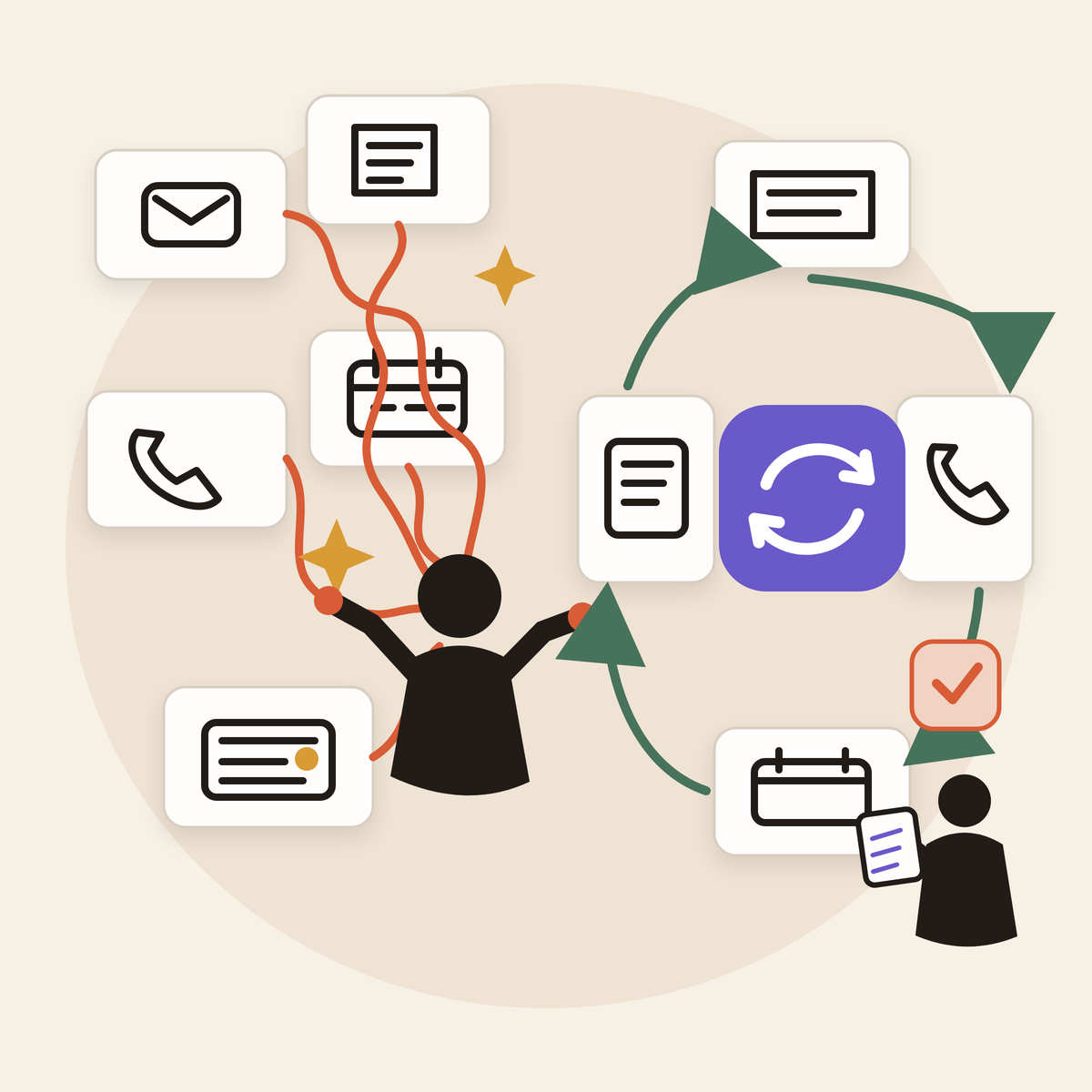
You bought the AI tool. It writes faster than you do, summarizes in seconds, and can produce a polished answer before you finish your coffee. Yet your day is still full.
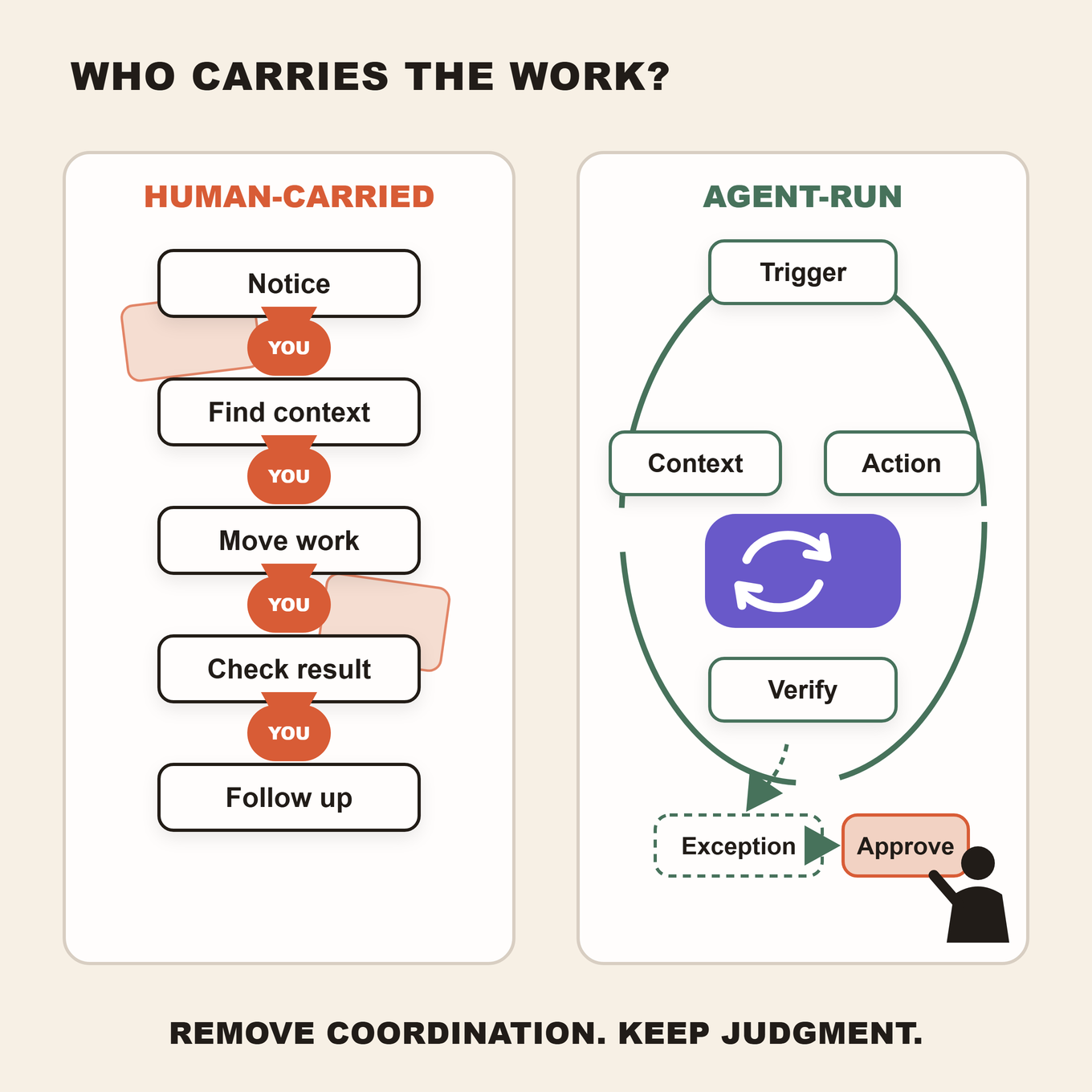
You still notice when work needs to begin. You find the right customer record, paste in the background, explain what happened last time, move the output into another system, check whether anything actually changed, and follow up when it did not.
The AI helped with a task. You remained responsible for the workflow.
That distinction matters because a business does not run on isolated outputs. It runs on completed jobs. The lead receives a response. The invoice gets resolved. The report reaches the right person. The customer gets a useful answer. If a person must carry every handoff between those moments, the workflow has not really been delegated.
The Praxivara Work Ownership Test exposes that hidden work. It asks six questions about one recurring workflow. Your answers show whether AI is producing a useful artifact or carrying the job from trigger to verified completion.
The goal is not zero human involvement. It is zero unnecessary human coordination. People should still set policy, approve consequential decisions, handle genuine exceptions, and remain accountable. They should not have to manually shepherd every routine step.
In this guide
- Why a faster task can leave the work unfinished
- Where the Work Ownership Test fits
- The six questions
- How to score a workflow
- A complete before-and-after example
- Why approval is not the same as coordination
- How to audit your workflows this week
- How Praxivara approaches completed work
A faster task can still leave the work unfinished
Generative AI can make bounded tasks dramatically faster. That evidence is real. The mistake is assuming that a faster step automatically creates a completed business process.
In a preregistered experiment involving 453 college-educated professionals, Noy and Zhang found that ChatGPT reduced completion time on defined professional writing assignments by 40 percent and increased evaluator-rated quality by 18 percent.
That is a meaningful result. It is also a result about bounded writing assignments in an online experiment. ChatGPT did not have to notice when a live business process should begin, retrieve the correct records, update another application, confirm the downstream result, or manage an exception.
A later six-month randomized field experiment studied 7,137 knowledge workers across 66 firms. Among employees who received and used a generative AI tool integrated into email, meetings, and writing applications, the researchers found approximately two fewer hours of email work per week during the experiment's second half. They did not detect a broader change in the quantity or composition of workers' tasks from individual-level access to the tool.
The field experiment centered on a specific workplace product, and some authors worked for the company that made it. The paper also states that the researchers retained discretion over the results. Its most useful lesson is narrower than a universal productivity claim: time saved inside an activity does not necessarily redesign who carries the surrounding work.
Current U.S. business data show a similar gap between adoption and integration. A 2026 Census Bureau working paper found that 18 percent of U.S. employer firms used AI in a business function. Among those functional adopters, 57 percent used it in only one to three of the 15 functions measured. Among firms that reported some change to employee tasks, 66 percent reported augmentation alone, while about 5 percent reported substitution alone.
The Census paper is an experimental statistical product. Its definition of AI is broader than generative AI, and the task effects came from firm respondents. Still, its descriptive evidence is useful: AI use is often narrow and augmentative. The tool can help with the step while a person remains responsible for carrying the job.
This is why prompt counts, license counts, and folders full of generated documents can create a false sense of progress. They prove that AI is being used. They do not prove that the operating model changed.
Where the Work Ownership Test fits
Praxivara already uses several frameworks to answer different operating questions. The Work Ownership Test is not another AI maturity ladder. It has one specific job: evaluate a recurring workflow that already uses AI and locate the routine coordination still falling back on a person.
| Framework | Question it answers |
|---|---|
| Green-Light Grid | Which process should you automate first? |
| Draft-to-Done Scale | What class of tool fits the job, from drafting help to cross-tool completion? |
| Delegation Ladder | How much authority has the system earned? |
| Approval Line | Which actions can proceed, and which should stop for human authorization? |
| Work Ownership Test | Who currently carries this workflow from trigger to verified completion? |
The distinction prevents framework clutter. The Green-Light Grid may tell you that overdue-invoice follow-up is a strong automation candidate. The Draft-to-Done Scale may help you distinguish a writing assistant from a system that can act across tools. The Delegation Ladder helps determine appropriate authority. The Approval Line protects decisions that should remain with a person.
The Work Ownership Test examines what happens now. It follows one job through the systems and asks where it waits for you.
What ownership means here: Ownership means who carries routine execution. It does not mean legal ownership, managerial accountability, or unlimited autonomy. A person remains accountable for the policy and the result.
The 6-Question Work Ownership Test
Choose one recurring workflow and draw its boundaries narrowly. “Sales” is too broad. “Respond to a qualified website inquiry and book the next step” is specific enough. So are “follow up on an invoice seven days past due” and “prepare and distribute Monday's operating report.”
For each question, mark Human when a person must routinely carry the step before work can continue. Mark System when the configured workflow carries the step within defined limits or brings a well-scoped decision to a person with the necessary evidence already assembled.
1. Who notices that the work needs to begin?
Every workflow has a starting condition. An invoice crosses its due date. A lead submits a form. A call goes unanswered. Friday's reporting cutoff arrives. A contract reaches its renewal window.
If you must remember, inspect a dashboard, search an inbox, or notice a calendar event before anything happens, you own the trigger. The AI may be capable of helping after you prompt it, but it is not carrying the start of the process.
A delegated routine path begins from a defined signal. That can be a schedule, status change, form submission, incoming message, or another permitted event. The trigger does not need to sound sophisticated. It needs to start the right job dependably without relying on a person's memory.
Mark Human if: a person must notice, remember, check, or manually start the routine workflow.
Mark System if: an approved event or schedule starts it.
2. Who gathers the context?
A useful output depends on the right customer history, current status, previous correspondence, relevant documents, company policy, deadlines, and permissions.
Many apparently efficient AI routines begin with several minutes of invisible preparation. You open the CRM, copy the latest note, download an attachment, find an old email, remove irrelevant material, and explain the situation. The AI generates a response in seconds, but you built the context package by hand.
That preparation is part of the workflow. If it happens every time, count it.
A better routine retrieves the permitted records it needs, uses an established source of truth, and identifies missing information before acting. Context access should remain bounded. The answer is not unrestricted access. The answer is to define what information the job legitimately needs and make it available under appropriate controls.
Mark Human if: a person routinely searches for, copies, cleans, or restates the information needed to proceed.
Mark System if: the workflow retrieves authorized context or makes a precise request for genuinely missing information.
3. Who chooses the next routine step?
Some decisions should remain human. Pricing exceptions, unusual refunds, sensitive personnel matters, high-value commitments, and policy changes may require judgment and authority.
But many workflows also contain routine routing decisions. Is the lead qualified under published criteria? Is the invoice eligible for the first reminder or the second? Did the report pass its data checks? Does a request belong with sales, support, billing, or operations?
If you repeatedly interpret stable rules and tell the AI what to do next, you are still the router. The system may have produced useful analysis, but the job pauses until you translate that analysis into action.
Marking System does not mean giving AI unrestricted decision-making authority. It means the routine path is defined. When a case falls outside that path, the workflow escalates it with the context a person needs to decide.
Mark Human if: a person must choose every routine next step or convert the output into instructions.
Mark System if: defined cases route automatically and consequential or ambiguous cases arrive as prepared decisions.
4. Who moves the work between systems?
This is where many AI workflows quietly become manual administration again.
The model drafts an email, but you paste it into the inbox. It extracts information, but you enter the fields into the CRM. It prepares a summary, but you upload it to the client record. It identifies an action item, but you create the task. It produces a spreadsheet, but you send it to the team.
Each transfer may take only a minute. Across dozens of recurring jobs, those minutes form a layer of coordination that belongs to no application and therefore falls to a person.
Integration count alone does not solve this. A long list of connected apps matters only when an approved workflow can use those connections to carry the job forward. The important outcome is not “the AI can access the CRM.” It is “the right record changed under the right conditions, and there is evidence of what happened.”
Mark Human if: a person routinely copies, uploads, re-enters, forwards, or recreates the output elsewhere.
Mark System if: the workflow performs approved transfers and records the result.
5. Who verifies that the intended result happened?
An action request is not the same as an outcome.
An email can fail. A calendar slot can be taken. A CRM update can be rejected. A report can contain missing data. A payment link can be invalid. A task can be created without the necessary owner or deadline.
If the workflow ends when an AI says, “Done,” a person often has to reopen the destination and confirm what actually happened. That verification is not needless skepticism. It is operational work, and a reliable workflow should account for it.
Completion needs an observable definition. The message appears in the sent folder. The event exists with the right attendees. The record reflects the new status. The file is stored in the intended location. The customer received the promised information.
The workflow should capture evidence appropriate to the action. For higher-risk activity, a person may still review that evidence. The key is that the reviewer should not have to reconstruct the entire execution trail.
Mark Human if: a person must routinely reopen systems, confirm results, or discover that a step silently failed.
Mark System if: the workflow checks defined completion conditions and exposes a clear execution record.
6. Who handles the routine exception?
Real workflows do not stay on the happy path.
The contact record may be incomplete. The customer may reply with a question. The invoice amount may be disputed. Two data sources may disagree. An integration may be unavailable. A request may fall just outside the normal rule.
No responsible system should improvise through every exception. Some cases must stop. The ownership question is whether the workflow can recognize common failure states, retry safe steps, request a specific missing field, or escalate the case to the right person with its history intact.
If every irregularity becomes a vague alert that says “something went wrong,” the person still has to diagnose the process, find the context, and decide where to resume. That is exception ownership by default.
A delegated workflow does not eliminate exceptions. It makes the path for exceptions explicit.
Mark Human if: a person must investigate every interruption and reconstruct what happened.
Mark System if: common recoverable issues have defined handling and other cases escalate with context, status, and a clear decision request.
How to score your workflow
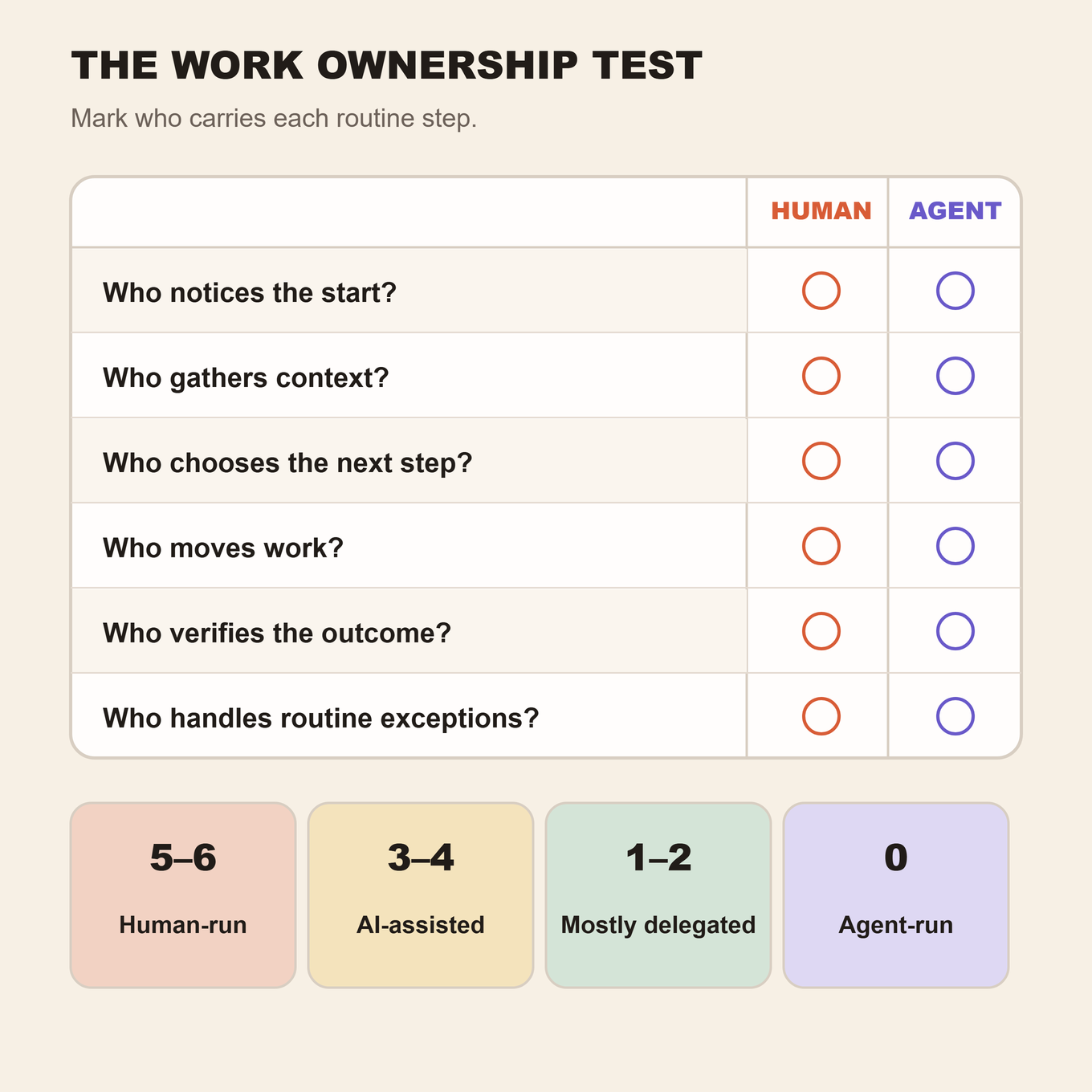
Add one point for each Human answer. The result is not a grade for your company. It is a practical diagnostic for one workflow at one point in time.
| Human coordination score | Operating state | What it usually means |
|---|---|---|
| 5 to 6 | Human-run with AI help | AI may accelerate an output, but a person carries almost every transition. |
| 3 to 4 | AI-assisted | Some steps are easier, while major routine coordination still depends on a person. |
| 1 to 2 | Mostly delegated | Human involvement is concentrated around defined decisions or exceptions. |
| 0 | Agent-run, governed | The routine path can run within defined limits. People still own policy, accountability, and deliberate approvals. |
Do not chase zero for its own sake. A zero is inappropriate if reaching it requires automating a decision that should remain human. Ask whether every remaining human touch has a clear reason.
A workflow with one deliberate approval for a material financial action may be better designed than a zero with weak controls. A score of six may also be perfectly sensible for a rare, sensitive process. Prioritize high-frequency workflows where the score represents repeated coordination rather than necessary judgment.
The score also needs a volume measure. A four-point process that runs 200 times a month can impose a much larger coordination burden than a six-point process that runs twice. Count human touches per completed job, routine coordination minutes per run, and runs per month. Those numbers reveal where redesign will matter.
Example: following up on an overdue invoice
Consider a company that uses an AI writing tool to help with collections.
When an invoice becomes seven days overdue, the owner notices it in accounting software. The owner opens the customer record, finds the invoice, checks earlier messages, and asks the AI to draft a polite reminder. The owner reviews the draft, copies it into email, sends it, and adds a note to the customer record. Three days later, the owner checks whether payment arrived. If the customer disputes the amount, the owner reconstructs the history and decides who should handle it.
The message may take seconds to draft. The workflow still scores six:
- The owner notices the overdue invoice.
- The owner gathers the invoice and communication history.
- The owner chooses the reminder stage.
- The owner moves the draft into email and updates the record.
- The owner checks for payment or a reply.
- The owner diagnoses every exception.
Now consider a more delegated design. An approved status change starts the workflow. It retrieves the relevant invoice and permitted customer history. Defined rules select the appropriate reminder, while disputed balances or unusually large accounts stop for review. The workflow sends the approved communication, records the action, watches for the defined result, and routes a reply or unresolved balance to the right person with the history attached.
The routine ownership score can reach zero even if one deliberate approval remains. The person still owns the policy. What disappears is the need to remember the date, assemble the packet, carry the message between applications, and repeatedly check whether anything happened.
For a detailed collections schedule, scripts, and legal cautions, use Praxivara's guide to chasing overdue invoices without losing the customer.
Approval is not the same as owning the workflow
Business owners sometimes resist deeper delegation because they assume the only alternative to manual control is unrestricted automation. That is a false choice.
A person can approve an action without manually assembling and operating the entire process around it.
A workflow can detect a refund request, retrieve the order and policy, summarize the customer history, identify whether the request falls inside established limits, and prepare the proposed action. A manager then approves or rejects it. After approval, the workflow can execute the permitted steps, update the appropriate records, and verify the result.
The manager made the consequential decision. The manager did not have to search three systems, calculate eligibility from memory, transfer the result, and confirm every update.
This is the role of a clear Approval Line: preserve human judgment where it matters while routine work on either side of that line moves predictably.
Accountability also stays human. A company must decide which data a workflow may use, which actions it may take, what completion means, who reviews performance, and how an agent is paused or corrected. Delegation changes who carries routine execution. It does not transfer legal, ethical, financial, or managerial responsibility to software.
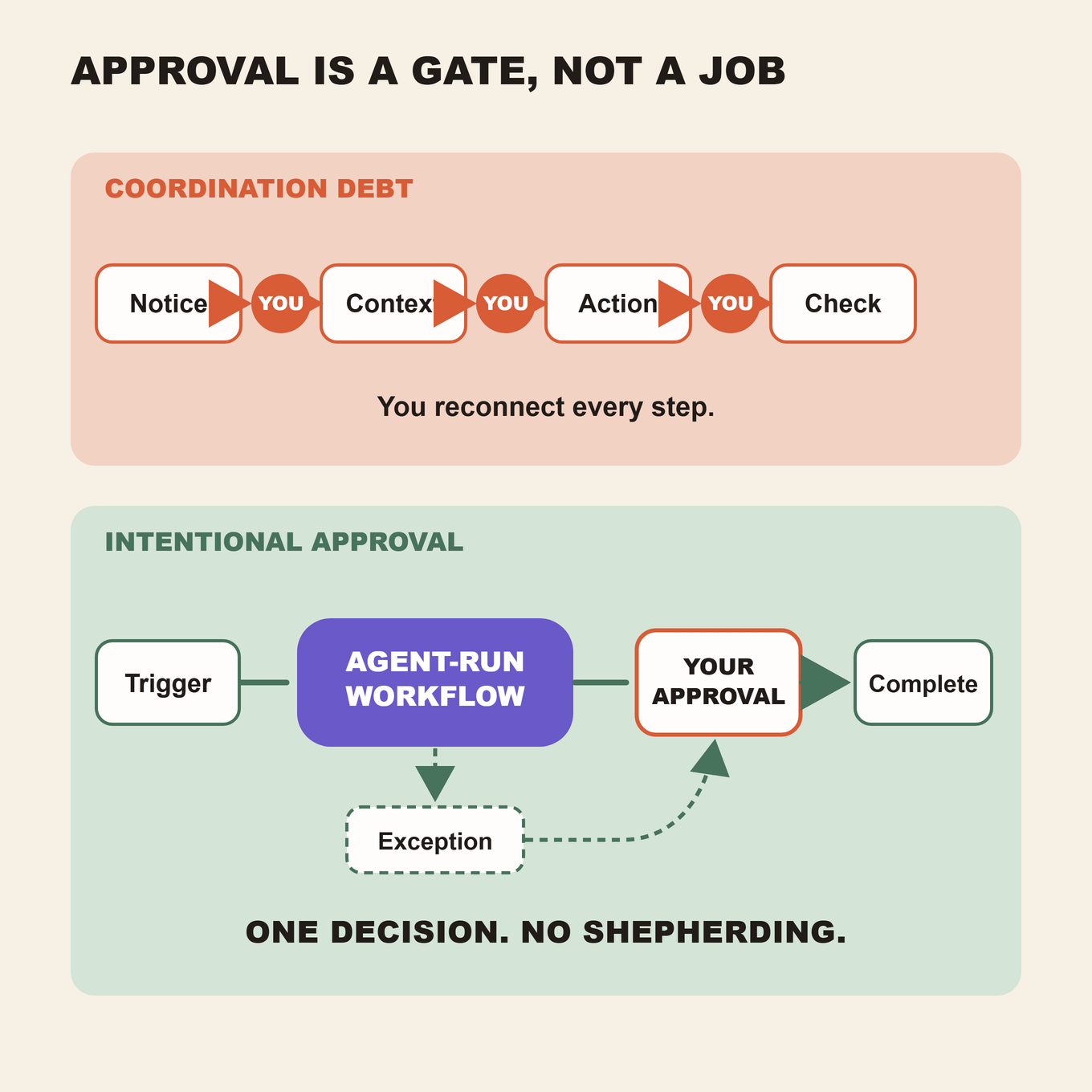
A well-designed approval is a decision point, not a rescue mission. The reviewer should receive the evidence, proposed action, policy basis, and consequences. If the person must investigate the case from the beginning, the workflow is handing back its hardest coordination work.
What the test reveals in other common workflows
Inbound lead response
An AI-generated reply is useful, but ask what surrounds it. Who notices the form submission? Who checks the company, territory, requested service, and prior relationship? Who creates or updates the record? Who proposes a meeting time? Who follows up when the lead does not answer?
The writing may be the shortest part of the job. The ownership opportunity lies in connecting qualification, response, recordkeeping, scheduling, and follow-up under clear rules.
Weekly operating report
An AI tool may summarize a spreadsheet well. Yet a manager may still export data from several systems, reconcile date ranges, remove duplicates, explain anomalies, paste tables into a template, distribute the file, and answer questions about where the numbers came from.
The Work Ownership Test separates summarization from report production. A report is complete when authorized inputs have been collected, checks have run, the deliverable has been produced, limitations are visible, and it has reached the intended audience.
Missed customer call
A transcript or call summary does not recover the opportunity by itself. Who identifies the caller? Who determines whether the request is urgent? Who updates the customer record? Who sends the promised information? Who creates the follow-up task? Who confirms that the issue reached the right person?
The surrounding workflow determines whether the customer experiences a responsive company or a dead end. Praxivara's analysis of the cost of missed calls shows how to audit coverage and follow-up.
Recurring management follow-up
Meeting notes can capture decisions, but someone may still turn those decisions into assignments, add deadlines, chase owners, update status, and prepare the next agenda. If that person is always the founder, AI improved documentation without changing who carries movement.
A better design makes execution explicit. It can prepare tasks and reminders, record responses, and surface overdue commitments. The manager remains responsible for priorities and performance, but no longer acts as the transfer layer between every conversation and every system.
Audit your workflows this week
Do not begin with an abstract plan to “use more AI.” Start with three to five recurring jobs that consume attention or frequently wait for you.
For each workflow, write down a clear starting event and a clear definition of done. Then observe one real run and answer the six questions based on what actually happens, not what the software theoretically supports.
- Name the workflow narrowly. Use “respond to a qualified website lead” instead of “sales automation.”
- Define the start. Record the observable event that should cause work to begin.
- Define completion. State the business result, including required record updates and evidence.
- Score the six questions. Count routine human coordination, not deliberate judgment.
- Count frequency. A workflow that runs daily may deserve attention before a rare one with a higher score.
- Measure the burden. Include searching, copying, checking, chasing, and restarting after errors.
- Mark the approval boundary. Identify actions that should stop for a person and explain why.
- Choose one ownership gap. Improve it, test the workflow, and score it again.
Use the companion workbook: The free Praxivara Work Ownership Audit includes an editable scorecard, formula-driven monthly totals, worked examples, the six-question scoring guide, and space to define completion, approvals, evidence, and exception paths.
The six answers are only the beginning. Review the reason behind each Human mark. If context gathering depends on you because information is scattered across disconnected records, writing a better prompt will not fix the system. If verification depends on you because nobody defined what “done” means, adding another integration may only make the failure faster.
For every workflow you redesign, write a simple completion contract:
| Field | What to define |
|---|---|
| Start event | The precise signal that begins the job. |
| Permitted context | The authoritative data and records the workflow may use. |
| Allowed actions | What the workflow may read, write, send, spend, or delete. |
| Definition of done | The observable result that completes the job. |
| Approval boundary | The consequential decisions that require a person. |
| Exception path | The retry, pause, escalation, and context-handoff rules. |
| Completion evidence | The log, record, receipt, or destination state that proves the result. |
This also makes ROI more concrete. Instead of assigning a speculative value to every generated output, measure coordination hours removed, cycle time reduced, missed follow-ups prevented, and completed jobs produced. Praxivara's AI Agent Cost and ROI Report explains how to compare those gains with the full cost of deployment and oversight.
How Praxivara approaches completed work
Most AI tools are optimized for the answer. Praxivara is built for the work that must happen after the answer.
The Praxivara Assistant can take permitted action across connected business tools, not only respond inside a chat window. Praxivara Agents can run on a schedule, from a trigger, or on demand. Praxivara's public product pages describe step-by-step run records, deliverable creation, and permission settings that can stop consequential actions for review.
Those capabilities map directly to the six ownership questions:
- Schedules and permitted triggers reduce dependence on someone remembering to begin.
- Authorized business context reduces repetitive searching and copying.
- Defined workflow logic carries routine routing while surfacing ambiguous cases.
- Connections across more than 200 tools support approved movement between the systems where work happens.
- Run records make execution and completion easier to inspect.
- Permission settings and exception paths let you keep consequential decisions with people.
None of that makes every process suitable for automation. A responsible workflow still needs accurate source data, bounded permissions, an observable finish line, a human owner, and an escalation path. Autonomy should grow with evidence and trust.
The difference is where you spend your attention. Instead of repeatedly carrying context and outputs between systems, you define the rules, inspect results, handle genuine exceptions, and improve the operation.
Stop measuring how often you use AI
A prompt count tells you that the tool is active. A license count tells you that access exists. A folder full of generated documents tells you that content was produced.
None of those measures tells you whether the business became less dependent on manual coordination.
Measure completed jobs. Measure human touches per completed job. Measure cycle time, unresolved exceptions, duplicated context, missed follow-ups, and hours spent moving information between tools. Then run the Work Ownership Test again.
If the score falls because routine coordination moved into a controlled, observable workflow, you created more than a faster task. You changed how the business operates.
Your company should not need you to be the trigger, the clipboard, the router, the integration layer, the status checker, and the recovery plan. Your attention is too valuable for that.
Praxivara is built for the moment AI stops waiting for another prompt and starts carrying permitted work toward a verifiable result. Humans keep authority. The business keeps moving.
Build a business that keeps moving when you stop prompting it
Use Praxivara to turn recurring work into agent-run workflows with connected tools, real deliverables, visible execution, and approval boundaries you control.
See what Praxivara can take off your plateResearch note: The studies cited here examine different populations, tools, tasks, and time periods. Noy and Zhang measured controlled professional writing assignments. Dillon and coauthors studied access to an integrated workplace AI tool across participating firms. The 2026 Census working paper describes adoption patterns using survey data from U.S. employer firms. Together, they support the distinction between faster task execution and broader workflow redesign. They do not establish that every organization will receive the same result.